
Senior Editors
Senior Editor Workflow
Guide for Senior Editors to manage submission assignments and distribute to Associate Editors
This guide outlines the workflow for Senior Editors who manage submission assignments in a hierarchical review structure.
Senior Editor Workflow
1. Receive Submission Assignments
Track Chairs assign submissions to you through the SE Assignments page.
2. Find Your Assignments
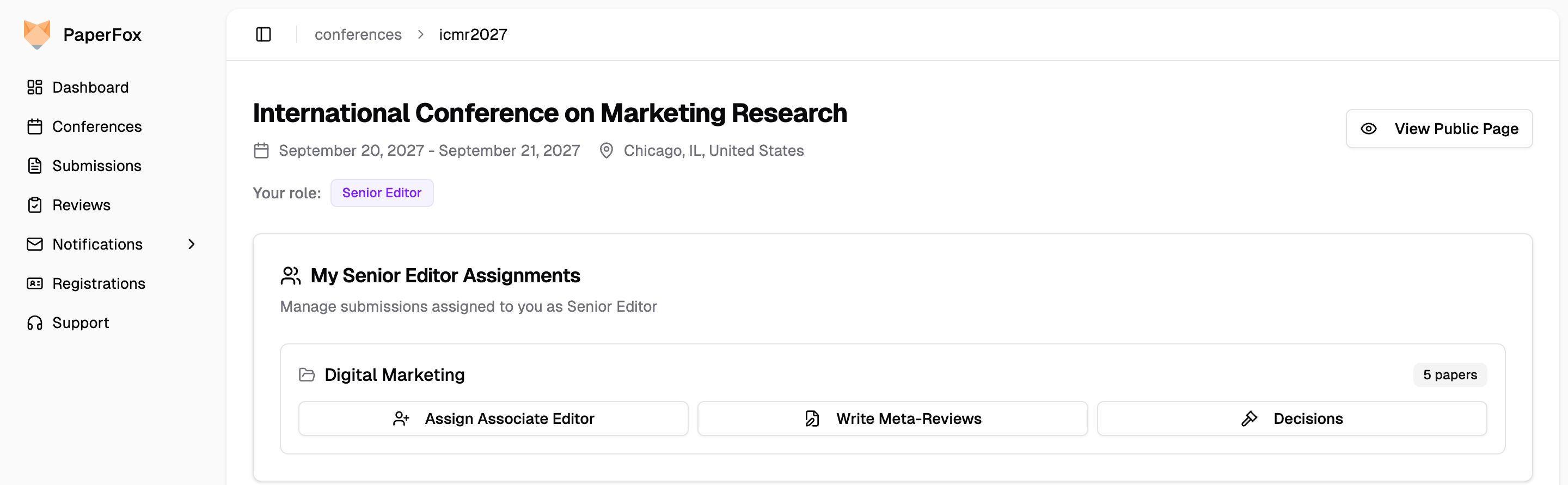
- Go to Conferences in the sidebar, then click on your conference
- Find the My Senior Editor Assignments card, which lists each track you have submissions in
The card is always on the page while you hold the Senior Editor role — before anything is assigned to you it reads "No submissions assigned". If your conference renamed the role, the card uses that name instead.
3. Assign Submissions to Associate Editors
Click "Assign Associate Editor" on the track you want to work in.
- Select an Associate Editor from the dropdown for each submission
- The AE will then manage reviewer assignments for that submission
4. Monitor Review Progress
Track the status of submissions you've distributed.
- View review completion status for each submission
- See which AE is handling each submission
5. Write Meta Reviews
Provide summary evaluations for submissions after reviews are complete.
- Synthesize reviewer feedback into a consolidated assessment
- Make recommendations based on all reviews