
Camera-Ready — How to Handle the File
Two patterns for collecting the final PDF when submissions reach Camera Ready, and what each one actually protects.
When a submission reaches your final-version phase (often called Camera Ready, sometimes Final Version, Proceedings Version, or whatever your committee prefers), authors need to upload a new PDF. You have two patterns to choose from, and they protect different things.
If you haven't set up the phase itself yet, start with A Typical Two-Phase Workflow — this guide is specifically about the file field, not the whole phase setup.
Pattern A — Reuse the submission-file slot
Authors hit the same Submission File field and upload their camera-ready PDF over the original.
What happens: A new SubmissionVersion is created. The previous version — with the original PDF URL — is preserved in the submission's version history.
| Setup | None. Default behavior for every track. |
| Where the original PDF lives | Version history on the submission detail page (one click deeper). |
| Where the camera-ready PDF lives | Same slot — shown as the "current" file everywhere (exports, proceedings ZIPs, reviewer views). |
| Good for | Workshops, internal-only events, small conferences where version history is enough. |
| Tradeoff | Authors have to trust that the old file is archived. One stray click on Replace can swap it; we now show a confirmation ("Submission file hasn't changed since version N") when they try to save without replacing, but that's a speedbump, not a lock. |
Pattern B — Add a phase-scoped Camera-Ready field
You add a new file field in the submission form, scope it to your Camera Ready phase, and authors upload the new PDF to a separate slot. The original Submission File stays visible.
Setup: In the track's Forms → Submission Form tab, click "Add Field", pick File Upload, and set Add to Phase to your camera-ready phase. Name it something unambiguous like Camera-Ready PDF. On a multi-track conference where every track collects camera-ready files, add the field once on Conference Forms instead — same dialog, and every track inherits it in that phase (see Phase-Scoped Fields).
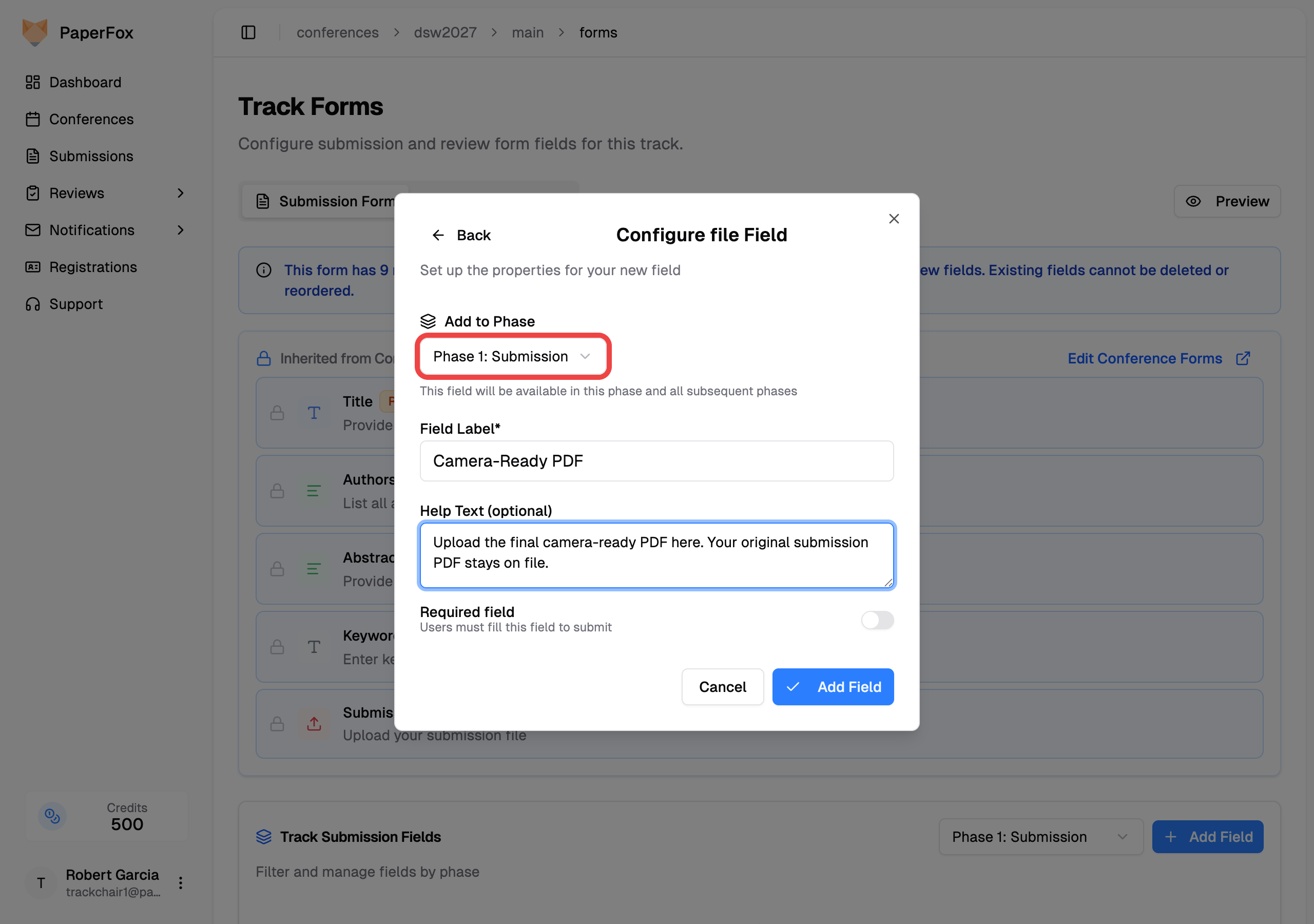
Any field's help text is shown to authors right under the label — use it to tell them which slot to upload to (e.g. "Upload the final camera-ready PDF here. Your original submission PDF stays on file.").
| Setup | One file field added to the phase. Once submissions exist, the field's schema locks so it can't be deleted. |
| Where the original PDF lives | The original Submission File slot — shown side-by-side with the camera-ready slot in every phase. |
| Where the camera-ready PDF lives | The new field you added. Distinct artifact in exports, proceedings ZIPs, and the submission detail page. |
| Good for | Published proceedings, legal/archival requirements, anything where "which file is the submission of record?" needs to be unambiguous. |
| Tradeoff | Authors see both slots in the edit form, and the original slot stays editable until you lock it — see below. |
Keep the original Submission File unchanged
Pattern B gives you a clean place for the camera-ready PDF, but on its own it does not lock the original Submission File. When an author opens Edit Submission in the camera-ready phase, every field visible to that phase is editable by default — including the original phase-1 Submission File slot.
To make the original read-only, lock it:
- In the track's Forms → Submission Form tab, click the edit icon on the Submission File field
- Turn on "Lock answer in later phases" and click "Update Field"
Authors then see their original file in the camera-ready phase but can't replace it; chairs still can. See Lock Individual Answers Across Phases for how the lock works. As a chair, your own edit form ignores locks — click "Author view" on the edit page to check what authors get.
Even without the lock, the original file is never lost:
- Version history is permanent. Every save creates a new
SubmissionVersionthat snapshots the file URL. Old files stay downloadable from the submission detail page regardless of what the author does next. - The "unchanged file" soft gate fires in any post-submission phase (index > 1). If the author saves without picking a new file for any file slot, they see a confirmation dialog before the revision commits.
- Deadlines you set on the phase stop edits entirely. Once the camera-ready revision deadline passes, authors can't save new versions at all.
Which pattern should I pick?
- Running a workshop or internal review? Pattern A. No setup, version history is enough.
- Publishing proceedings, or have a legal/archival need for two distinct artifacts? Pattern B. Add the field, use the help text to direct authors, and lock the original Submission File if it must stay unchanged.
Whichever you pick, the version history is the floor — you can always recover any previously uploaded file from the submission detail page.