
AI Research Profile Discovery: Building Reviewer Expertise Profiles Automatically

A reviewer's expertise is scattered everywhere — Google Scholar pages, ORCID profiles, personal websites, CVs buried in email threads, and the chair's memory of who mentioned "deep learning" at last year's dinner. No single place brings it all together.
Conference chairs end up Googling reviewer names one by one, skimming publication lists, and making their best guess. This doesn't scale past 30 reviewers.
The Problem with Traditional Expertise Profiling
Most conference management systems ask reviewers to select topics from a predefined list — "Machine Learning", "NLP", "Computer Vision", and so on. This approach has three problems:
Lists go stale. Research moves fast. A topic list written two years ago doesn't capture emerging areas like "foundation models" or "AI agents."
Granularity is wrong. Broad categories like "Machine Learning" tell you nothing useful. A reviewer who works on reinforcement learning for robotics is very different from one who works on federated learning in healthcare. But a list with 500 micro-topics is unusable.
Self-reporting is incomplete. Reviewers rush through profile setup. They pick 3-4 topics and move on, even if they're qualified to review papers in 15 different areas. The system only knows what reviewers bother to tell it.
How AI Profile Discovery Works
When a reviewer is invited to a conference on PaperFox, AI Profile Discovery kicks in automatically. It runs a web search using the reviewer's name, email, affiliation, and country to find their publications across Google Scholar, ORCID, Semantic Scholar, and academic websites. From those papers, it extracts expertise keywords and builds a research profile — no manual data entry required.
The AI extracts both broad research areas ("information systems", "health informatics") and specific topics ("technology adoption", "electronic health records"). This mix captures expertise at every level of granularity — exactly what static topic lists get wrong.
The whole process takes 30-60 seconds. Reviewers get an email asking them to verify the results, and they can re-run discovery anytime to pick up new publications.
Three Types of Keywords
Each reviewer's profile combines three independent sources of expertise keywords, each color-coded so you can tell where they came from at a glance.
System Keywords — Automatic from Submissions
When a researcher submits a paper in PaperFox, the submission form includes a keywords field. Those keywords are automatically linked to every co-author's research profile as system keywords.
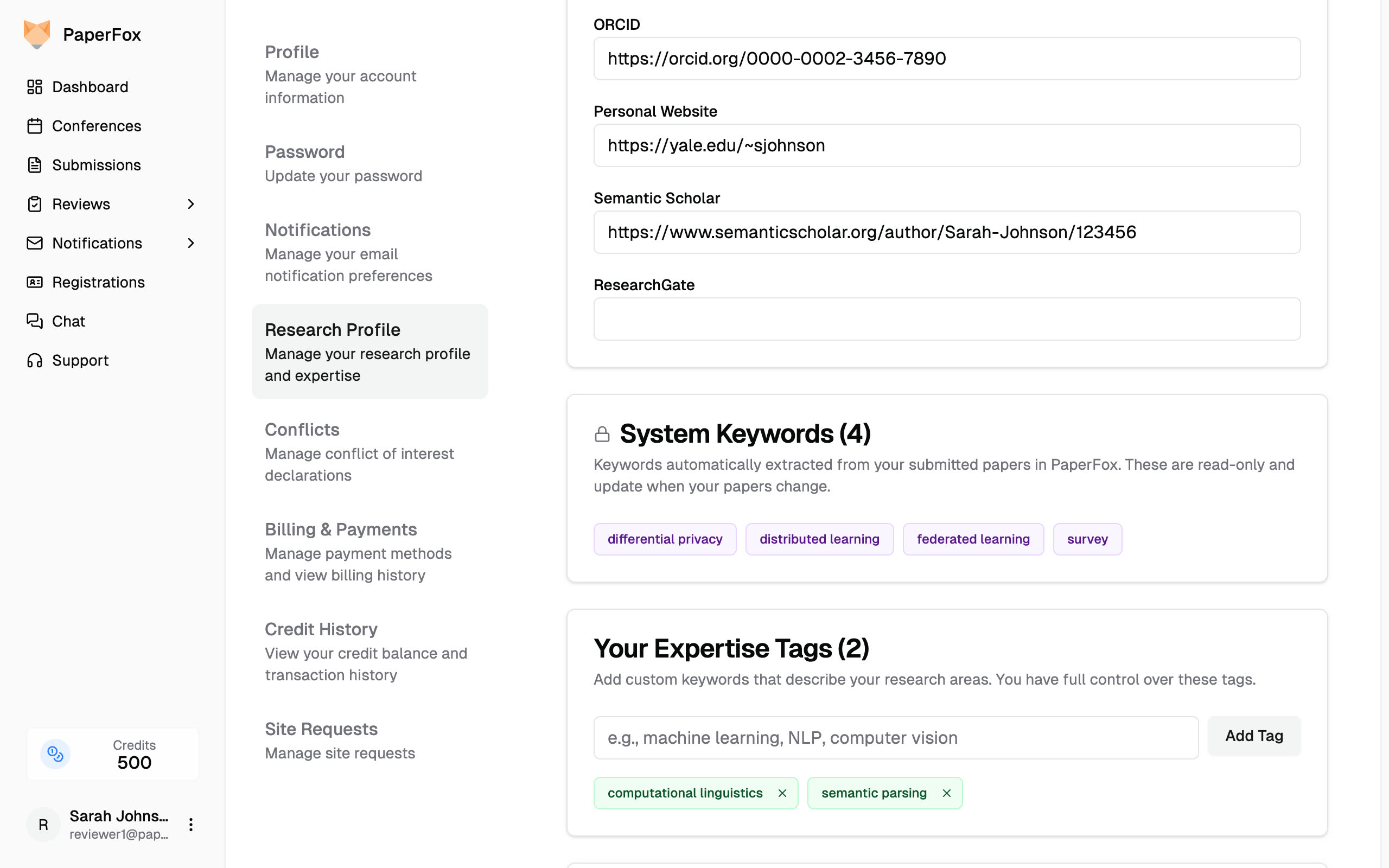
System Keywords (purple) from submitted papers, and User Expertise Tags (green) added manually by the reviewer
These are read-only and always in sync. If a paper is revised and keywords change, the profile updates automatically. No action required from anyone.
System keywords are the highest-confidence signal because they come directly from actual research output — not self-assessment, not AI guessing.
AI-Discovered Tags — From Publication History
These are the tags extracted by AI Profile Discovery from the reviewer's published work across the web.
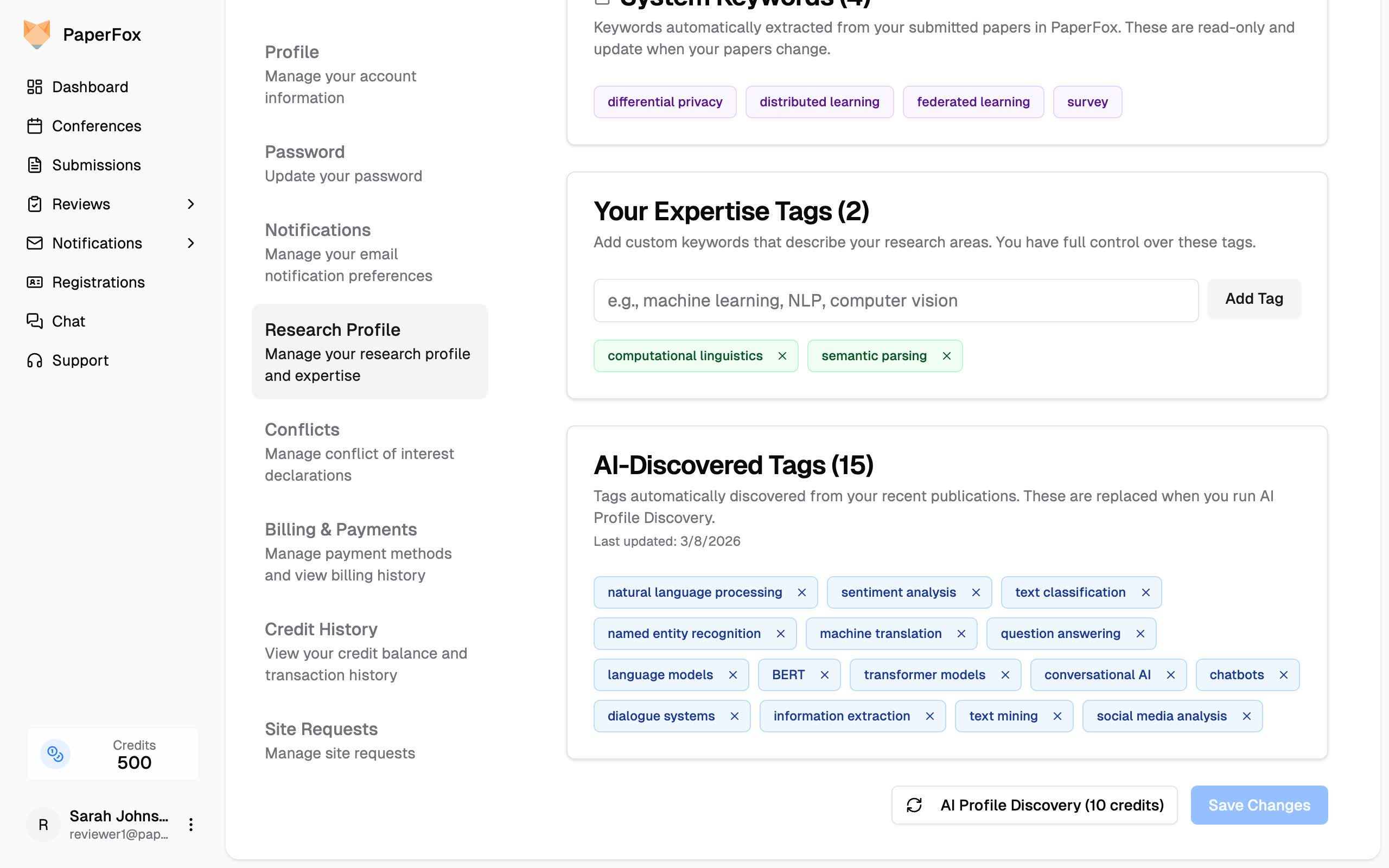
AI-Discovered Tags (blue) extracted from recent publications via web search
They're replaced each time discovery re-runs, so they stay current with the reviewer's latest work. Reviewers can remove irrelevant tags — removed ones won't reappear until the next run.
User Expertise Tags — Added by Reviewers
Reviewers can add their own keywords to fill gaps. Maybe they have deep expertise in a topic they haven't published on yet. Maybe they're moving into a new research area. Maybe the AI missed something.
The key difference from traditional topic lists: reviewers type free-text keywords instead of picking from a fixed menu. "Explainable AI for clinical decision support" is a valid tag. So is "XAI." There's no predefined list to go stale.
Compared to Traditional Systems
In most conference management systems, reviewer expertise is a manual process — chairs configure topic lists for reviewers to select from, or simply ask reviewers to enter their own keywords. Either way, the system only knows what reviewers bother to tell it. This works for small conferences where chairs know their reviewers personally.
At scale, it breaks down. Reviewers don't fill out profiles carefully. Topic lists don't evolve with the field. Chairs can't personally vet 100+ reviewers. The result is incomplete expertise data and hours of manual work.
PaperFox starts from the opposite end: build the expertise profile automatically from real data, then let humans refine it. Less work for reviewers, better data for chairs, and profiles that improve as more papers flow through the system.
Related Docs
- Research Profile — Manage your research profile and expertise keywords
- Invite Reviewers — Invite reviewers and monitor their profile status
- Auto Assign Reviewers — Automatically match papers to reviewers