
Reviewer Workflow
The complete reviewer journey in PaperFox — from invitation to submitted review — plus guidelines for writing good reviews
This guide walks you through the reviewer experience end to end, with links to detailed how-tos for each step, and closes with guidelines for writing high-quality reviews.
Workflow at a Glance
- Join the track
- Complete your research profile
- Accept or decline submission assignments
- Write and submit your reviews
- Update a review or join the discussion
- Delegate to a sub-reviewer (if enabled)
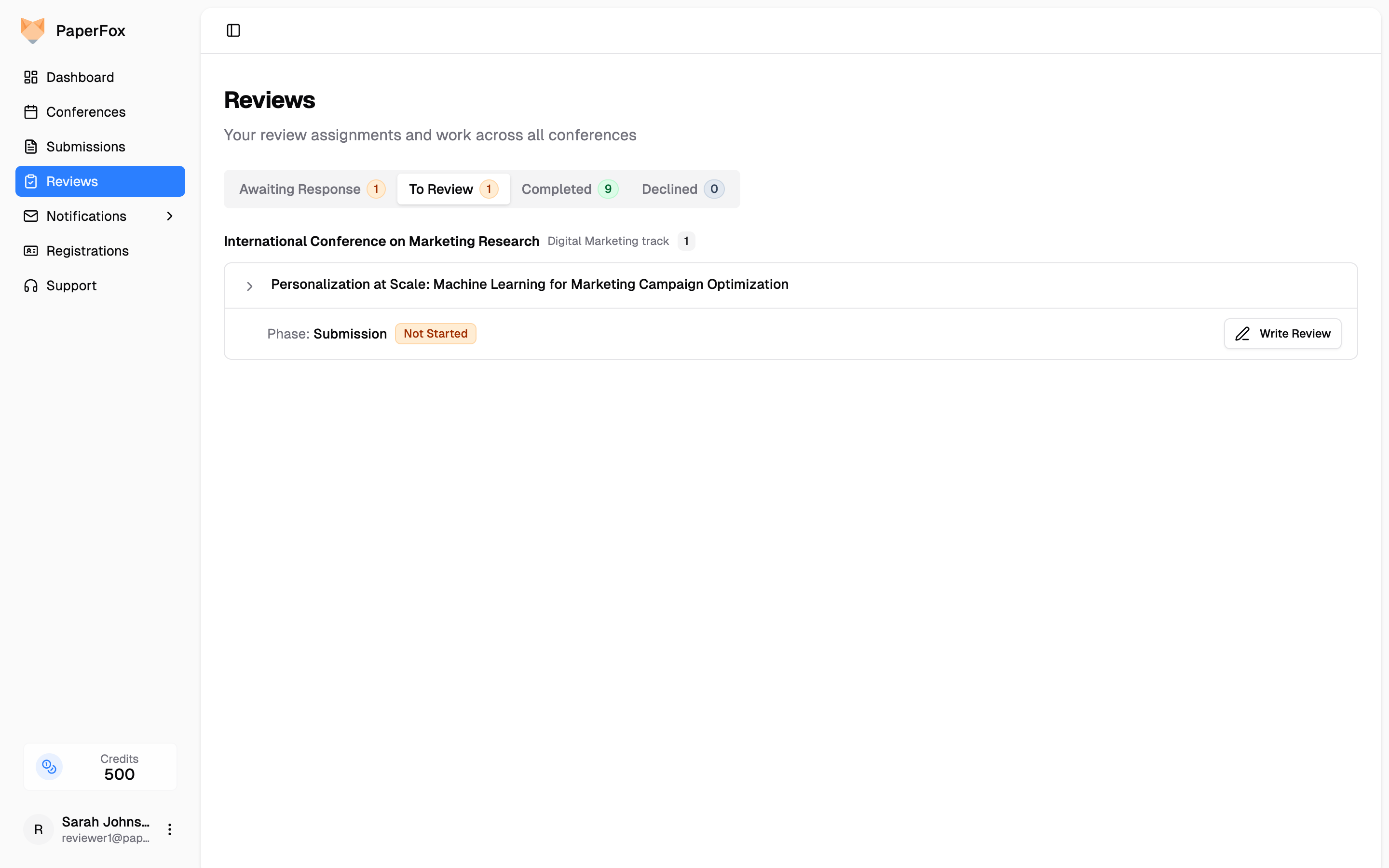
Everything happens on one page: click Reviews in the sidebar to see your invitations and reviews across all conferences, organized into Awaiting Response, To Review, Completed, and Declined tabs.
1. Join the Track
A track chair either adds you directly or invites you — the email tells you which, and only one of them needs a reply. See Managing Invitations for both flows.
- "Added as Reviewer" — your access is already active; nothing to accept. If the address is new to PaperFox, create your account with it and the role activates automatically. The same email carries a "Remove Me from This Role" link if you'd rather not serve — it works for 30 days after you were added; after that, ask the chairs to remove you.
- "Reviewer Invitation" — click Accept or Decline (creating an account first if you don't have one). Respond promptly either way: a quick decline lets the chair find someone else. These links expire after 30 days.
Either way, check that the conference matches your expertise and that you have time for the review period. Joining the track doesn't commit you to any particular submission — you accept or decline each assignment separately (step 3).
2. Complete Your Research Profile
Add your expertise keywords in your Research Profile — chairs use them to match submissions to you, so a complete profile means assignments you're actually qualified to review. Also declare any conflicts of interest so conflicted submissions are never assigned to you.
3. Respond to Submission Assignments
When a chair assigns you a submission, it appears under Awaiting Response on the Reviews page (and you're notified by email). Expand the row to read the abstract, then Accept or Decline. Decline promptly if the submission is outside your expertise, you can't meet the deadline, or you have an undeclared conflict with the authors. See Manage Your Reviews.
4. Write and Submit Your Reviews
Accepted submissions wait under To Review. Click "Write Review" to open the review editor: the submission and the PDF on the left, the My Review form card on the right — the form stays in view while you scroll the submission. The form's fields — ratings, comment boxes, optional file upload — are configured by the track chair.
Save your work as a draft anytime (drafts are private to you and sync across devices), and submit before the deadline. See Write and Update Reviews.
Whether you can see the authors' names depends on the track's review type: double-blind (identities hidden both ways), single-blind (you see authors; they don't see you), or open (both visible).
5. Update a Review or Join the Discussion
Submitted reviews move to Completed and can be revised until decisions are finalized — open the review, click "Update Review", and optionally add a revision note for the chairs. Each update is versioned in the review history. Chairs may also contact you to clarify your review or discuss submissions where reviewers disagree — engage with other perspectives, explain your reasoning, and adjust your assessment if you're persuaded.
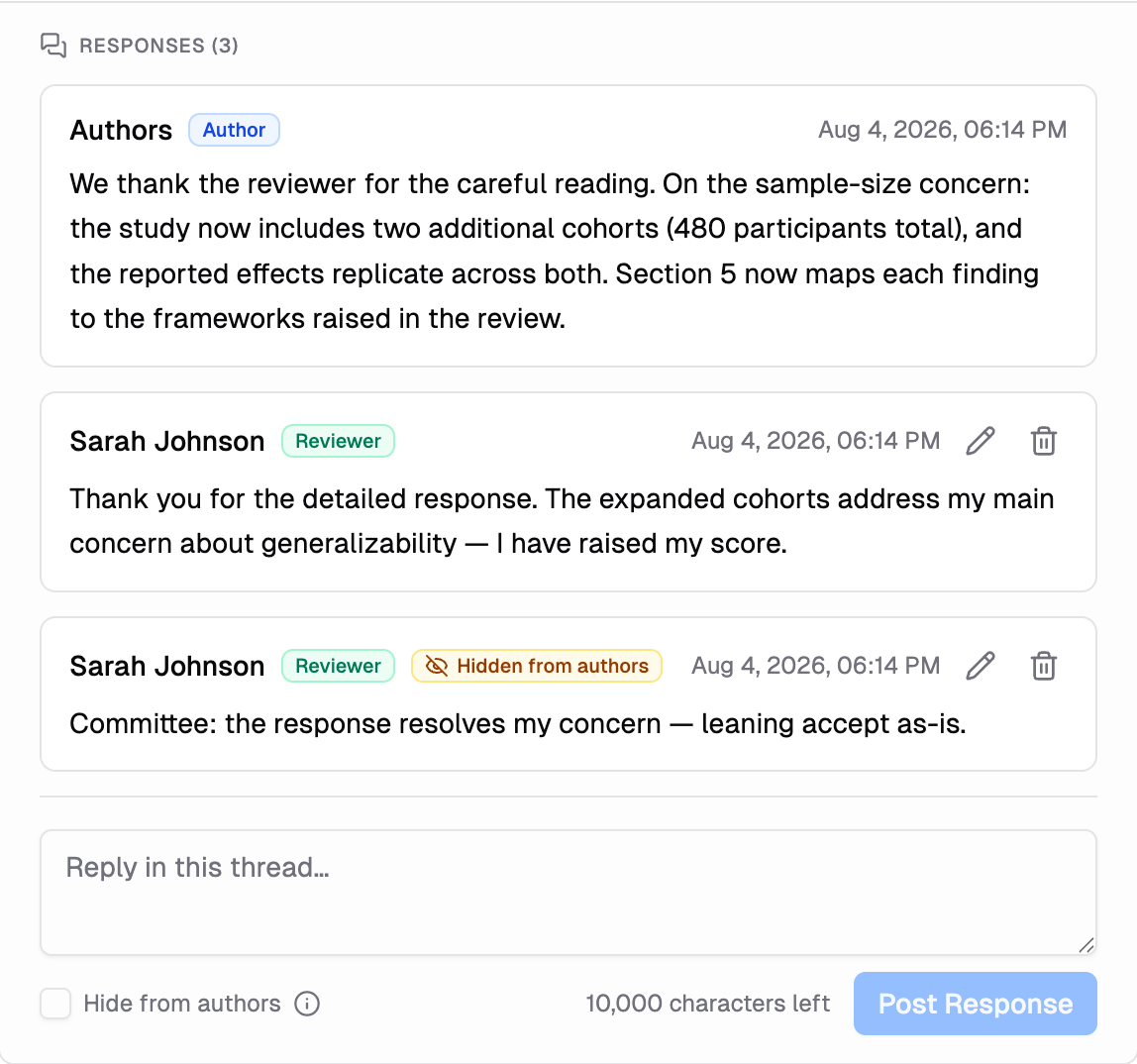
If the track enables author responses (rebuttal), the authors' response to your review appears in a Responses thread directly under My Review on your review page, and you can reply in the thread anytime — the response deadline binds only the authors:
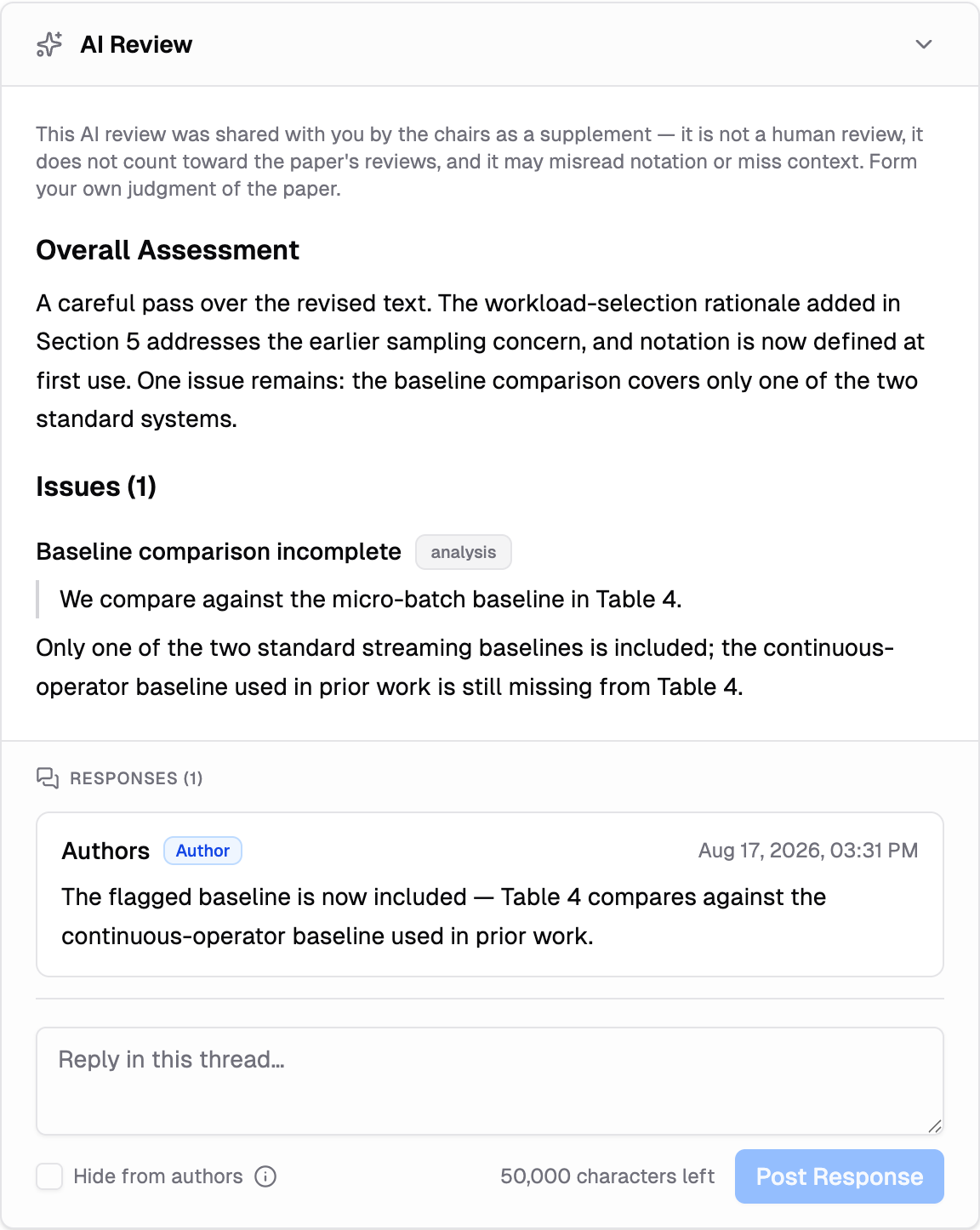
If the chairs released an AI review to you, it appears as an AI Review card with its own thread, where you can read the authors' reaction to the AI-raised points:
- On double-blind tracks, author responses appear as "Authors", and authors see you as "Reviewer #N" — matching your review's number, so don't reveal your identity in a response.
- "Hide from authors" keeps a note between you, the editors, and the chairs. In the general Discussion section it is on by default, so committee notes stay private unless you clear it; in a response thread under a review it starts off, because that thread is your conversation with the authors. The ⓘ next to it explains exactly who sees the note.
- You can edit or delete your own responses: an edit shows an "Edited" marker (the committee can view earlier versions), and a deletion leaves a note in the thread.
- A Discussion section at the bottom of the reading column (under the submission) carries conversation that isn't about one review.
- The copy and download buttons in the page header save everything you can see — reviews, the AI review, and the threads — as one Markdown or plain-text document. See Copy or Download Everything You See.
- The typical loop: read the response, reply, then update your review if it changed your assessment.
6. Delegate a Review (Optional)
If the track allows sub-reviewers and you can't complete an assignment yourself, you can delegate it to a qualified colleague and stay responsible for the result. See Delegate a Review.
Review Guidelines
What to Evaluate
- Technical quality — Is the methodology sound? Are the conclusions supported by the evidence? Could the work be reproduced?
- Novelty and significance — What is new here, and how much does it advance the field?
- Clarity — Is the submission well-organized and understandable, with readable figures and tables?
- Fit — Does the work match the track's scope, and will the audience find it valuable?
Writing a Good Review
Structure your comments as a brief summary of the contribution (showing you understood the work), followed by specific strengths and weaknesses, then detailed suggestions.
- Be constructive — focus on how to improve the work; suggest fixes, not just faults
- Be specific — point to sections, figures, or claims; explain the reasoning behind each criticism
- Be balanced — acknowledge what's good even in a submission you recommend rejecting
- Be professional — critique the work, never the authors; in double-blind review, don't reveal your identity in your comments
Allow a few focused hours per submission, and start early enough to submit before the deadline. If you're falling behind, tell the track chair rather than going silent.
Ethics
- Confidentiality — never share or discuss a submission outside the review process, and don't use its ideas in your own work before publication
- Conflicts of interest — decline (or report to the chair) any submission by a recent collaborator, colleague at your institution, or anyone you can't judge objectively; see Managing Conflicts of Interest
- Fairness — judge the work on its merits alone
Ready to begin? Check Reviews for pending invitations and submissions waiting on your review.