
Chairs
Managing Submission Payments
Set up payment to support submissions over the free limit
Each conference includes 20 free submissions. If you expect more, you'll need to add a payment method to avoid blocking submissions when the limit is reached.
Adding a Payment Method
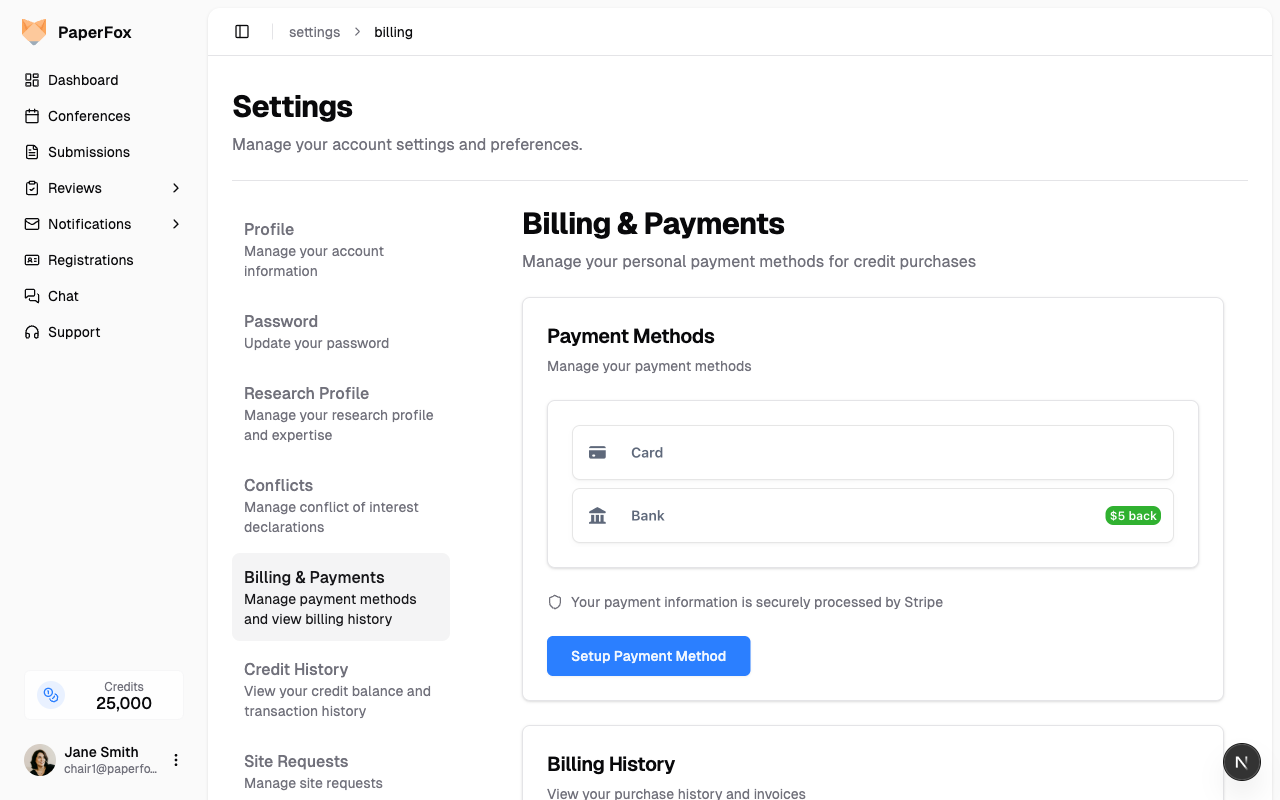
Step 1: Access Billing Settings
Navigate to your billing settings: https://www.paperfox.ai/settings/billing
Or from any page:
- Click your profile menu
- Select "Settings"
- Click "Billing & Payment" in the sidebar
Step 2: Add Payment Method
- Enter your credit card or bank information
- Click "Setup Payment Method"
Important: Any conference chair can add a payment method. The payment method is tied to the specific conference, not to your personal account.
How Billing Works
Automatic Billing Process
During Conference:
- First 20 submissions are free
- Submissions 21+ require a valid payment method
- No charges occur during the conference
After Conference Ends:
- You receive a billing preview email 7 days before conference end date
- Final billing occurs on the conference end date
- Only charged for submissions beyond the free limit
Payment Security
Secure Processing:
- All payments processed through Stripe
- Your card information is encrypted and secure
- PaperFox never stores your full card details
- Industry-standard security practices
Payment Method Management:
- View saved payment methods in billing settings
- Update or remove payment methods anytime
- Billing history available for download