
Conflict of Interest Enforcement
How COI rules protect review integrity across all assignment paths
PaperFox automatically checks for conflicts of interest (COI) whenever you assign reviewers to submissions. You do not need to manually check — the system blocks hard conflicts outright and flags softer ones with a warning so you can decide. Enforcement is on by default; you can turn it off per track if your venue doesn't want blocking.
Three Hard Rules (Block)
Every reviewer-submission pair is checked against three hard rules. If any matches, the assignment is blocked:
| Rule | What It Checks | Source |
|---|---|---|
| Self-conflict | Reviewer is listed as an author on the submission | Automatic — matches reviewer's name/email against the submission's author list |
| Co-author conflict | Reviewer co-authored another submission with one of the authors in the last 3 years | Automatic — detected from PaperFox submissions |
| Declared conflict | Reviewer manually declared a conflict with one of the authors | Reviewer's COI list in their settings |
These three match on name and email — see Matching Logic below.
One Soft Rule (Warning)
| Rule | What It Checks | Behavior |
|---|---|---|
| Same institution | Reviewer and one of the authors share an institution (by affiliation) | Warning, not a block — the assignment is allowed, but you're notified so you can reassign if you consider it a conflict |
Same-institution is a warning because affiliation overlap isn't always a true conflict (large universities, shared umbrella organizations) and policies vary by venue. PaperFox surfaces it and leaves the call to you. It matches on affiliation — see Matching Logic.
Where COI Is Checked
COI is checked on every assignment path:
- Auto Assign — hard-conflicted reviewers are excluded before the matching algorithm runs and never appear in suggestions. Same-institution reviewers still appear, flagged with a warning on the suggestion.
- Manual assignment — drag-and-drop and bulk save reject hard conflicts with an error. A same-institution assignment saves successfully and shows a warning toast.
- AE/SE assignment — the same rules apply when assigning Associate Editors or Senior Editors to submissions.
Turning Off Enforcement
If your venue prefers to see conflicts without being blocked by them — for example, a small community where recent co-authorship is unavoidable — you can turn off COI enforcement per track:
- Go to Conferences in the sidebar, click your conference, then click the track
- Under Review Management, expand Review Settings
- Turn off "Enforce Conflict of Interest Checks"
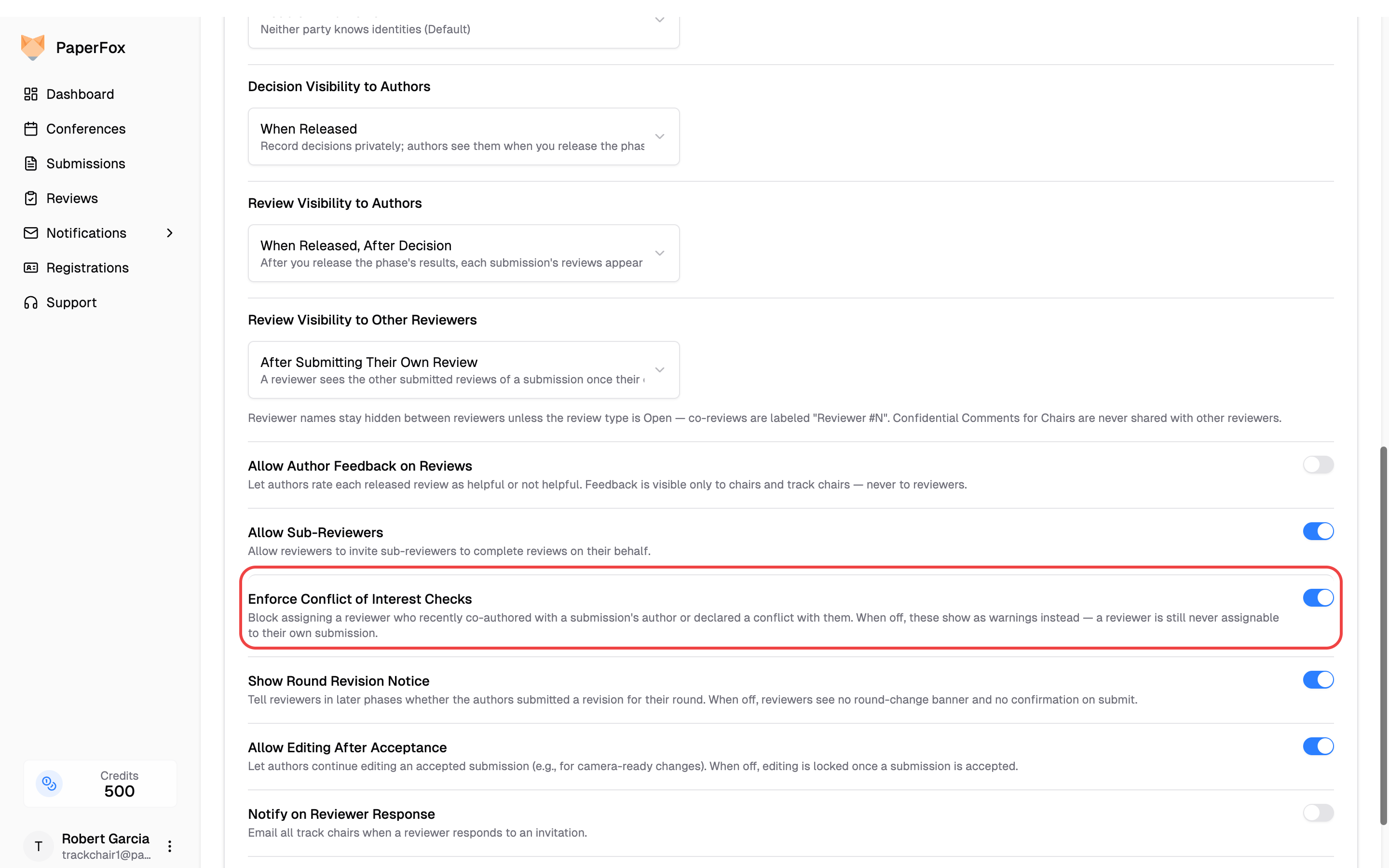
With enforcement off, co-author and declared conflicts no longer block — they appear as warnings on every assignment path instead, just like same-institution matches, so you still see every conflict the system finds.
Self-conflict always blocks
A reviewer is never assignable to their own submission, regardless of this setting. Turning enforcement off only relaxes the co-author and declared-conflict rules.
Encouraging Reviewers to Declare Conflicts
The self-conflict, co-author, and same-institution rules are automatic, but declared conflicts depend on reviewers maintaining their COI list. Encourage your reviewers to:
- Go to Settings → Conflicts in their account
- Add advisors, close collaborators, and co-authors from outside PaperFox
- Review their system-detected co-author list for accuracy
You can use the Notification Composer to send a reminder to all reviewers in your track.
Reviewer COI guide
Share the Managing Conflicts of Interest guide with your reviewers. It explains how to declare conflicts, how system-detected co-authors work, and how matching logic works.
Matching Logic
The self-conflict, co-author, and declared rules use name and email matching:
- Name match — the conflict name appears as a substring of the author's full name (case-insensitive). For example, "Smith" matches "John Smith".
- Email match — the conflict email exactly equals the author's email (case-insensitive).
The same-institution warning matches on affiliation instead:
- ROR ID match — when both the reviewer's and the author's affiliation are matched to the same ROR organization, they are treated as the same institution (reliable across name variants like "MIT" vs "Massachusetts Institute of Technology").
- Affiliation name match — otherwise, the two affiliation strings must be equal after normalizing case, whitespace, and punctuation. This is deliberately strict: it will not treat "MIT" and "MIT Media Lab" as the same institution unless they share a ROR ID. A missed match is safer than a noisy false warning.
For full details, see How Matching Works in the reviewer guide.