
Submission Edit Rules
Understand when authors can and cannot edit their submissions, and how to control editing after acceptance
PaperFox automatically locks and unlocks a submission for editing based on its state in the review workflow. This page explains every rule, plus the settings chairs can use to customize behavior after the revision deadline and after acceptance.
Who Can Edit
| Role | When They Can Edit |
|---|---|
| Submitting author | Whenever the submission is unlocked (see rules below) — this is the person who created the submission |
| Co-authors | Never — only the submitting author has edit access |
| Track chair | Always, regardless of state |
| Conference chair / creator | Always, regardless of state |
Co-authors who need a change must ask the submitting author or a track chair to make it for them.
Edit a Submission as a Chair
Chairs can edit any submission on their track at any time, including after the revision deadline has passed, after a decision, and while reviews are in progress. This is how you help an author who missed the deadline — you fix their submission without reopening editing for everyone who submitted on time.
- Go to Conferences in the sidebar, then click on your conference
- Click on the track, then click "Submissions"
- Click the submission you want to edit
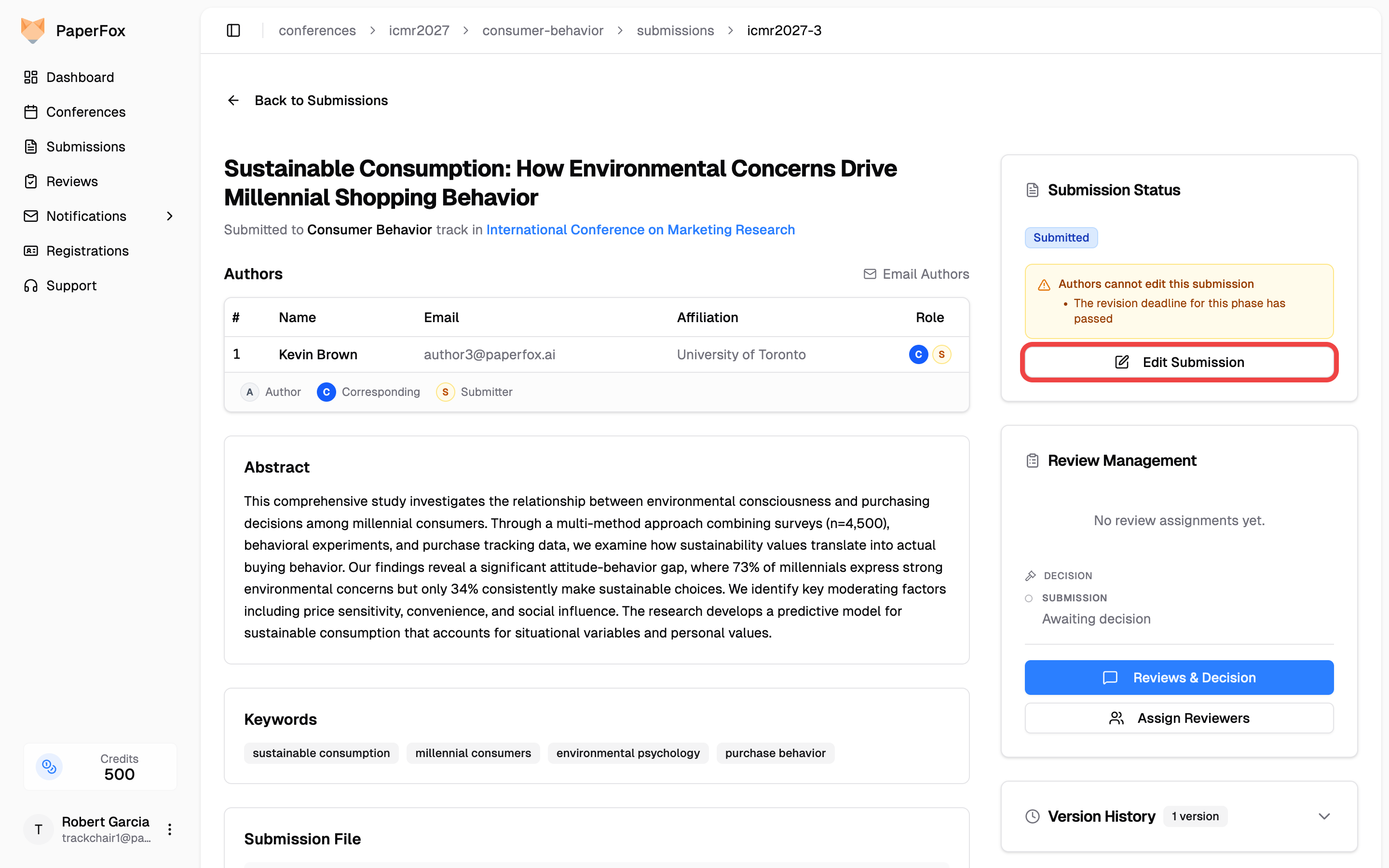
- In the right sidebar under Submission Status, click "Edit Submission"
When the authors themselves cannot edit the submission, an amber note above the button tells you exactly why.
The edit form opens in Chair view: a blue banner at the top reminds you that locked answers, revision deadlines, and the phase's author-editing setting don't apply to you. When authors are blocked right now, an amber warning below it names your role and every rule your edit is stepping over.
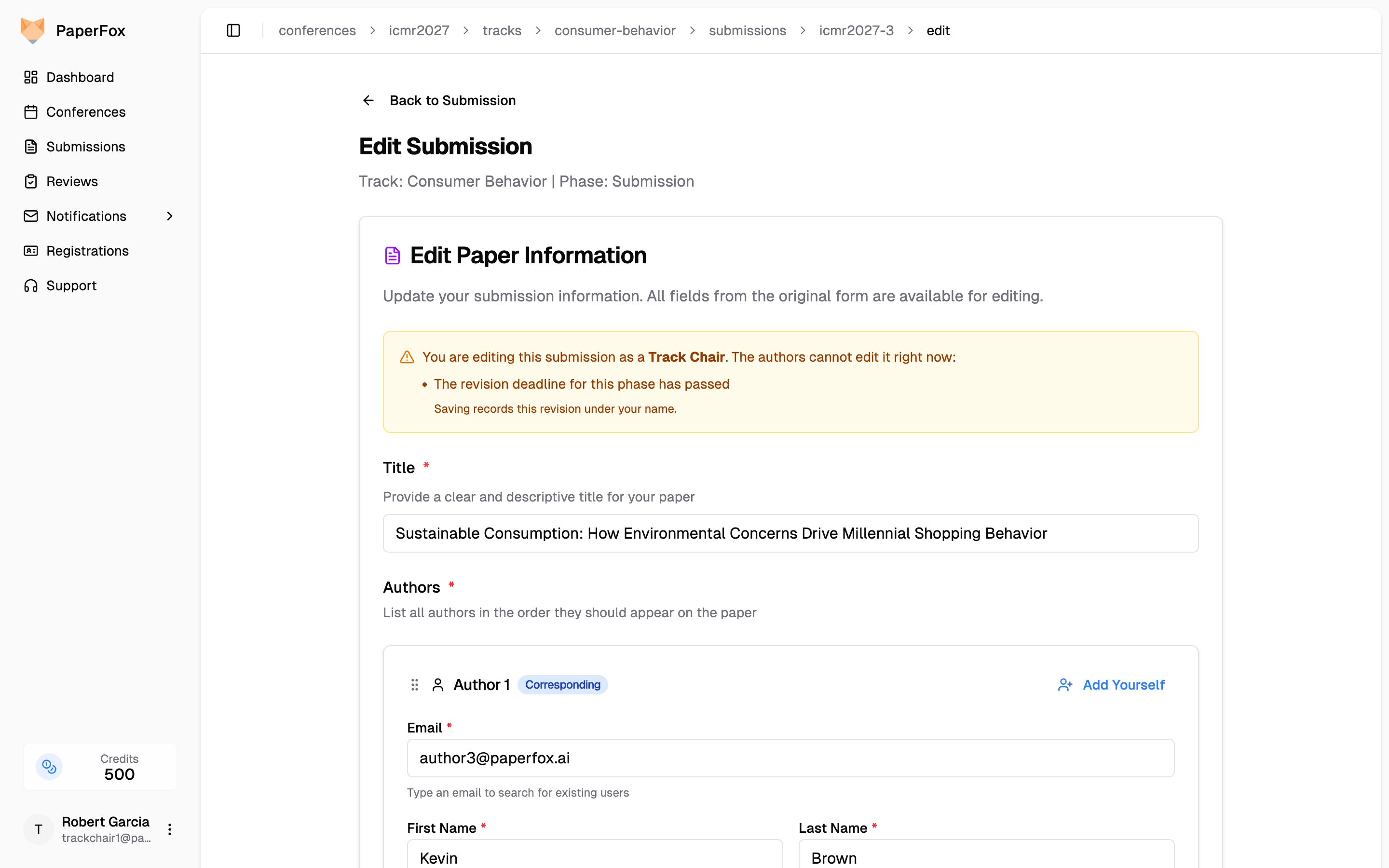
Make your changes and click "Save Revision". Three things happen automatically:
- The revision is recorded under your name in the submission's Version History and in the activity log, alongside the specific rules you overrode.
- "Notify all authors about this revision" is checked by default, so the authors receive an email describing what changed. Uncheck it if you'd rather tell them yourself.
- On multi-phase tracks, the phase status badge (on the submission detail card, the submissions list, and the decisions page) shows "Edited by chair" — so your edit is never mistaken for the author's revision or for silence. If the author later submits their own revision, the badge switches to "Revised by author".
Editing during active review
Chairs can also edit while reviewers are actively reviewing the submission. The reviewers will see your new version, not the one they started on. Read the amber banner before saving — if it lists "Editing is paused while reviewers are reading this version.", your edit will swap the submission out from under the reviewers.
This is not the same as submitting on behalf of an author
Submit on Behalf creates a new submission for an author. Use it when someone missed the submission deadline and has no submission in the system yet. To fix a submission that already exists, use the chair edit described above — submitting on behalf would create a duplicate with a new submission number and no review history.
When the Submission Is Locked
A submission is locked for authors (but still editable by chairs) in any of these cases:
| Condition | Effect | Recoverable? |
|---|---|---|
| Submission is withdrawn | Locked | Only by restoring from withdrawal |
| Decision: Reject | Locked permanently | No |
| Decision: Desk Reject | Locked permanently | No |
| Decision: Accept (default) | Locked | Yes — chair can enable post-accept editing per track |
| A reviewer has accepted an assignment in the current phase, and a version has already been submitted for that phase | Locked during active review | Unlocks automatically after a decision (revision or accept with setting on) — see Revision phases |
| The current phase's revision deadline has passed and that deadline is Enforced (the default) | Locked | Yes — a chair can edit the submission directly, extend the deadline, or switch the deadline to not enforced on the Phases page |
| Author Editing is off for the current phase | Locked | Yes — turn Author Editing back on for that phase |
Reviews in Flight vs. Revision Phases
The "a reviewer accepted an assignment" lock exists to stop the submission changing underneath someone who is mid-review. It therefore only applies once there is a new submission for that phase — which is not automatic. When you move a track into a revision phase, PaperFox carries the previous version forward so reviewers always have something to open, but that carried-forward copy is not the author's revision. Until the author submits, reviewers assigned in the new phase are reading the previous phase's text.
| Situation | Can the author edit? |
|---|---|
| Single-phase track — the author submitted, a reviewer accepted the assignment | No — locked while the review is in flight |
| Revision phase — the author has submitted their revision, reviewers are reading it | No — locked, same as any other phase |
| Revision phase — the author has not submitted yet, but a reviewer already accepted an assignment | Yes — the phase is waiting on the author, so editing stays open |
The lock re-arms as soon as the author submits their revision: from that point the submission is frozen for the rest of the phase, exactly as in the first two rows.
Assign reviewers whenever you like
Because of the third row, you can assign reviewers for a revision phase before the authors have finished revising — the assignments sit there and the authors are not blocked. Reviewers see a notice on the review page telling them whether a revision has actually landed for their round, so nobody reviews an unchanged submission by accident.
When the Submission Is Editable
A submission is editable by the submitting author when none of the above conditions apply. In practice this means:
- Before the submission deadline — authors can freely edit their submission
- After the submission deadline, before any reviewer accepts an assignment — still editable. The submission deadline controls when new submissions can be created, not when existing ones are frozen; only a phase's revision deadline locks editing
- In a revision phase the author hasn't submitted into yet — editable even if reviewers have accepted assignments, because there is no revision for them to be reading yet
- After a Major Revision or Minor Revision decision — editing reopens so authors can revise and resubmit, until the phase's revision deadline passes (if one is set and enforced)
- After an Accept decision — only if the track has Allow Editing After Acceptance turned on (see below)
Lock Individual Answers Across Phases
Every rule above locks the submission as a whole. Lock answer in later phases works one field at a time: the submission stays editable, but a specific answer is frozen once the submission moves past the phase that collected it.
This is the setting for a revision round where the new question should be answerable and the reviewed claims shouldn't quietly change. Authors can upload the camera-ready file and answer what the phase is asking for, while the title reviewers evaluated stays put.
Turn it on per field in the form builder — see Configure Submission Forms. It is off for every field until you turn it on, and it only appears on tracks with more than one phase.
What Authors See
A locked answer stays visible and readable in its normal field — it just refuses edits, and carries a LOCKED badge. A single note at the top of the form explains why once, rather than repeating itself under every locked field.
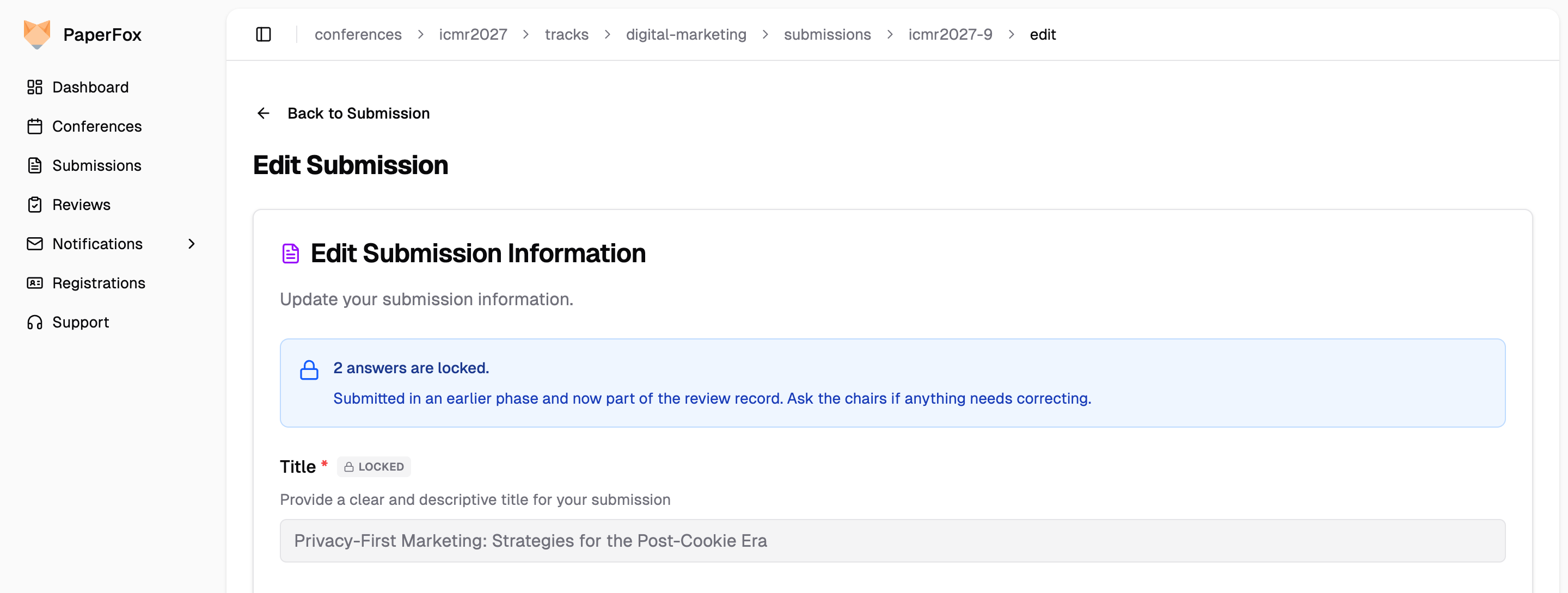
The note tells authors to ask the chairs if something locked needs correcting — and chairs can, exactly as with every other rule on this page.
Check What Authors See
Because locks never apply to chairs, your own edit form shows every field open — even on a submission you also authored. To see the form exactly as its submitting author gets it:
- Open the submission and click "Edit Submission"
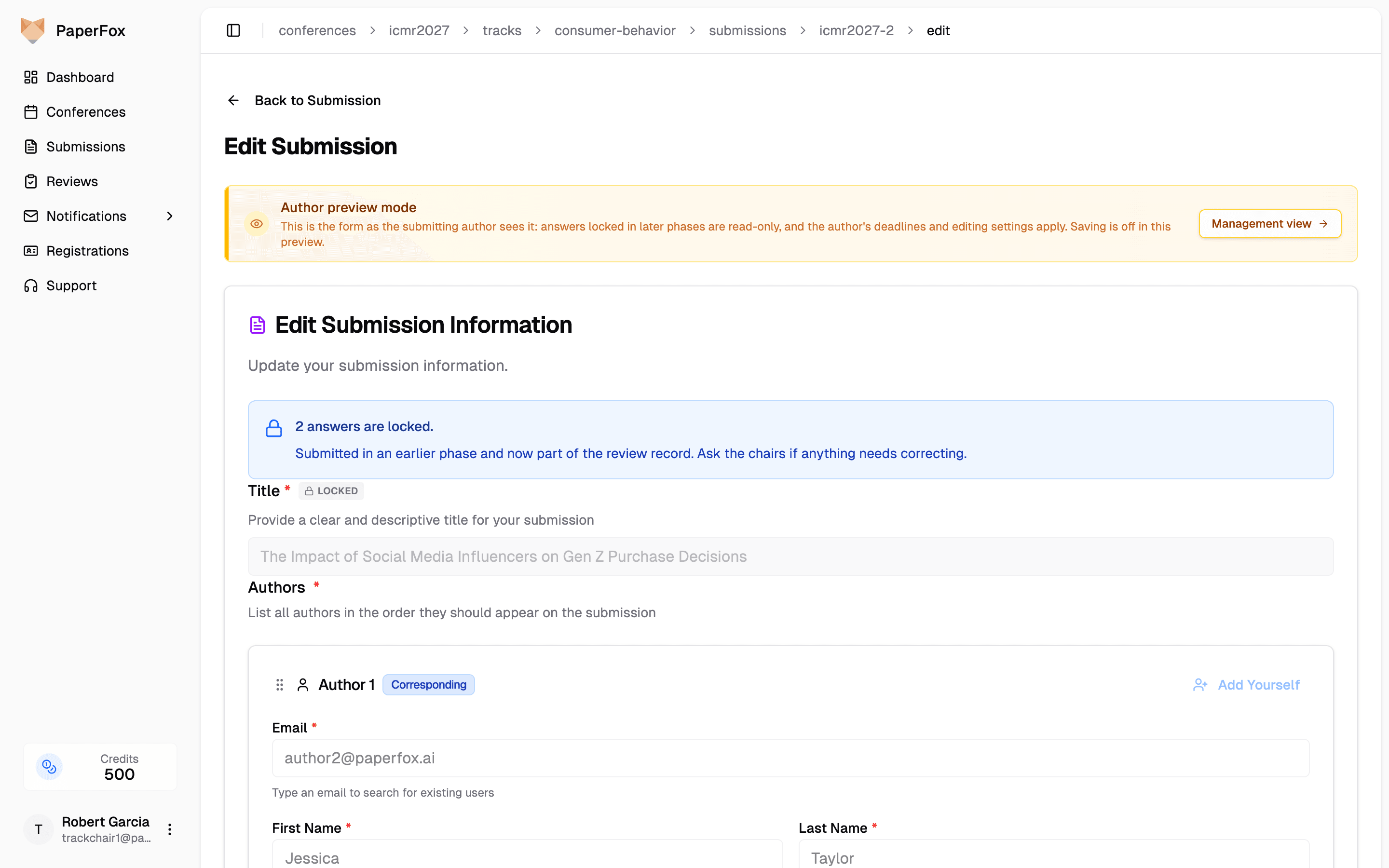
- In the blue Chair view banner, click "Author view"
The form switches to Author preview mode: locked answers carry their LOCKED badge, the author's deadlines and editing settings apply, and if authors can't edit right now you see the same message they do. The preview is read-only — click "Management view" to go back and make changes.
Two Cases the Lock Skips
| Case | Locked? | Why |
|---|---|---|
| The field's own phase | No | The question has to be answerable in the round that asks it |
| The answer is empty | No | A required field nobody answered would otherwise be both mandatory and un-fillable, with no way for the author to submit |
| The author list | Never lockable | Author changes are governed by the track's own rules, not the form builder |
The lock is enforced, not just greyed out
Locking is applied when the revision is saved, not only in the browser — a locked answer is restored from the stored version even if the request never came from the form. Authors can't work around it by editing the page, and they don't need to: everything else in the same revision saves normally.
Author Editing (Phase Setting)
Each phase has an Author Editing switch (Settings → Phases → Phase Settings, under Authors). It is on by default. Turn it off and authors cannot edit their submission in that phase — regardless of deadlines, decisions, or whether reviews are in progress. They're told the chairs have closed editing, which is exactly what happened.
This is the setting to use when a phase isn't for author work at all. The revision deadline answers a different question — when editing closes — and only makes sense while editing is open.
A back-dated deadline is not the same thing
Setting the Revision Deadline to a past date also blocks authors, but it tells them a deadline passed when none ever existed, and it silently does nothing unless that deadline's Enforced switch is also on. Reach for Author Editing when you mean "closed".
As with every other rule on this page, chairs are unaffected — you can still edit a submission in a phase with editing closed, and the amber banner lists "The chairs have closed editing for this phase." among the rules you're overriding.
Revision Deadline Enforcement (Phase Setting)
Each phase's Revision Deadline carries its own Enforced switch, right below the date on the Phases page (Settings → Phases → Phase Settings). With it on (the default), authors can no longer edit their submission once the deadline passes. Switch it off to make the deadline informational: authors still see the date on their submission page as guidance, but a late revision is quietly accepted — no support email, no chair intervention.
Because enforcement is per phase, each revision phase on a multi-track workflow locks on its own schedule — and one phase can be strict while another stays soft. See Configure Track Phases for where the switch lives.
Chairs are never affected either way — you can still edit any submission after the deadline (that's how you help an author who has a legitimate reason to change something), and the amber banner on the edit form lists the passed deadline among the rules you're overriding.
When to Soften a Deadline
Keep the deadline Enforced if your venue treats it as a hard freeze — the version on file at the deadline is the version reviewers see. Switch it off when the date is a target rather than a cutoff:
- Rolling or lenient revision windows — you'd rather accept a revision two days late than exchange emails about it
- Small venues with hands-on chairs — the deadline sets expectations; the chair decides case by case
- Early planning — you want authors to see the expected date before you're ready to commit to enforcement
This is separate from Accept Submissions
The revision deadline governs editing existing submissions; the Accept Submissions toggle and the submission deadline govern creating new ones. You can close new submissions while still allowing edits — the controls are independent.
Allow Editing After Acceptance (Track Setting)
By default, authors of accepted submissions can keep editing — this is what most venues want, since acceptance is usually followed by a camera-ready or corrections phase. Turn Allow Editing After Acceptance off if your venue treats acceptance as final and you don't want any further changes.
Enable on a Track
- Go to Conferences in the sidebar, then click on your conference
- Click on the track you want to configure
- In the Review Management section, click "Review Settings" to expand the settings
- Find "Allow Editing After Acceptance" and toggle it on or off
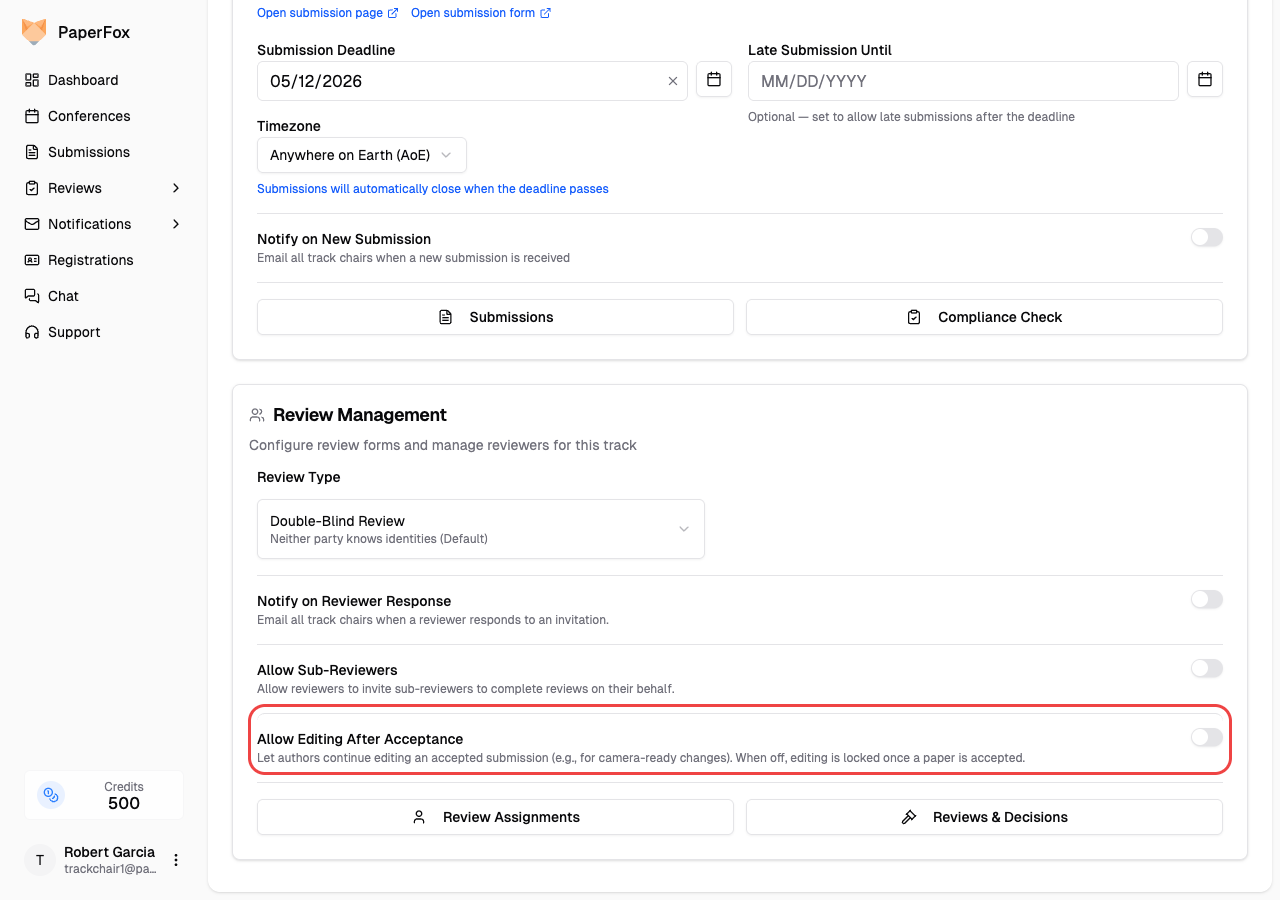
The setting takes effect immediately for every submission on this track. Rejections and revision decisions are unaffected — rejections stay locked, revisions stay editable. Only the Accept case is controlled by this toggle.
When to Enable It
Turn this on if your venue has any of these workflows:
- Camera-ready submissions — authors upload the final version after acceptance
- Post-acceptance corrections — authors need to fix typos, update affiliations, or adjust metadata before publication
- Shepherding — a chair or shepherd asks authors to make specific changes after acceptance
If your venue treats acceptance as final, leave it off.
Author list changes after acceptance
When this setting is on, authors can also add or remove co-authors from an accepted submission. Every edit is captured as a new submission version with the full author list snapshot, and a SUBMISSION_REVISE entry is written to the activity log (who revised, what authors were added or removed), so any change is fully auditable. If you need author-list changes to go through chair approval instead, turn the setting off and make the edits yourself as a track chair — you can always edit any submission regardless of this toggle.
Quick Reference: Decision Types
| Decision | Editable by Author? | Notes |
|---|---|---|
| No decision yet | Yes (until a reviewer accepts) | The "reviewer accepted" trigger locks the submission mid-review — but only once a version exists for the current phase |
| Major Revision | Yes | Until the phase's revision deadline passes, unless that deadline is switched to not enforced |
| Minor Revision | Yes | Until the phase's revision deadline passes, unless that deadline is switched to not enforced |
| Accept | Only with setting on | Controlled by Allow Editing After Acceptance |
| Reject | No | Permanent lock |
| Desk Reject | No | Permanent lock |
Default Behavior
- Author Editing — on by default for every phase, so a new phase never locks authors out by surprise.
- Revision deadline enforcement — on by default for every deadline. A phase with no revision deadline never locks editing on a date; setting one locks authors out when it passes, unless you switch that deadline to not enforced.
- Allow Editing After Acceptance — on by default. This matches the workflow of most academic venues, which run a camera-ready or corrections phase after acceptance. Turn it off per track if your venue treats acceptance as final.
These settings only ever restrict authors — chairs can still edit any submission on their track at any time.