
Track Dashboard
View track-level statistics, review and decision status, and recent activity at a glance
The Track Dashboard gives track chairs a centralized overview of their track — who's on the committee, how the reviewing is going, what's been decided, and what's due next.
Accessing the Dashboard
- Go to Conferences in the sidebar, then click on your conference
- Navigate to your track
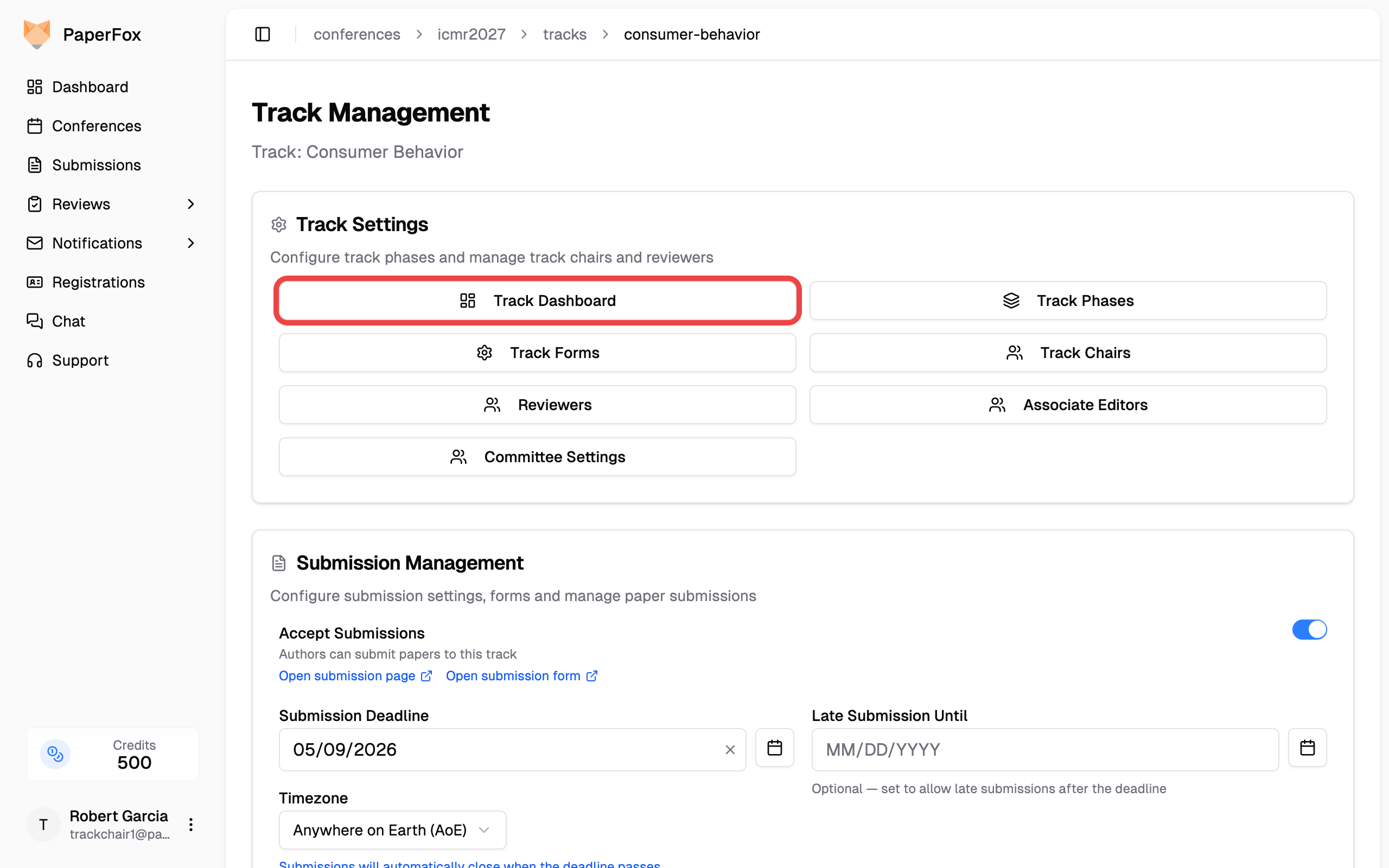
- Under Track Settings, click "Track Dashboard"
Two Bands: the Track, and One Phase of It
The dashboard answers two different questions, so it's split into two bands.
The track band at the top — Track Chairs, Submissions, Review Assignments, Reviewers, and Associate Editors — describes the track as a whole. These numbers don't change as work moves through phases. Each card links to its management page.
Review Assignments counts reviewer assignments, not reviews that have arrived: every phase, including invitations a reviewer declined. Each review slot counts once — a sub-reviewer counts under the reviewer who delegated to them, and a cancelled delegation not at all, since the original reviewer takes the submission back. When some assignments sit on withdrawn submissions, the card notes how many.
Reviewers counts your whole reviewer committee. If some of them accepted the invitation but never finished setting up their account, the card notes how many — they can't sign in or be assigned submissions until they do, and they appear greyed out on the assignments page with the same note. This is account setup, not the separate Research Profile.
Everything below the divider describes one phase. Submissions sit in exactly one phase at a time, and assignments, reviews, and decisions all belong to a phase — so these numbers only mean something once you say which phase you mean.
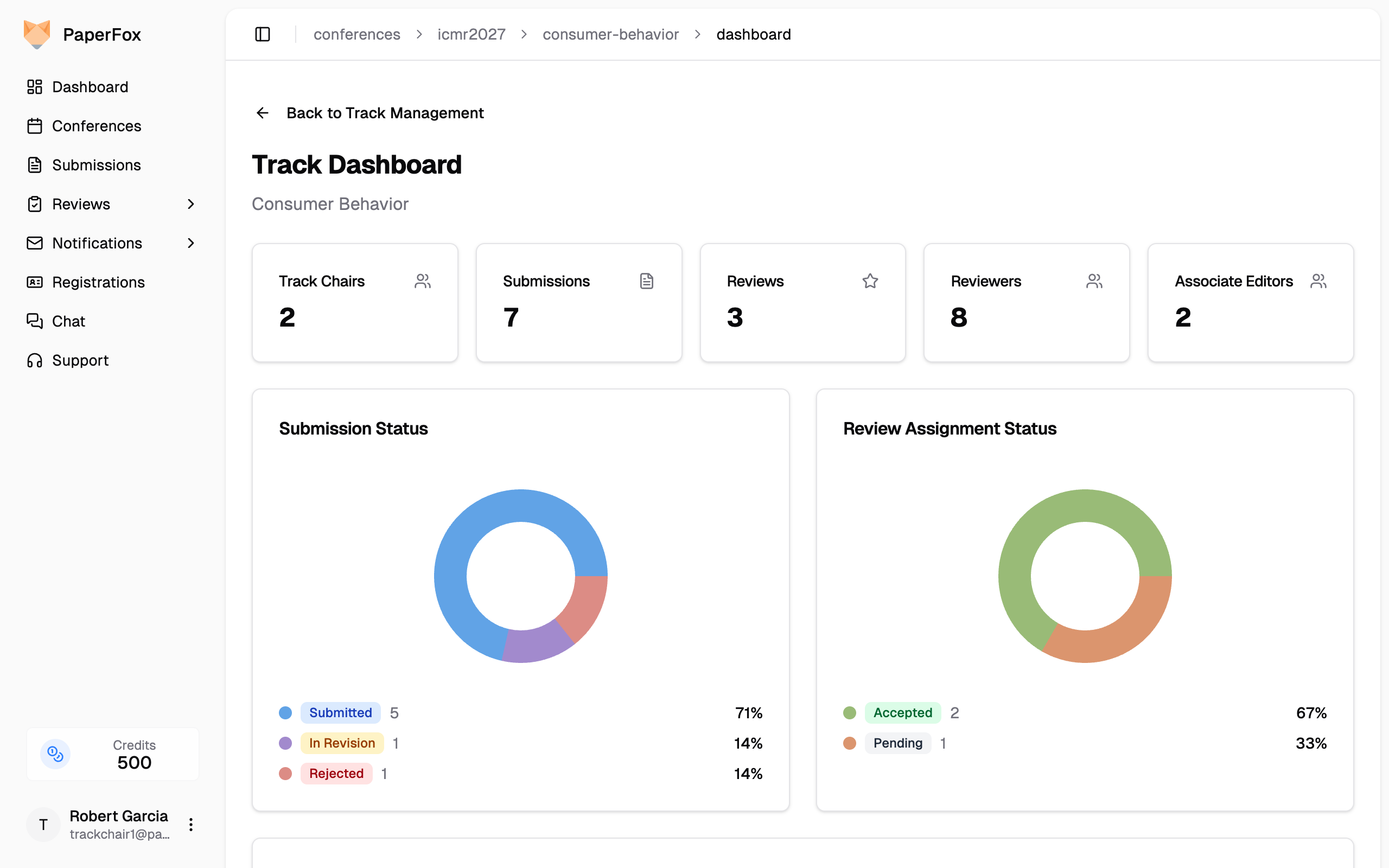
On multi-phase tracks a phase selector sits to the right of the phase heading. The dashboard opens on your track's current phase — the furthest one holding submissions — so use the selector to look back at an earlier phase. Single-phase tracks show no phase heading and no selector; the cards simply describe the one phase.
Withdrawn submissions
The Submissions card counts every submission the track received and notes how many were withdrawn. Their review assignments are still assignments, so they count in the Review Status chart and in Total Assignments, and the Review Assignments card notes how many of yours sit on withdrawn submissions. They drop out of Reviews expected — nobody is waiting on a review for a withdrawn submission — so the completion bar can still reach 100%. Decision Status leaves withdrawn submissions out of its chart entirely and notes them beneath.
Alerts
When the review workflow needs attention, alerts appear above both bands. They span every phase, so an alert about phase 2 is never hidden by looking at phase 1:
- Submissions without a reviewer — in phases that have a review deadline, with the days remaining
- Overdue reviews — reviews still outstanding after the review deadline has passed
- Ready to release — every live submission has its reviews in, but results haven't been released to authors yet
Each alert links to the page where you can act on it. When everything is on track, no alerts are shown.
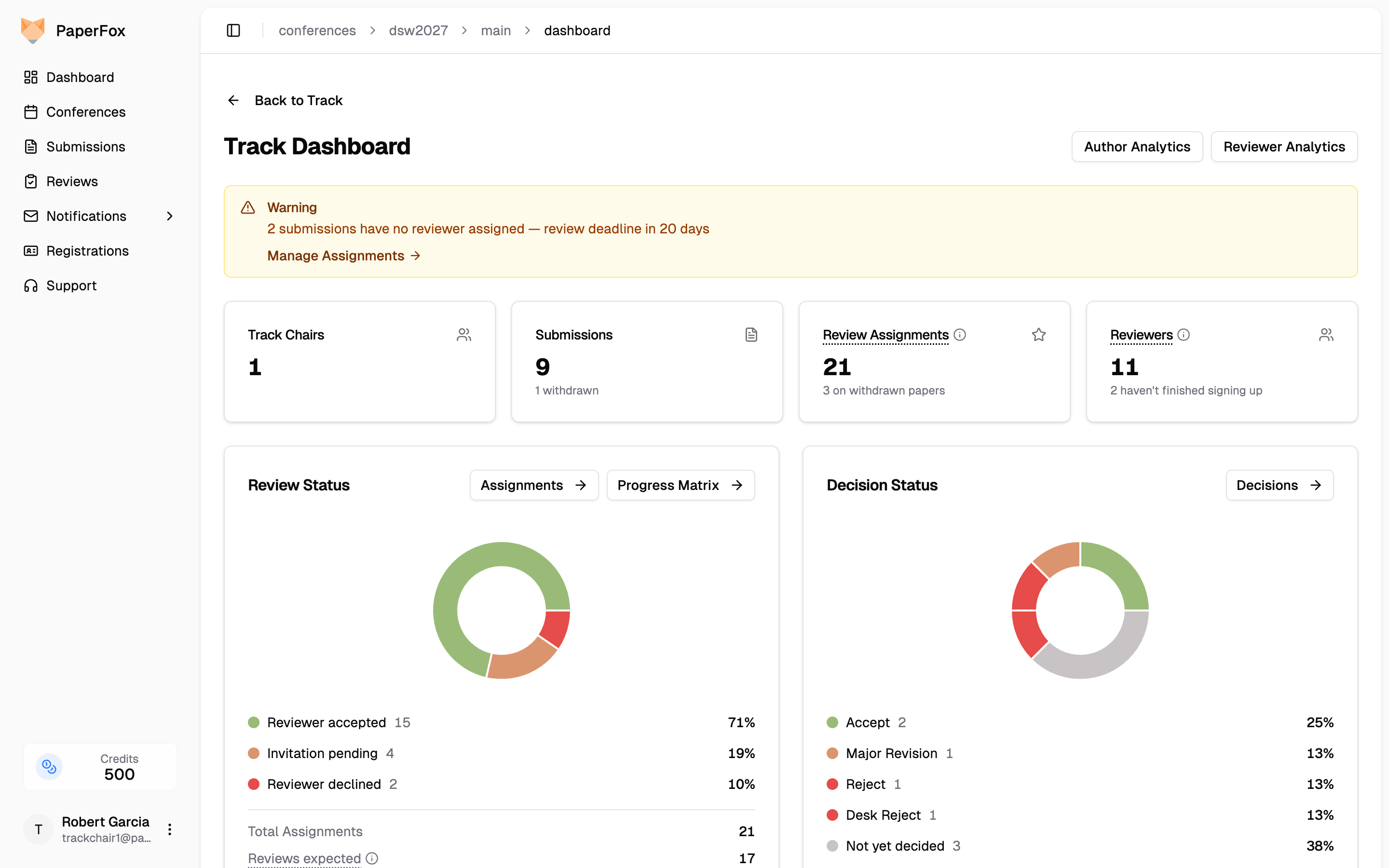
Review Status
How the reviewing is going in this phase. The chart breaks invitations down by what the reviewer did with them — Reviewer accepted, Invitation pending, Reviewer declined — so nothing here reads as a decision on the submission. A handover in progress shows as Delegated to sub-reviewer, counted once. If the reviewer later cancels that handover, the submission goes back to them and they show as accepted again — a cancelled delegation is never a slice of its own, or the same review slot would count twice.
Beneath the chart, three numbers read as a funnel — each one is the line above it, minus something the chart already shows:
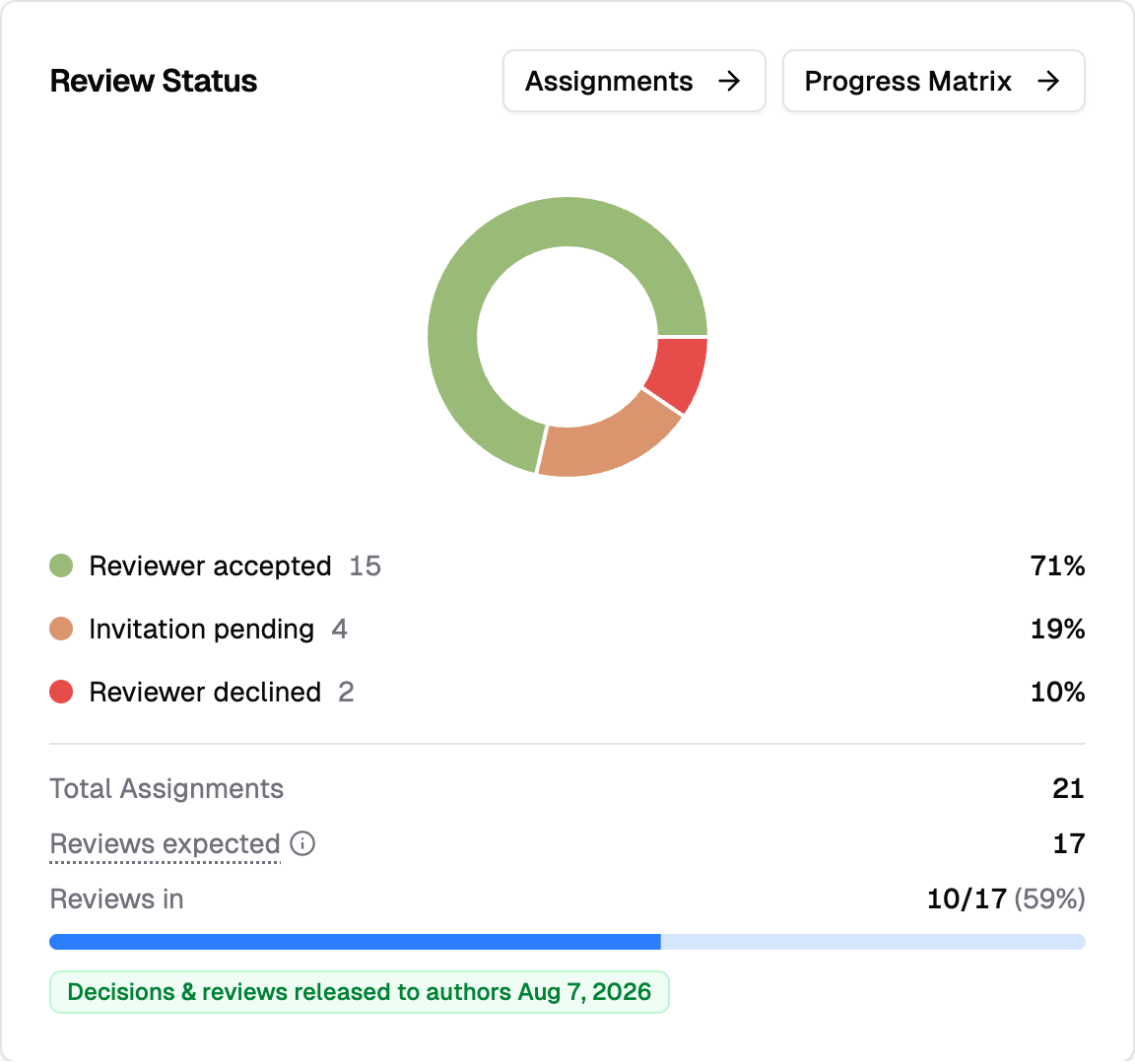
- Total Assignments — every assignment in this phase; the chart's own total
- Reviews expected — the ones a review can still arrive from: pending, accepted, and delegated, on a submission that's still live. Declined assignments and any sitting on withdrawn submissions drop out, which is why this number is lower
- Reviews in — how many of those have actually been submitted
Click the ℹ️ beside Reviews expected for the breakdown on your own numbers. When your track's visibility settings gate results behind release, the release status appears here too — whether decisions and reviews have reached authors yet.
Use "Assignments" to manage reviewer assignments, or "Progress Matrix" for the per-submission review matrix.
Decision Status
What happened to this phase's submissions. The chart covers every submission, not just the decided ones: one slice per decision type your conference uses, plus Not yet decided for the rest. Click any row to open the decisions page filtered to exactly those submissions.
Conferences with many custom decision types see the largest four, with a "Show N more" toggle for the rest. Withdrawn submissions are noted beneath the chart rather than counted in it.
Use "Decisions" to open the Reviews & Decisions page.
Recent Submissions and Upcoming Deadlines
At the bottom, you'll find the five most recent submissions with their status badges, and upcoming review, revision, and author-response deadlines with urgency indicators.
Switching Tracks
If you manage more than one track, a track switcher dropdown appears in the page header. Use it to jump between your tracks without going back to the conference dashboard. The switcher only lists tracks where you hold a track chair, associate editor, or senior editor role — never tracks you don't manage.
The switcher is hidden when you only manage a single track.
Track-Level Author and Reviewer Analytics
Each track has its own analytics views, scoped to submissions in that track only. Open them with the "Author Analytics" and "Reviewer Analytics" buttons in the dashboard header:
- Author Analytics — country, affiliation, and co-authorship breakdown for your track
- Reviewer Analytics — review length distribution and reviewer rankings for your track
Conference chairs see all tracks; track chairs see only the data for tracks they manage.
See also: Review Progress Matrix for a detailed per-submission view of review completion, and Make Decisions on Submissions for the decision workflow.