
Publish Decisions & Reviews to Authors
Configure when authors see decisions and reviews, then publish results per phase
PaperFox keeps a paper's outcome private while you work, then publishes it to authors on your signal. Two things control this:
- Two per-track settings decide what waits for publishing — when authors see decisions, and when they see reviews.
- One "Publish" button per phase is the moment you publish that phase's results to authors.
You configure the settings once per track, then flip the publish switch for each phase when you're ready. Recording a decision is always private work until then — you can deliberate, change, or clear it without anything reaching the author.
Who can publish results?
Conference chairs, track chairs, and senior editors can configure visibility settings and publish or unpublish results for any phase in their track.
Choose What Authors See
Go to your track management page (Conferences → your conference → your track) and find the Review Management section. Two dropdowns sit under Review Type — both save automatically when you pick an option.
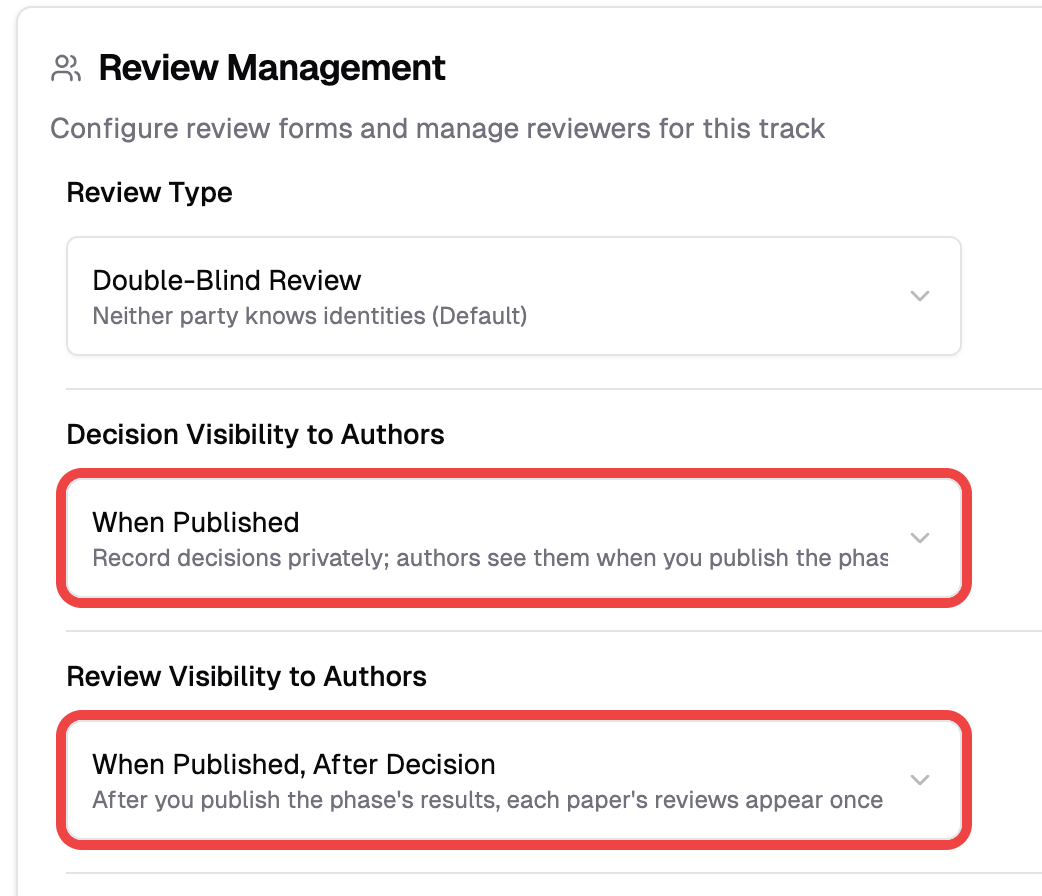
Decision Visibility to Authors — when authors see the accept/reject/revision decision:
| Option | Authors see the decision… |
|---|---|
| When Published (default) | Once you publish the phase's results |
| Immediately When Recorded | The moment you enter it |
Review Visibility to Authors — when authors see the reviewer scores, comments, and files:
| Option | Authors see the reviews… |
|---|---|
| When Published, After Decision (default) | After you publish, once their paper also has a decision |
| When Published | As soon as you publish — no decision required |
| Immediately When Submitted | The moment each reviewer submits — no publish step |
The two settings are independent. A common combination beyond the defaults: set Review Visibility to Immediately When Submitted while leaving Decision Visibility at When Published — reviews stream to authors as they come in, but the decision stays private until you announce it.
Publish from the Decisions Page
Open the Reviews & Decisions page for your track. A banner sits at the top, above the statistics cards.
When the phase hasn't been published, the banner is amber:

- Click the Publish button on the right
- Confirm in the dialog
The button names exactly what a click will reveal, based on your two settings — "Publish Results" when both decisions and reviews are waiting, or "Publish Decisions" / "Publish Reviews" when only one is. Once published, the banner turns green and shows who published and when:

No publish step needed?
If you set both Decision Visibility and Review Visibility to their "Immediately" options, nothing waits for publishing — the banner becomes a plain note instead of a button, because everything reaches authors as it's recorded or submitted.
Publish While Sending Decision Emails
When you send a decision letter (Acceptance, Major Revision, Rejection, etc.) from the Notify menu, a confirm dialog appears with a "Publish this phase's results with this email" toggle, defaulted ON.
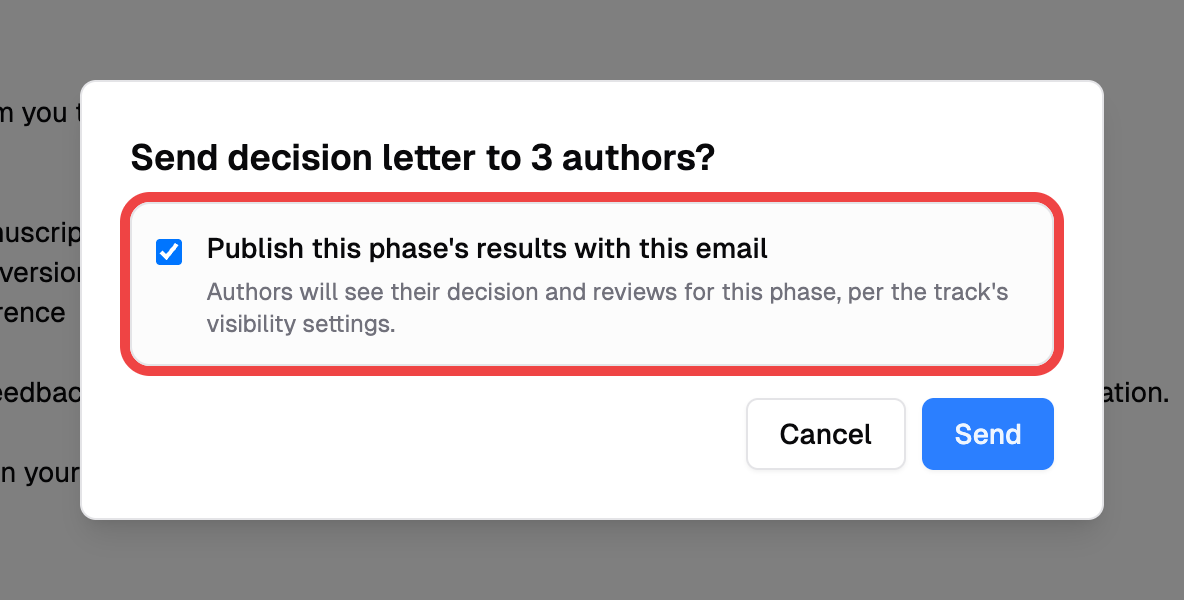
- Leave the toggle on so the phase is published atomically with the send — authors get the email and can see their results together.
- Uncheck it to send the email only and publish manually later from the Decisions page.
The toggle only appears for decision-letter templates. A generic blast or a non-decision template never publishes results.
Unpublish a Phase
If you published by mistake, click "Unpublish" in the green banner. The phase goes back to unpublished, and authors who haven't opened their pages yet stop seeing results.
Unpublish isn't a full undo
Authors who already opened their reviews page have already seen the content. Unpublishing only hides results from authors who haven't viewed them yet — use it to catch a mistake quickly, not as a routine "preview, then publish" workflow.
Multi-Phase Tracks
Publishing is per phase. Publishing Phase 1: Submission doesn't touch Phase 2: Camera Ready or any later phase. Switch phases using the Phase selector at the top-right of the Reviews & Decisions page — each phase has its own banner and its own publish state.
This lets you run a private second-round review without exposing it to authors until you're ready.
What Authors See
Until a phase is published (and, in the default review setting, until their paper also has a decision), authors see their submission as Under Review with no decision or review content — regardless of what you've recorded privately. After publishing, they see their decision, full review scores and comments, and any reviewer-attached files marked visible to authors, according to the two settings above.
Chair preview of the author view
When a chair visits the author reviews page at /submissions/{slug}/reviews, PaperFox shows the author preview — gated exactly as the author would see it, with a yellow banner reminding you that scores and reviewer identities are hidden. Use the Management view link on the banner to switch back to the unrestricted chair view.
Management views are never gated
Track chairs, conference chairs, senior editors, associate editors, and the reviewers themselves always see decisions and completed reviews on the Reviews & Decisions page as soon as they come in. Publishing only affects the author-facing pages.
See Also
- Make Decisions on Submissions — record and update decisions
- Send Notifications — full guide to the notification composer