
Set the Review Type
Choose whether authors and reviewers can see each other — Double-Blind, Single-Blind, or Open Review.
Each track has a review type that controls whether authors and reviewers can see each other's identities. It defaults to Double-Blind. You can change it per track at any time — for example, switch to Open Review when you want authors and reviewers to collaborate openly throughout the process.
Change the Review Type
- Go to Conferences in the sidebar and open your conference.
- Click "Manage Track" on the track you want to change.
- In the Review Management section, click "Review Settings" to expand the settings.
- Open the Review Type dropdown and choose an option.
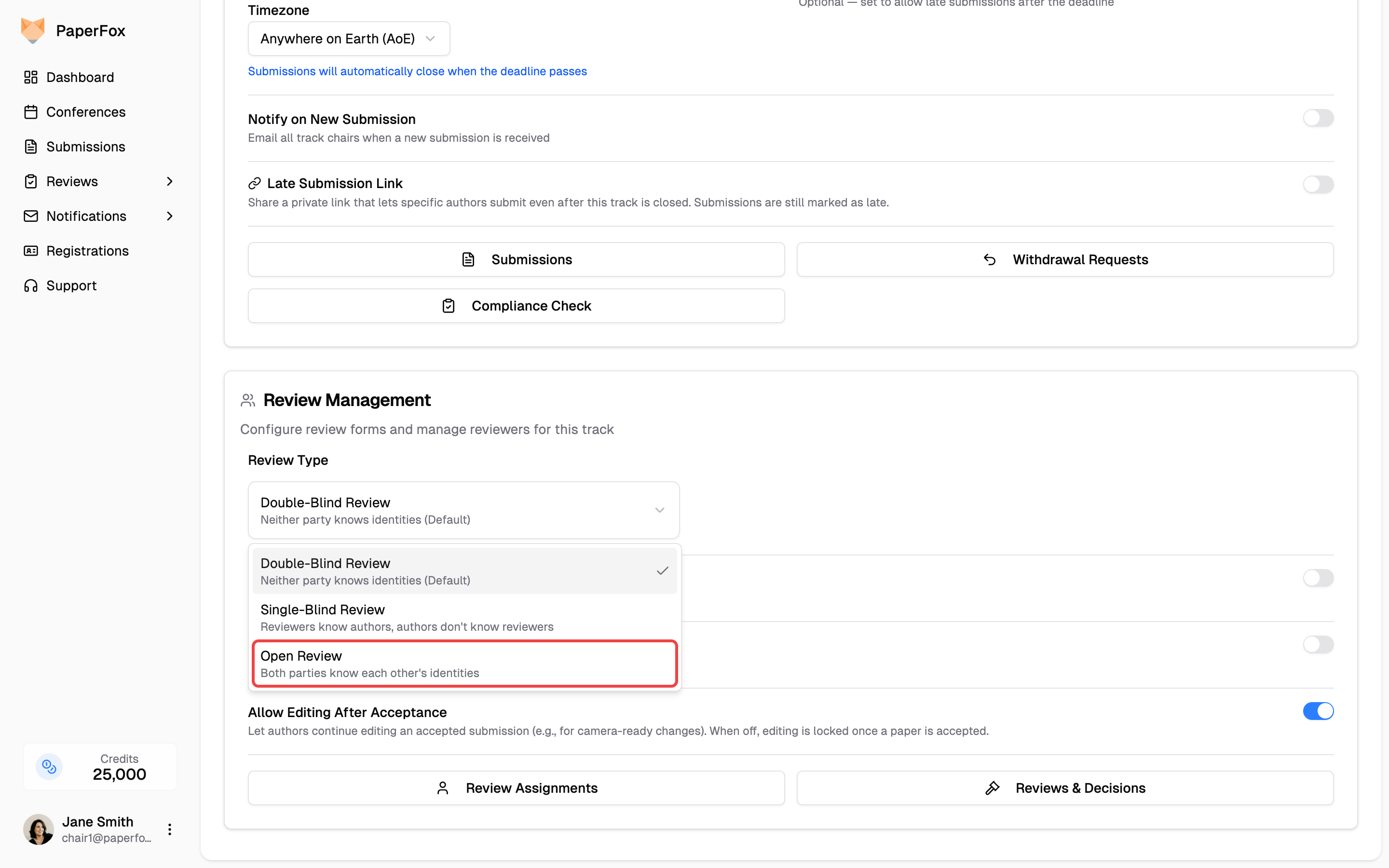
The change saves automatically — there's no separate Save button.
Who can change this
Conference chairs and the chairs of the track can set the review type. It applies to that single track; set it per track if your conference has more than one.
What Each Type Means
| Review type | Authors see reviewers? | Reviewers see authors? |
|---|---|---|
| Double-Blind (default) | No | No |
| Single-Blind | No | Yes |
| Open Review | Yes | Yes |
Under Open Review, authors see their assigned reviewers on the submission detail page once a reviewer accepts the assignment — before any review is submitted. Once reviews are released to authors, each reviewer's name and affiliation appear next to their review on the author's feedback page.
What Review Type Does Not Control
Review type decides who each side can see — never what a reviewer can read. On all three types, reviewers see every answer on the submission form except the Authors field, which Double-Blind removes.
So a question you add to the submission form — a data availability statement, a methods summary, a reproducibility checklist — reaches your reviewers on a Double-Blind track exactly as it does on an Open one.
Don't collect chair-only information on the submission form
Because reviewers read every submission answer, the submission form is the wrong place for questions meant only for organizers — student status, suggested or excluded reviewers, funding sources. Reviewers will see those answers, and on a Double-Blind track a "suggested reviewers" field names real people, which undoes the blinding. Collect that information outside the submission form.
Changing mid-review
Review type controls visibility in real time. If you switch to Open Review after reviewers are already assigned, their identities become visible to authors immediately — and switching back hides them again. Pick the model before assignments go out when you can.
See Also
- Configure Review Forms — how reviewer identity and each review field appear to authors across review types.
- Release Decisions & Reviews to Authors — the two visibility settings that sit beside Review Type, and when authors actually see decisions and reviews.
- Share Reviews Between Reviewers — whether reviewers can read each other's submitted reviews; review type only controls whether they see each other's names there.