
Import External Registrants
Add registrants from a registration system outside PaperFox so we can flag submissions without a registered author
If your conference uses a registration system other than PaperFox, you can still import the registrant list here. Once imported, PaperFox can tell you which accepted submissions don't have a registered author yet — see Author Registration Coverage.
Required fields per registrant: first name, last name, email. Affiliation and country are optional.
Open the External Tab
- Go to Conferences in the sidebar, then click your conference.
- Under Registration Management, click "Registrants".
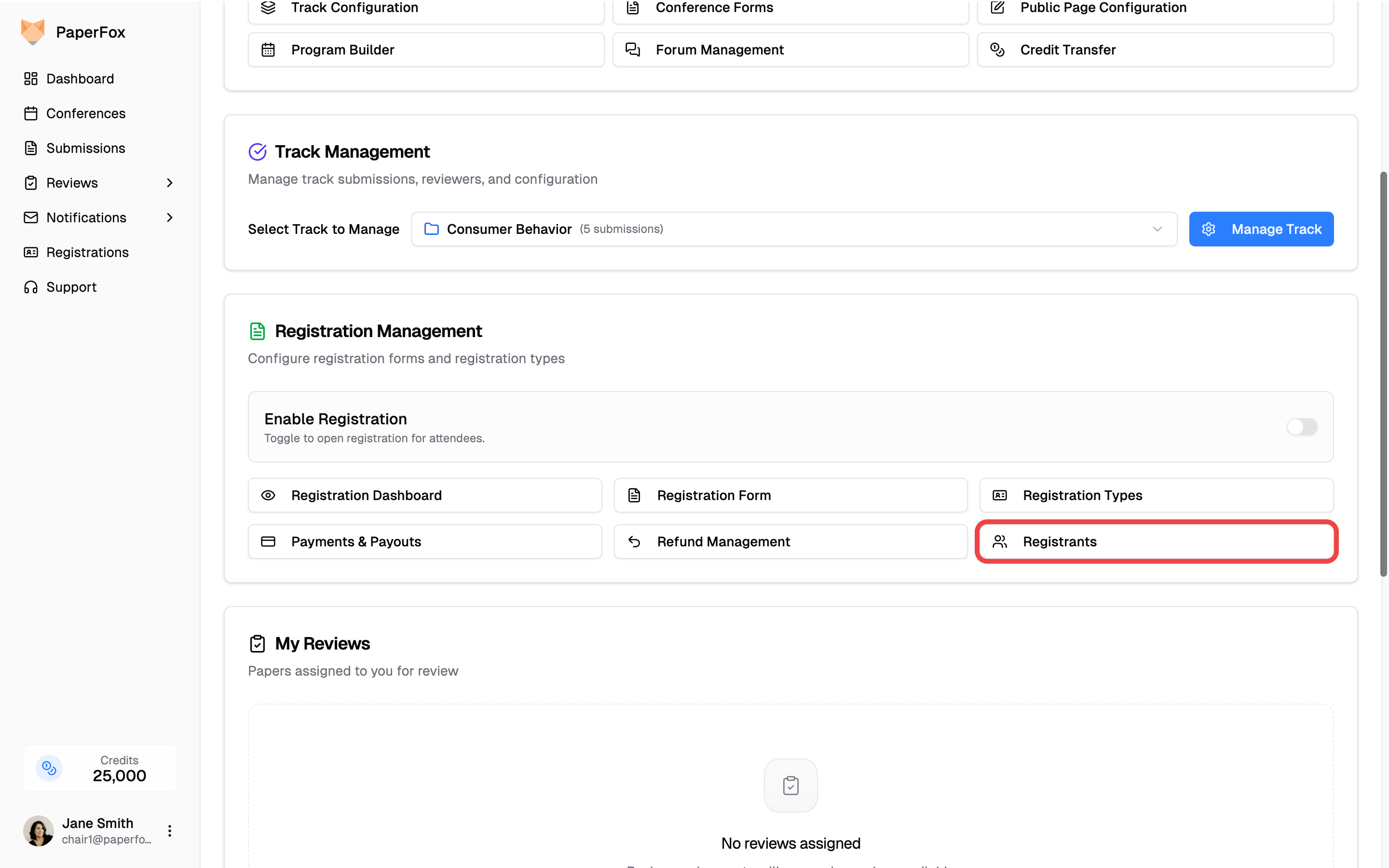
- Click the External tab.
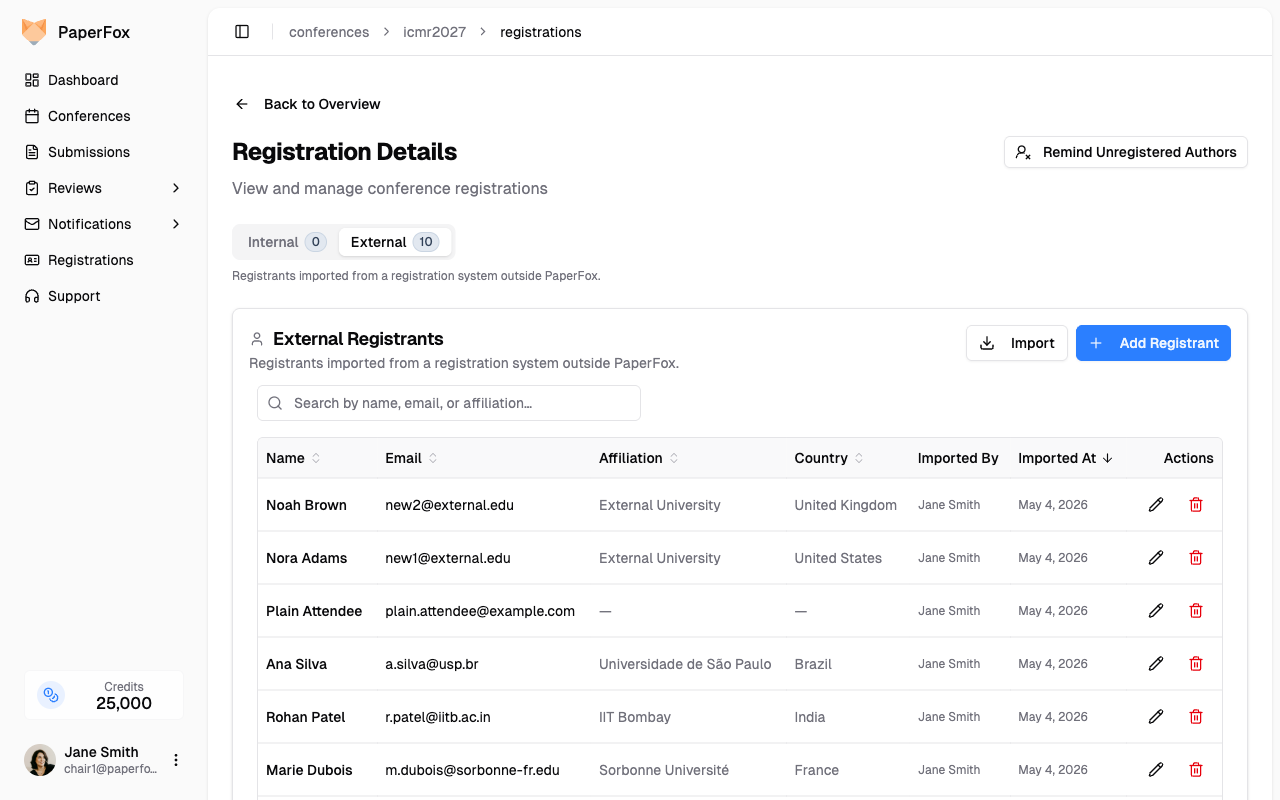
The Account column tells you, at a glance, whether each registrant matches an existing PaperFox account. The legend above the table is the key:
- No PaperFox account — email isn't tied to any PaperFox user.
- Has PaperFox account — email matches a PaperFox user. We use that user's profile (name, affiliation, country) for the registrant — see "How matching works" below.
- Already in Internal list — this person already paid through PaperFox, so they're also on the Internal tab. The External row remains for your records.
Add One Registrant
- Click "Add Registrant" (top right of the table).
- Pick a Country/Region first, then start typing the Affiliation — PaperFox suggests matching institutions from ROR scoped to that country.
- Fill in First Name, Last Name, Email.
- Click "Add Registrant" to save.
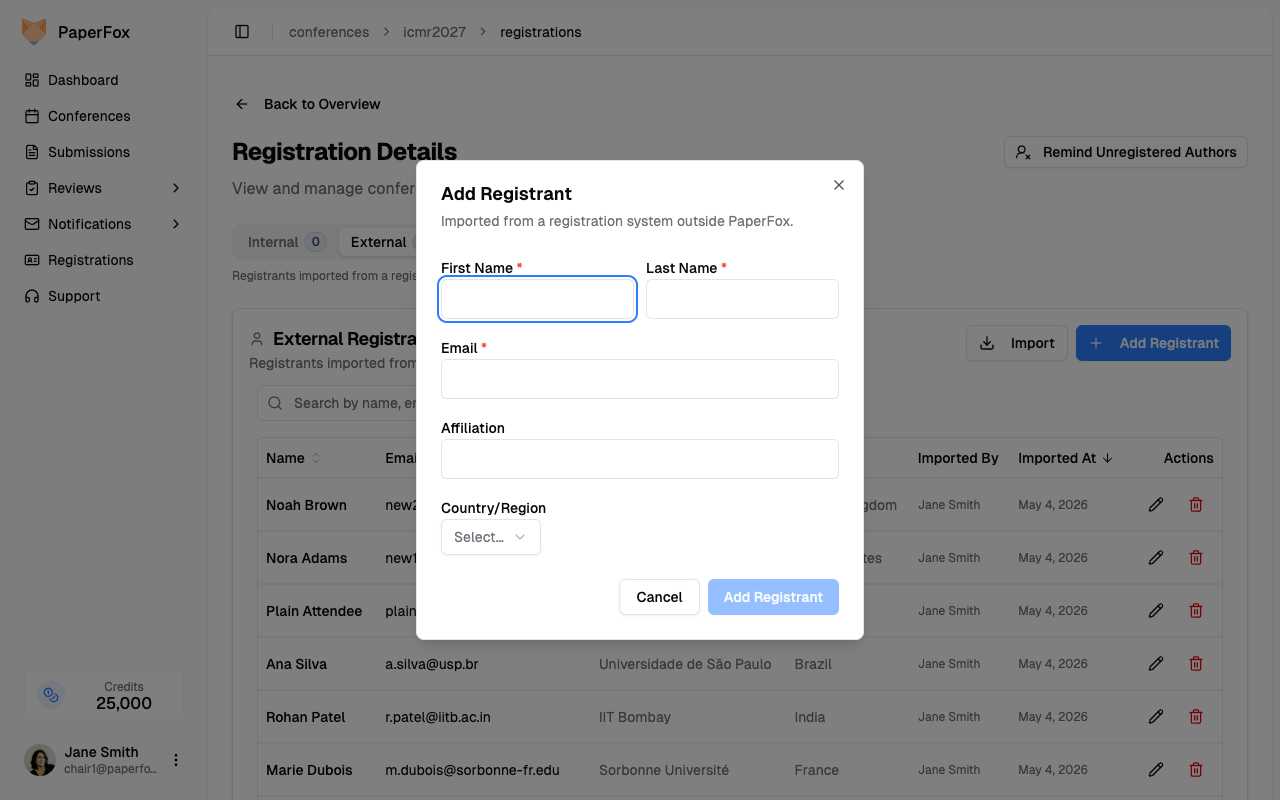
The new row appears at the top of the table. Use the pencil icon to edit any field, or the red trash icon to remove a row.
Bulk Import (CSV / Excel / Paste)
For more than a handful of registrants, use the bulk import.
- Click "Import" to open the dialog.
- Pick a method:
- Upload File — drag a CSV, XLSX, or TXT file onto the dashed zone, or click to choose. Use "Download CSV template" for a starting point.
- Paste Rows — paste the contents of a spreadsheet (header row included).
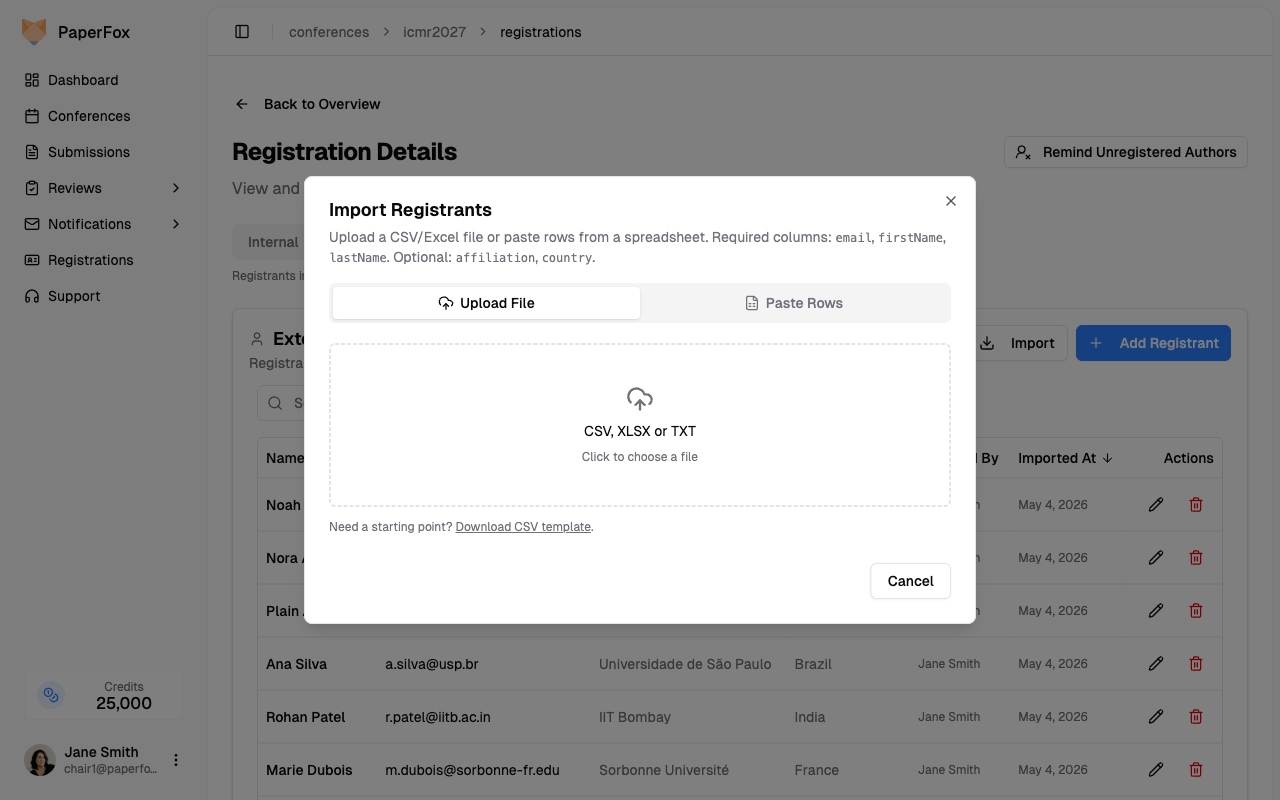
- PaperFox parses the file and shows a preview with four counters and a per-row Account status:
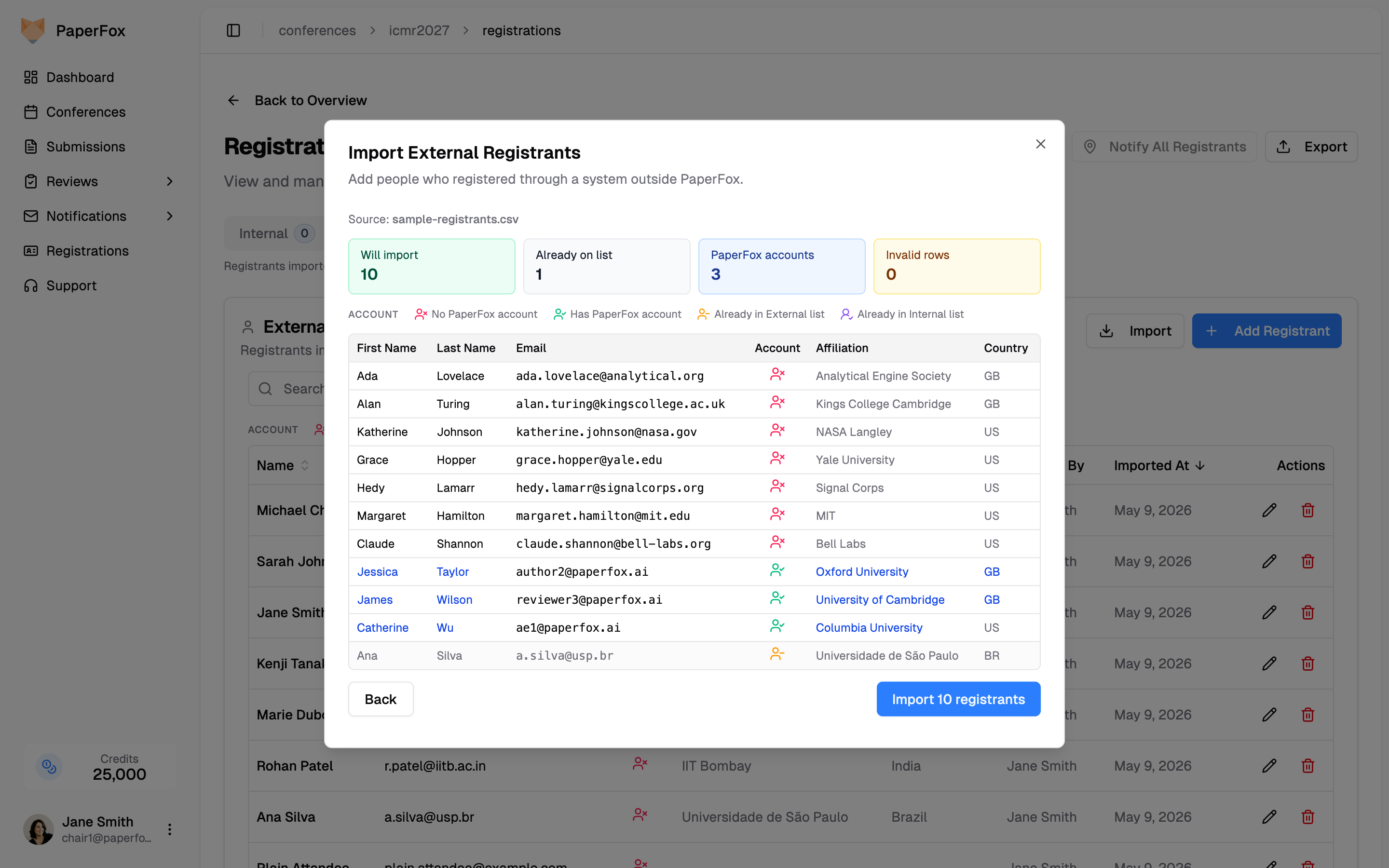
- Will import — rows that will be created.
- Already on list — rows skipped because the email is already on the External or Internal list for this conference.
- PaperFox accounts — rows whose email matches an existing PaperFox user. Their profile data overrides the CSV — see below.
- Invalid rows — missing/invalid email, missing first/last name, or unknown country code. Listed with the row number so you can fix the source.
- Click "Import N registrants" to commit. On a clean run you'll see a toast and the dialog closes; if any rows had errors or skips you weren't expecting, the dialog stays open so you can review before dismissing.
CSV column names
The parser auto-detects common header variations: email / e-mail, firstName / first name / given name, lastName / last name / surname / family name, plus optional affiliation and country. A single name column is split into first + last (last token = family name).
How Matching Works
When an imported email matches an existing PaperFox user account, the user's profile data is written instead of the CSV — first name, last name, affiliation, country, and ROR id all come from the user's PaperFox profile. This keeps the External list aligned with how those people show up everywhere else in PaperFox (My Registrations, submission authorship, reviewer records).
In the preview, overridden cells are rendered in blue and hovering shows "From PaperFox account profile" so you can see exactly what's about to change before you commit.
The CSV value is used as a fallback for any field the user hasn't filled in on their profile.
Dedup Rules
Three skip rules run before any row is created — all of them are visible in the preview before you click Import:
- Within the file — duplicate emails in the same upload collapse to one row.
- Already in External list — emails already imported as External registrants for this conference are skipped.
- Already in Internal list — emails already on a paid PaperFox registration are skipped (no point importing — they're already covered).
The Will import counter and the "Import N registrants" button always reflect the actual count to be created.
What Counts as Registered
Once imported, an external registrant's email contributes to the conference's coverage check. A submission "has a registered author" if at least one of its authors' emails matches:
- A paid PaperFox registration on this conference, or
- An external registrant you've imported here, or
- The current account email of any user with a paid registration on this conference (catches authors who changed their email since registering).
This is what powers the Registration Coverage report — see the next guide.
What the Registrant Sees
If the email you imported belongs to someone with a PaperFox account, that person will see your conference on their My Registrations page (sidebar → Registrations) with a Registered externally · Imported by Chair on May 4, 2026 label — no Receipt or Refund buttons since there was no payment through PaperFox. Match is by exact email (case-insensitive) against the user's current account email.
Email mismatch?
If a registrant tells you the conference isn't showing on their My Registrations, they likely changed their PaperFox email since you imported. Edit the row (pencil icon) to their current email — the row will appear immediately. Same fix if they used a different email at the external system than they use on PaperFox.