
Author Registration Coverage
See which accepted submissions still need a registered author and remind them in one click
Conference rule: at least one author of every accepted submission must register for the submission to be included in the program. PaperFox tracks this for you — the Author Registration Coverage report splits accepted submissions into the ones still missing a registered author and the ones already covered.
Open the Report
- Go to Conferences in the sidebar, then click your conference.
- Under Registration Management, click "Registrants".
- Click "Registration Coverage" in the top right.
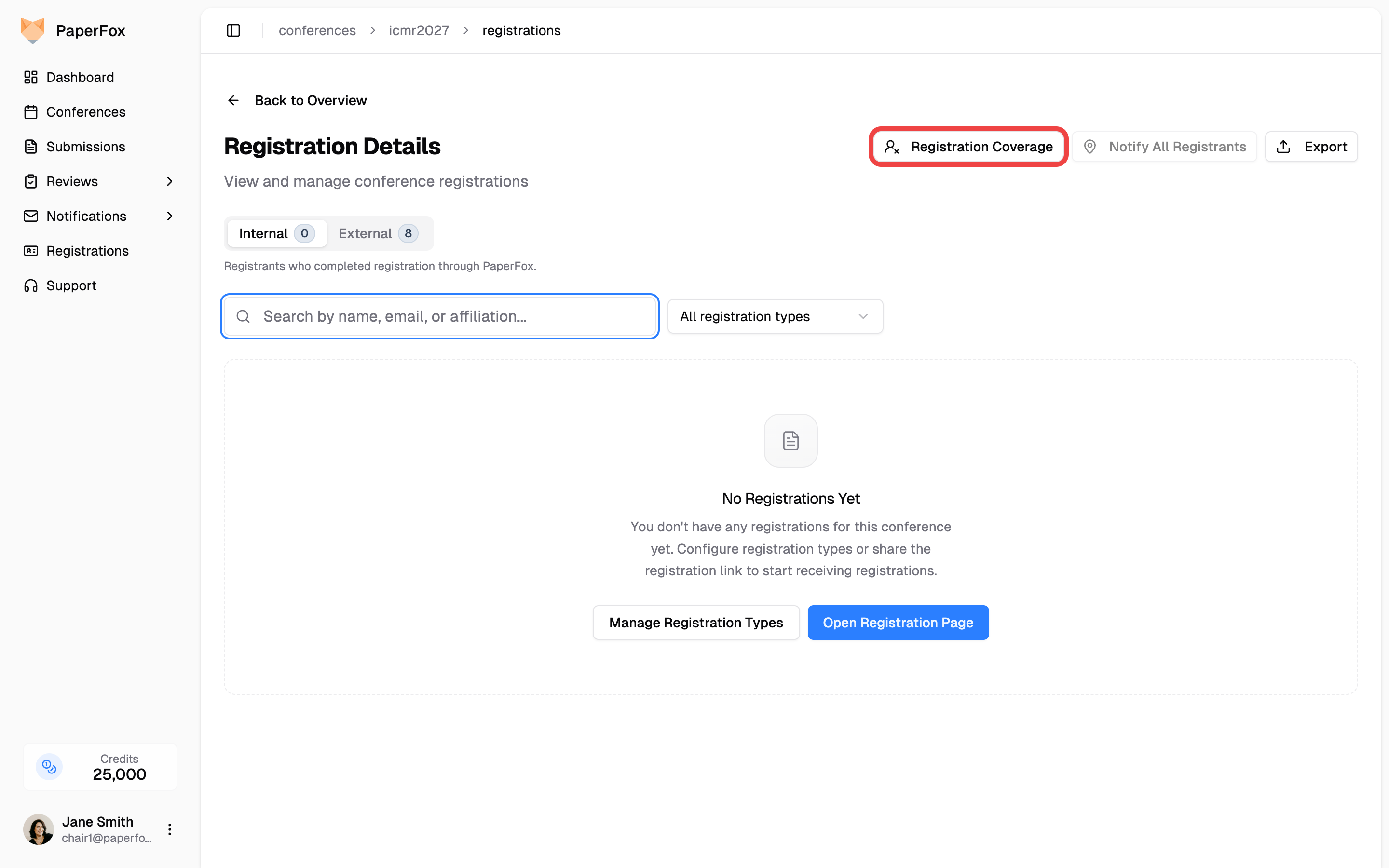
The button is always visible. When every accepted submission already has a registered author, it's disabled with a tooltip explaining why — no surprise disappearance, predictable position in the toolbar.
What You See
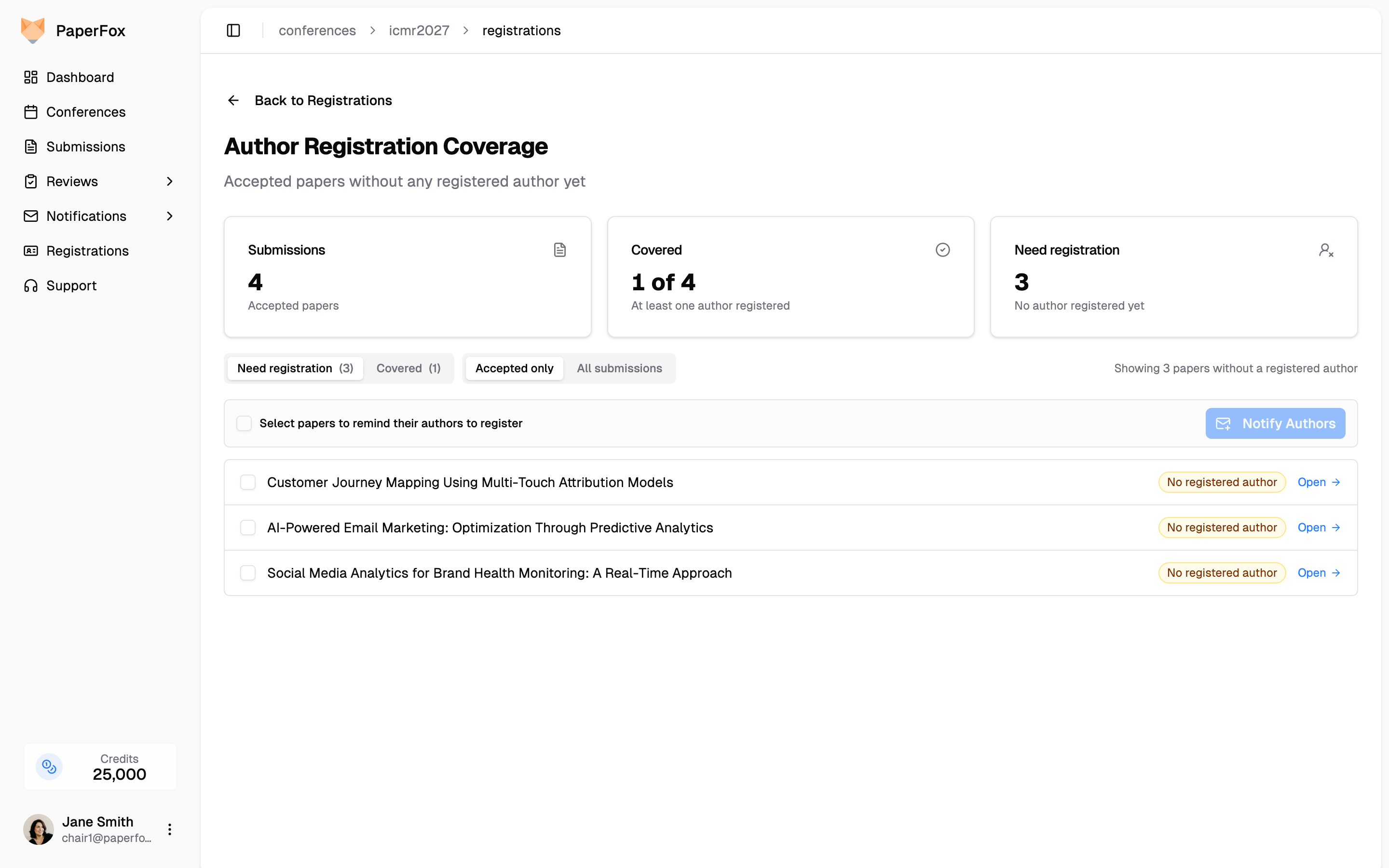
| Stat | Meaning |
|---|---|
| Submissions | Accepted submissions in scope (filter pill above the list controls this). |
| Covered | Submissions that already have at least one registered author — nothing to do. |
| Need registration | Submissions with zero registered authors. These need a reminder. |
Two pill rows sit above the list:
- View —
Need registration(default, shown above) lists submissions without a registered author so you can chase them.Coveredlists submissions that already have at least one author registered, so you can verify who's in. - Filter —
Accepted only(default) restricts to accepted submissions. Switch toAll submissionsto also include submissions still under review.
The two axes are independent. Switching the filter preserves your view, and vice versa.
A search box above the list filters by submission id, submission title, or author name/email — handy on conferences with hundreds of submissions. Each row also shows the submission id (e.g. icmr2027-12) as a small monospace prefix so you can quote it in chair-to-chair messages.
Each row in the Need registration view carries a badge so you can triage at a glance without expanding:
| Badge | Meaning |
|---|---|
| Amber "No registered author" | None of the unmatched authors have a likely registrant in the system. Reminder is the next step. |
| Indigo "N potential matches" | One or more unmatched authors look like a registrant already in the system. Expand the row to confirm — most of these don't need a reminder. |
Sort or scan by badge color: indigo rows are usually faster to clear than amber ones.
Run Matching
The Find Potential Matches card at the top of the page is how you generate suggestions. Pick a method, click "Run Matching", and PaperFox scans every unmatched author against the conference's registrants and refreshes the suggestions in the list below.
| Method | Engine | Best For |
|---|---|---|
| Algorithm Match (default) | Name similarity + email-domain + affiliation tokens — runs entirely inside PaperFox. | Routine sweeps. Catches the bulk of "different email, same person" cases instantly. |
| AI Match | OpenAI reviewing a shortlist of candidates. | Hard cases — nicknames, transliterated names, ambiguous affiliations the algorithm couldn't decide on. Adds a short written explanation under each suggestion. |
Each run replaces the suggestions on the page. Decisions you've already made stick: Confirm match keeps the submission Covered, and Not a match stops that specific candidate from resurfacing for that author on later runs.
AI Match privacy
Choosing AI Match opens a confirmation dialog before any data leaves your conference:
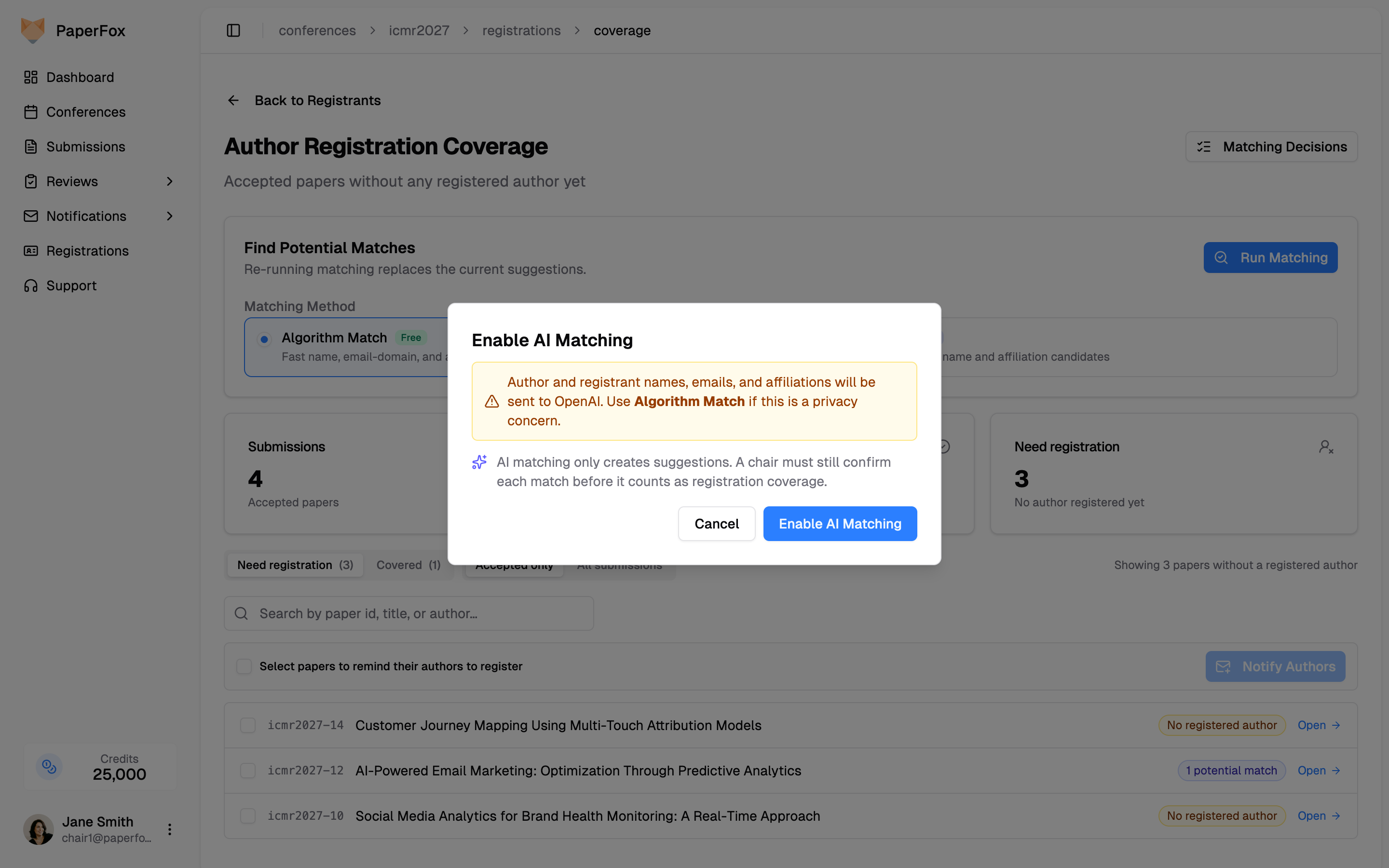
Author and registrant names, emails, and affiliations are sent to OpenAI when AI Match runs. If that's a privacy concern for your conference, stay on Algorithm Match — it never leaves PaperFox. AI matching only produces suggestions; a chair must still Confirm match before any submission flips to Covered.
Confirm a Likely Match
Authors often register under a different email than the one on their submission (a personal email vs. their institutional address, an old account, a co-author submitting on their behalf). PaperFox flags these as Potential matches under the unmatched author so you don't have to chase them with a reminder when they're already in.
Rows with potential matches show an indigo "N potential matches" badge in the collapsed view. Expand any such row to see the suggestion.
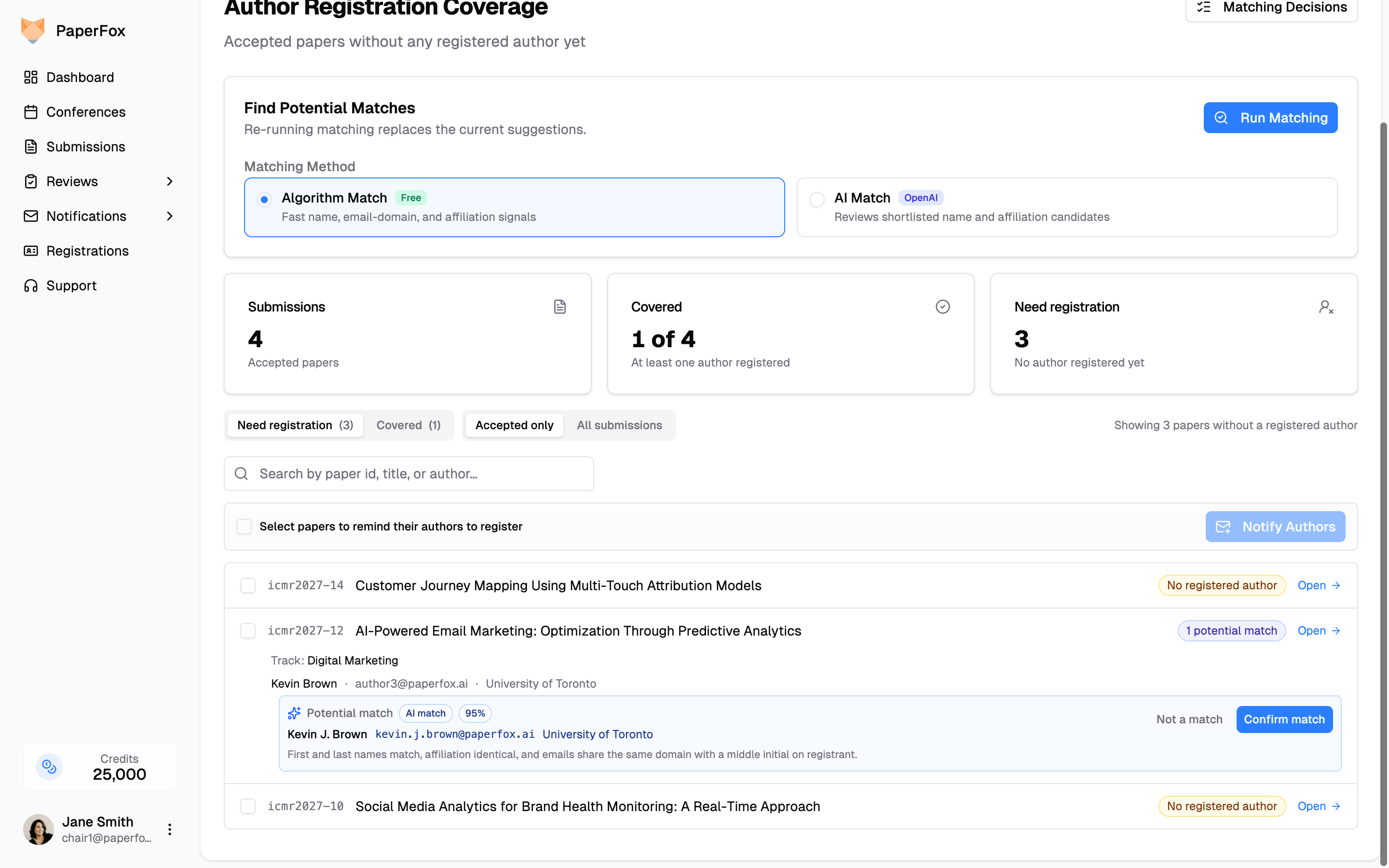
Each suggestion carries two badges so you know how it was generated and how confident the system is:
- A method badge —
Algorithm matchorAI match— telling you which engine produced this candidate. - A confidence percentage — strong overlap on the matching signals shows in the high 90s; below ~65% no candidate is shown so you don't see noisy near-misses.
Algorithm Match needs both a shared identity signal (an institutional email domain — exact or shared base like nyu.edu ⊂ stern.nyu.edu; a ROR id; or at least one distinctive affiliation token like Purdue or NYU) and a high name similarity. Consumer email domains like gmail.com, yahoo.com, or outlook.com are intentionally not counted as a signal — sharing those domains says nothing about being the same person.
AI Match evaluates a shortlist of candidates and adds a short written explanation under the row (e.g. "First and last names match, affiliation identical, and emails share the same domain with a middle initial on registrant") so you can see why it thinks they're the same person before confirming.
You have two actions on each suggestion:
- Confirm match records the link. The submission flips to Covered immediately. If the linked registrant is later refunded (internal) or deleted (external), the link is automatically reverted so the submission goes back on the chase list.
- Not a match dismisses the suggestion. The same candidate will never resurface for that author again — useful when names happen to overlap but the affiliations or context tell you it's a different person.
Only suggested for unmatched authors
Suggestions only appear when the email check failed — PaperFox never second-guesses a real email match.
Review and Reverse Decisions
Every Confirm match and Not a match click is recorded and reversible. To audit or undo your decisions, click "Matching Decisions" in the top right of the coverage page.
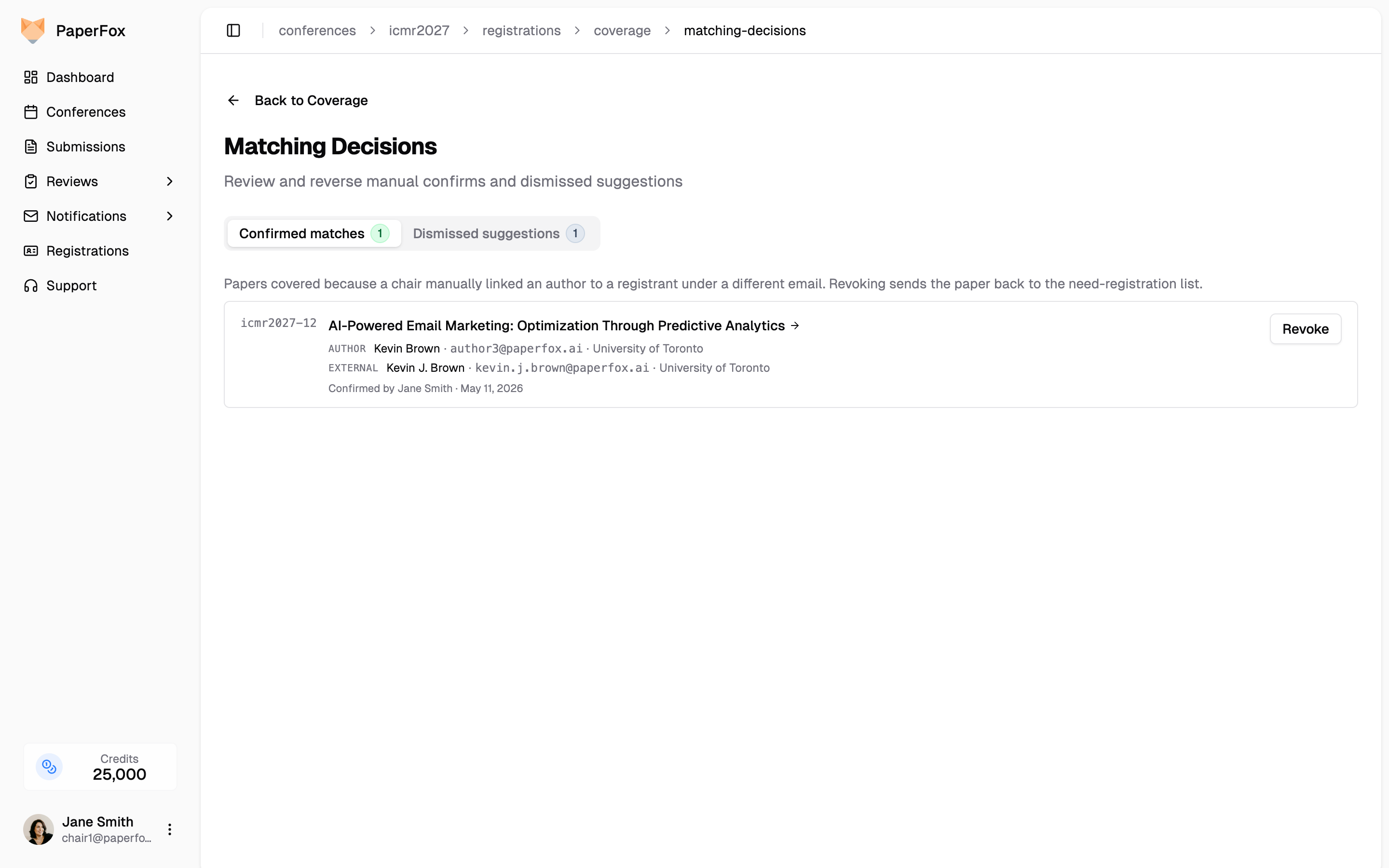
Two tabs:
- Confirmed matches — every submission covered because a chair manually linked an author to a registrant under a different email. Revoke sends the submission back to the need-registration list and the candidate suggestion resurfaces on the coverage page.
- Dismissed suggestions — every fuzzy candidate a chair has marked “Not a match.” Restore clears the dismissal and lets the suggestion appear again on the coverage page next time you visit.
Each row shows the author on the submission, the registrant they were linked to or dismissed against, and who made the decision when. Both actions are idempotent — revoking an already-revoked match or restoring an already-restored suggestion is a no-op, so you can't accidentally double-action.
Send Reminders
From the Need registration view:
- Tick the checkboxes next to each submission whose authors you want to email. Use the top-row checkbox to select all.
- Click "Notify Authors".
PaperFox routes you to the Notification Composer with the Registration Reminder template pre-loaded and recipients restricted to the authors of the submissions you selected. You can:
- Edit the subject and body (Mustache placeholders like
{{authorName}}and{{paperTitle}}are filled in per-recipient). - Preview before sending.
- Send when ready.
After the email goes out, refresh the report. As authors register, submissions move from Need registration to Covered automatically — both sources count: paid PaperFox registrations and your external imports, plus any Confirm match links you've added manually.
Verify Coverage
Switch to the Covered view to audit who's actually in. Each row shows the submission, a green badge of how many authors have registered (1 of 2 registered), and the names and emails of the registered authors when you expand the row.
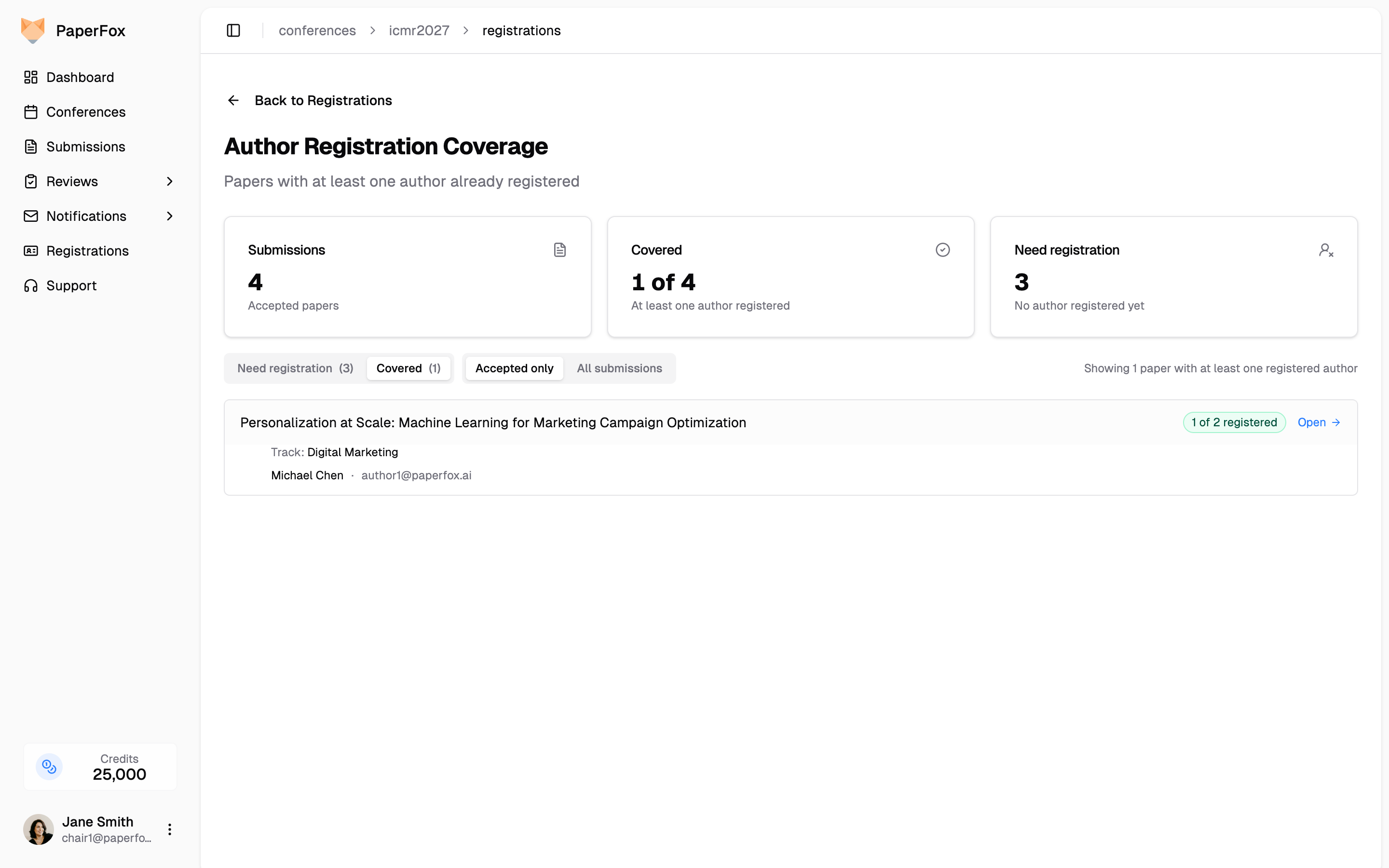
This view is read-only — no checkboxes, no Notify button — because there's nothing to chase. It's there so you can spot edge cases (e.g., a student registered while the senior author hasn't) before locking the program.
Discoverable from the Notifications hub
The reminder flow is also reachable from Notifications → Context-Aware → Remind Authors to Register. That card links directly to this report when there's anything to chase.