
Run AI Review
Generate reviewer-style technical reports on a track's submissions, paid in credits
AI Review reads each submission the way a careful reviewer would — passage by passage, keeping a running summary of definitions, equations, and claims — and produces a technical report: an overall assessment plus a list of concrete issues (flawed logic, equation inconsistencies, undefined notation, unsupported claims), each anchored to a verbatim quote from the submission.
Submissions are sent to an external provider
PaperFox Reviewer2 sends each submission's extracted text to OpenAI — no author information, text only. Refine.ink receives the submission's PDF file. The confirmation dialog states exactly what leaves PaperFox before every run.
Choose a Provider and Model
Two providers are available. PaperFox Reviewer2 runs the same review process on your choice of three OpenAI models — pick per run based on how deep you need the review to be. Refine.ink is a specialist vendor with a single flat-rate review:
| Provider | Model | Cost | Typical 9,000-word submission |
|---|---|---|---|
| PaperFox Reviewer2 | GPT-6 Luna (budget-friendly) | 15 credits per 1,000 words | ~135 credits |
| PaperFox Reviewer2 | GPT-6 Sol (balanced) | 45 credits per 1,000 words | ~405 credits |
| PaperFox Reviewer2 | GPT-6 Astra (deepest reasoning) | 225 credits per 1,000 words | ~2,025 credits |
| Refine.ink | — | 16,500 credits per submission (flat) | 16,500 credits |
Refine.ink is a separate specialist vendor at a premium price point — a proofreading-grade review service. Unlike Reviewer2 (which sends extracted text to OpenAI), it uploads the submission's PDF file to refine.ink for analysis. Its reports appear, share, and bill exactly like the other review services.
Every option is pay-as-you-go: submissions are charged one at a time, failed submissions are refunded automatically, and a run stops safely if your balance runs out. Enabling Reference Check adds a small per-submission surcharge based on the length of the submission's references section.
Unlike detection, every run produces — and is charged for — a fresh review, even on unchanged submissions. Reviews aren't deterministic: running the same model twice gives you two different reports, and both are kept. Use this deliberately — a second opinion from the same model, or a Premium pass over submissions Fast flagged.
Reviews take a few minutes per submission
Unlike detection (seconds per submission), a review makes many AI passes over each submission — expect several minutes per submission. The run continues in the background; you'll get an email when it finishes.
Running a Review
- Go to Conferences in the sidebar, then click on your conference
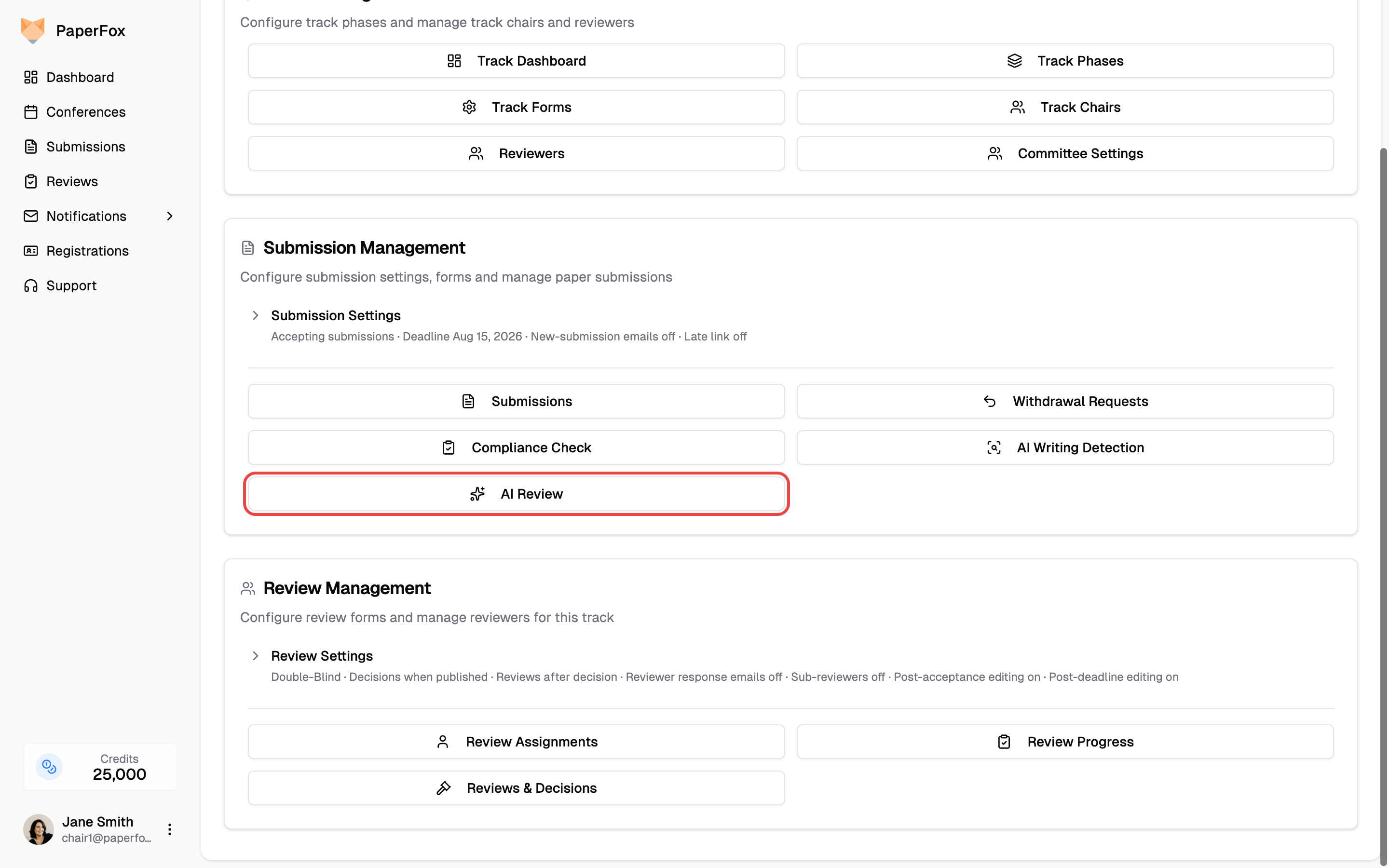
- Navigate to your track and under Submission Management, click "AI Review"
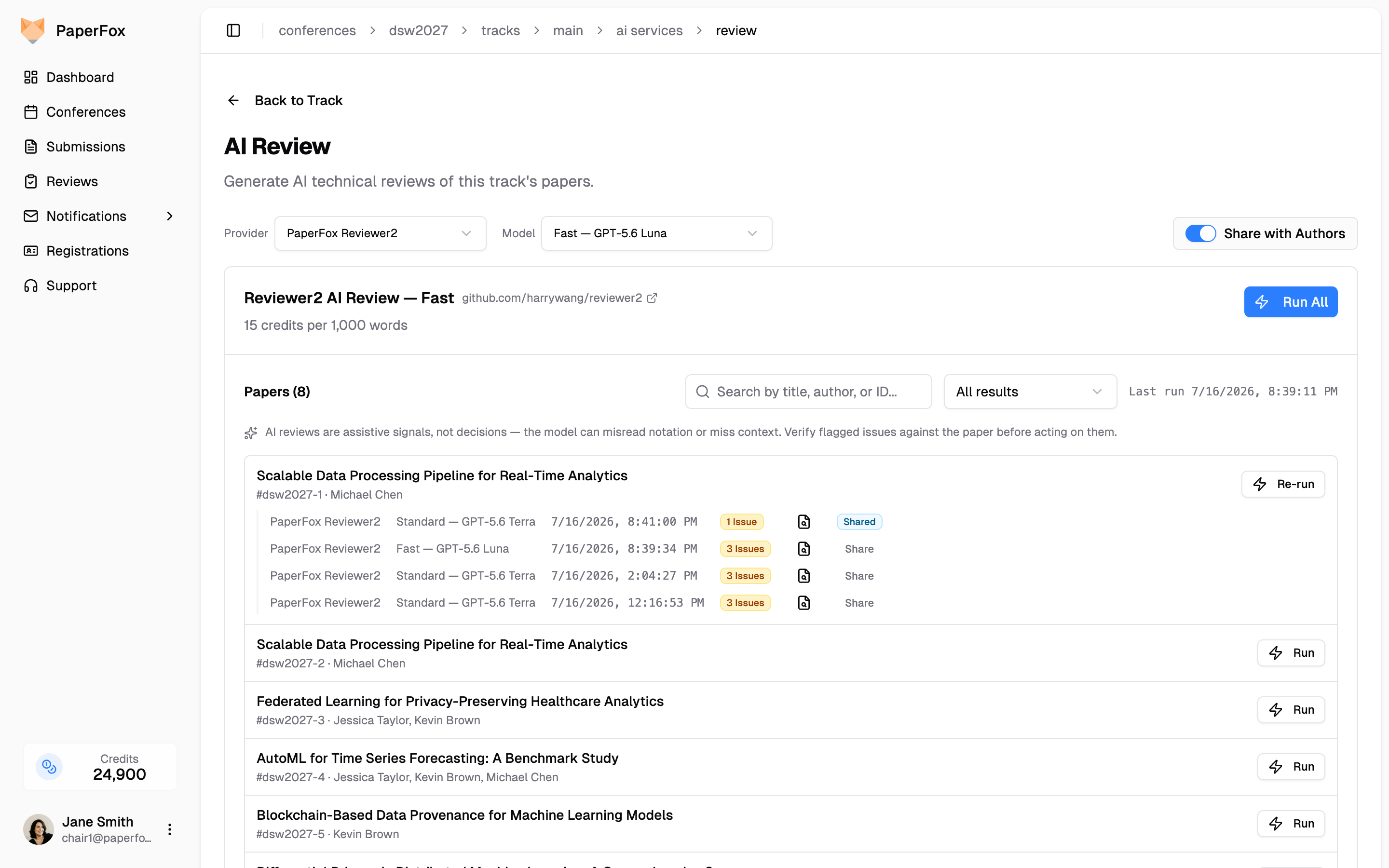
- Pick a Provider from the dropdown — Reviewer2 AI Review or Refine AI Review. With Reviewer2 selected, a Model dropdown picks the OpenAI model (GPT-6 Luna, Sol, or Astra). The card below shows the selection's rate and submission list — click "Run All", or "Run" on an individual submission's row to review just that submission
- The confirmation dialog shows the estimated cost and the external-data disclosure. Confirm to start
A run always analyzes each submission's latest uploaded version. Forms with several file fields get the same Submission field selector as detection — see AI Content Detection.
Reading the Report
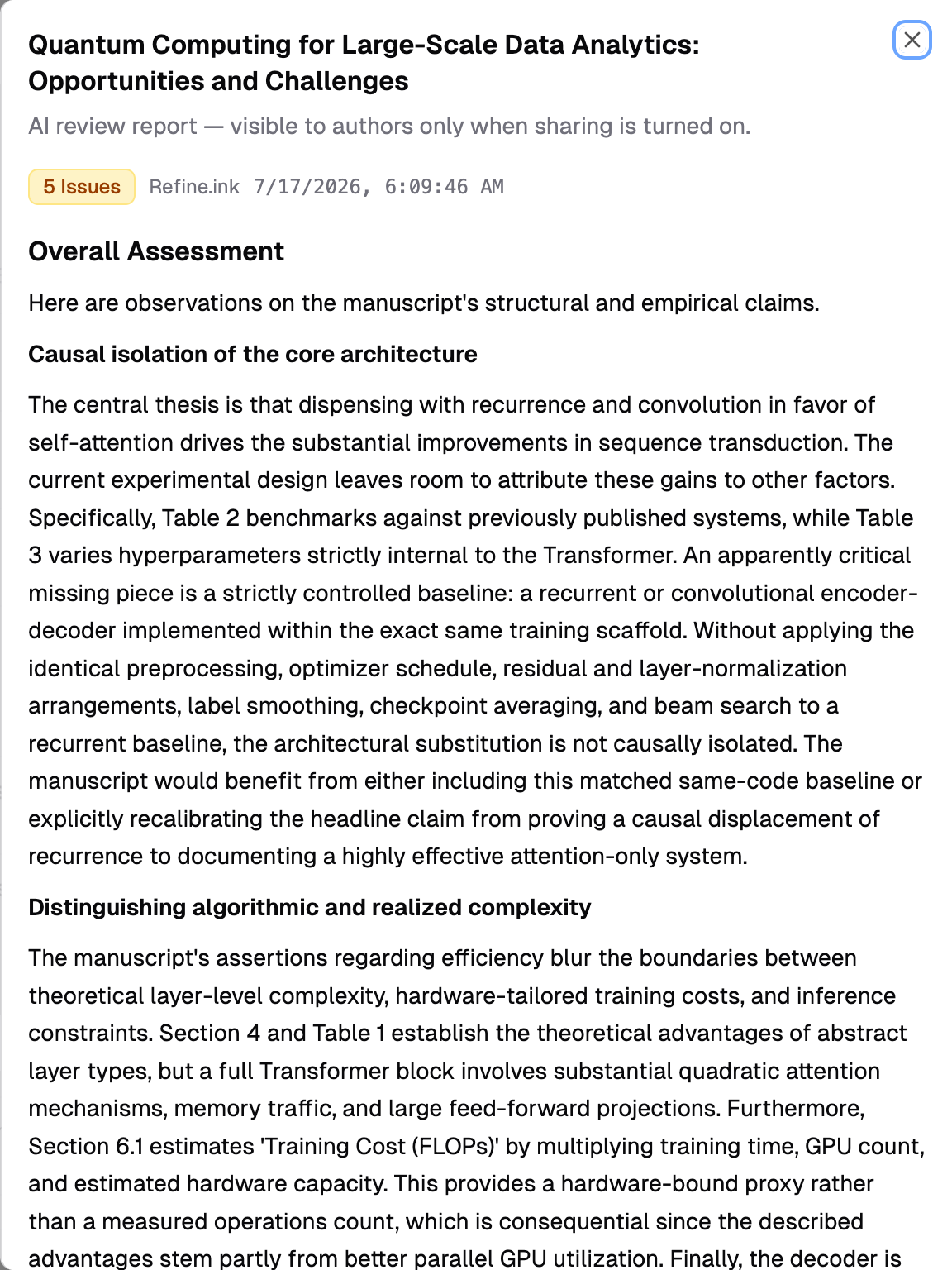
Every run of a submission is listed under its row with the provider, model, date, and a verdict badge — No Issues (green), or the issue count (amber, red at 10+). The Used for sharing marker shows which run sharing would hand out (the latest, by default — nothing is disclosed until you share the submission); click Use for Sharing on another run to hand out that version instead — see Sharing below for who sees it. Click a run's magnifier icon to open its full report:
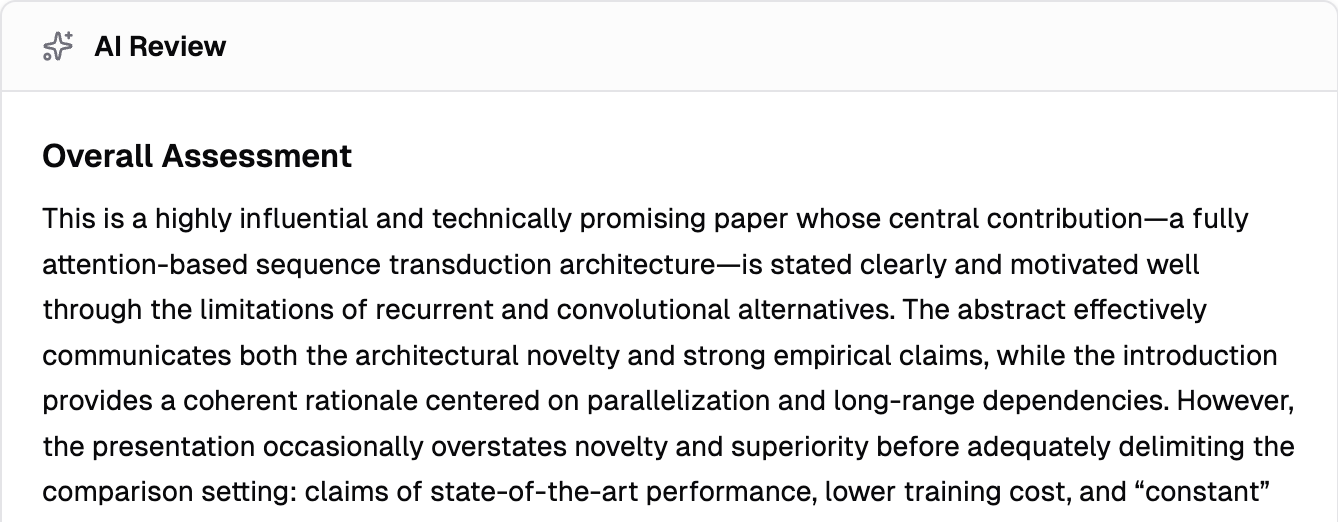
- Overall Assessment — a reviewer-style summary of the submission's strengths and weaknesses
- Issues — each with a title, a tag (technical, logical, suggestion, or reference when Reference Check is on), the verbatim quote from the submission it refers to, and an explanation of what's wrong
Reports render the vendor's formatting — LaTeX math, tables, and emphasis all display properly, including inside quoted passages. The copy and download icons next to the verdict export the report as Markdown or plain text.
Use the result filter above the submission list to focus on submissions with Issues Found, confirm the No Issues ones, or find submissions that were Skipped / Failed.
Reports stay inside PaperFox
Reports are visible to chairs only — unless you share one with the submission's authors (below). The report itself never leaves PaperFox, and no author information is ever sent to a provider.
An AI review is a signal, not a decision
The model can misread notation, miss context, or flag something an expert would accept. Treat the report as a screening aid that tells you where to look — verify every flagged issue against the submission, and never make an accept/reject decision on the report alone.
Every review is kept — a submission's run list spans all providers and models, so you can run GPT-6 Luna across the whole track and GPT-6 Astra on just the borderline submissions, then compare all the reports side by side under each submission. The result filter above the list buckets submissions by the most recent run of the selected provider, whichever model produced it.
Reference Check
Reference Check verifies every entry in a submission's bibliography against the Crossref, OpenAlex, and arXiv databases to catch hallucinated or inaccurate citations — an increasingly common problem in AI-assisted writing. It's off by default; turning it on is a per-track setting that applies to all Reviewer2 models.
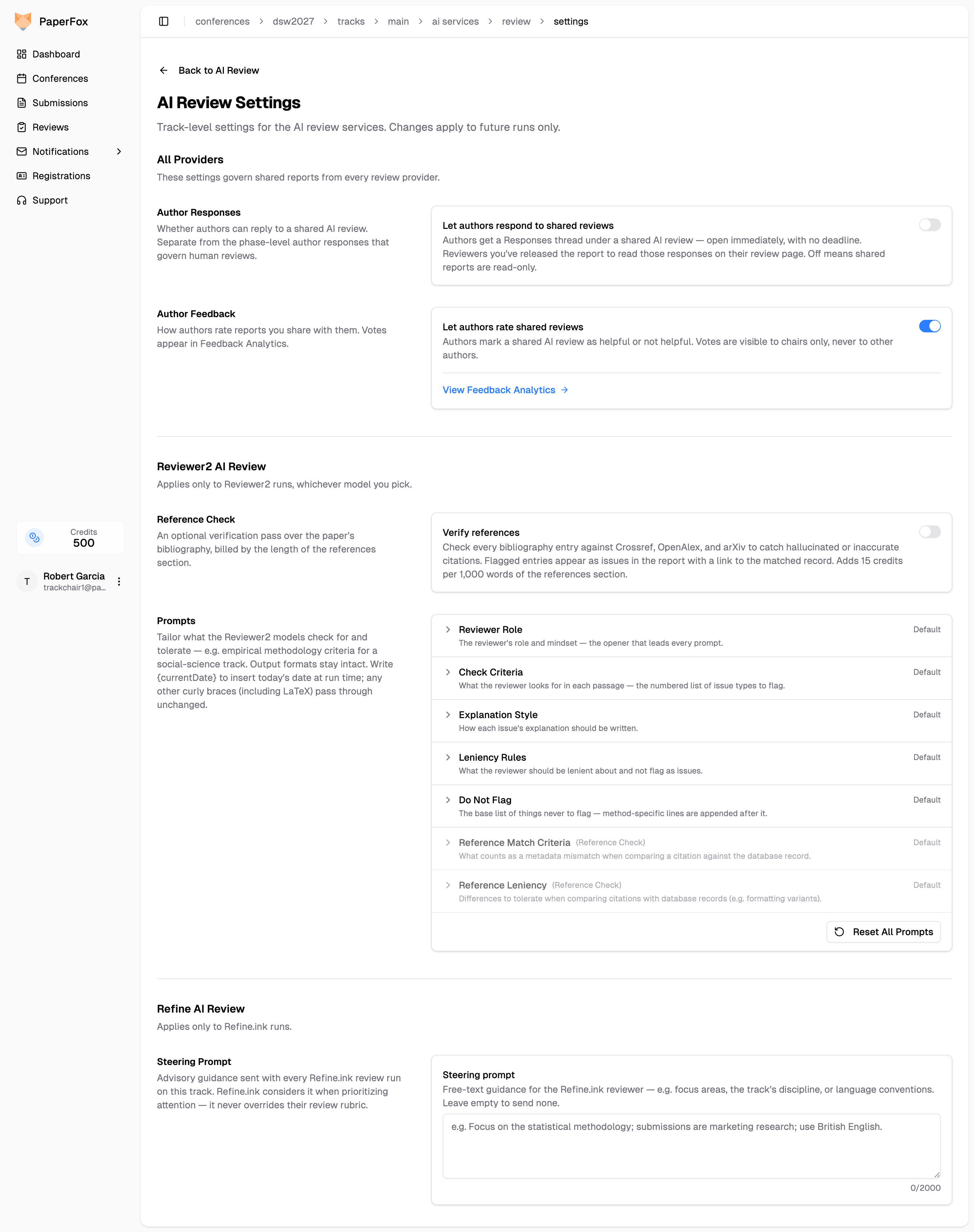
- On the AI Review page, click "Configure" at the top right — this opens the AI Review Settings page
- Turn on the "Verify references" switch — it saves as soon as you flip it
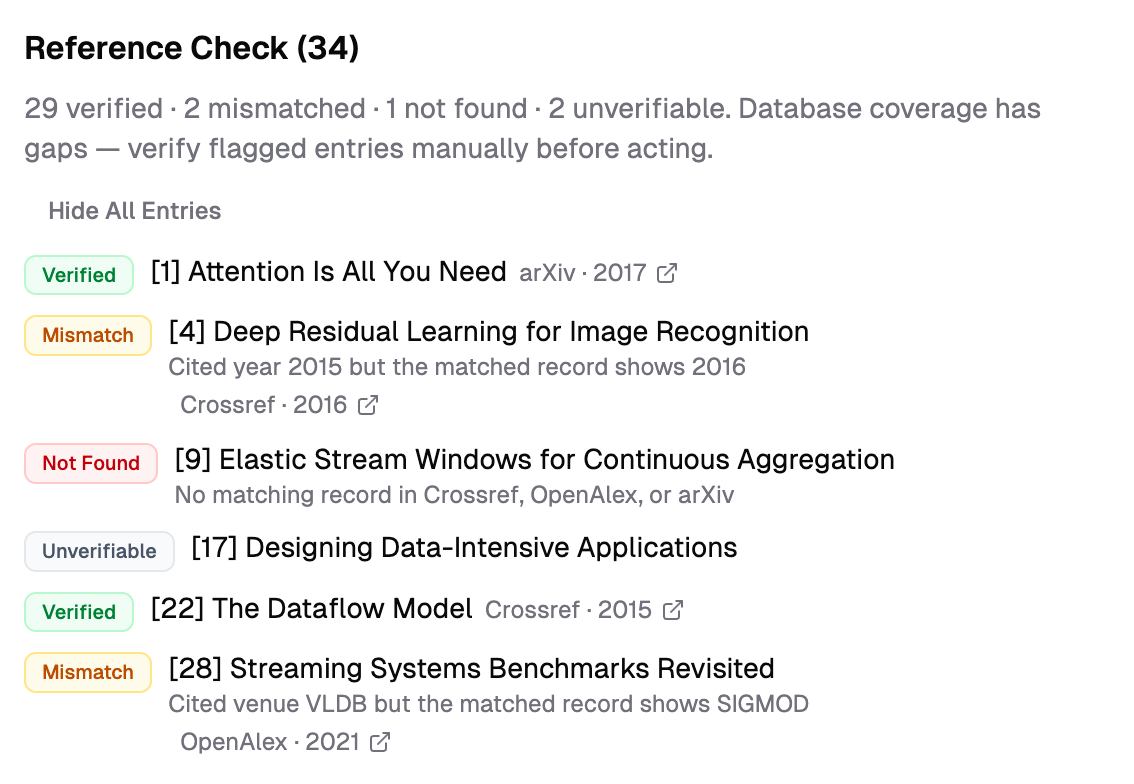
When enabled, every review additionally extracts the submission's reference list and looks each entry up by DOI, arXiv ID, or title search. The lookups are plain database queries — no AI involved — so a citation can never be "hallucinated as verified". Each entry gets a status:
| Status | Meaning |
|---|---|
| Verified | Matched a database record — the link jumps straight to it |
| Mismatch | A record was found, but the cited metadata disagrees (wrong year, venue, or authors) |
| Not Found | No matching record in any database — a possible hallucinated citation |
| Unverifiable | Books, websites, and theses the databases don't cover — never flagged |
| Ambiguous | Close candidates but no confident match — never flagged |
The report gains a Reference Check section with the verdict counts and the full per-entry breakdown, each verified or mismatched entry linking its matched record so confirming a citation is one click. Mismatch and Not Found entries also appear as issues with a reference tag, and a free extra check flags in-text citations like [41] that point past the end of the bibliography:
Reference Check adds 15 credits per 1,000 words of the references section (a typical bibliography is 1–2 units, so ~15–30 credits per submission) — the exact amount is shown in the run confirmation dialog. With it enabled, bibliography metadata (titles, authors, DOIs) is queried against the public Crossref, OpenAlex, and arXiv databases in addition to the submission text going to OpenAI.
Not Found is a flag, not a verdict
Database coverage has gaps — a very recent submission, a renamed venue, or an unusual citation format can show as Not Found without being fabricated. Verify flagged entries manually before raising them with authors.
Customize Review Prompts
The Prompts section under Reviewer2 AI Review on the same AI Review Settings page lets you tailor what the reviewer looks for — for example, empirical-methodology criteria for a social-science track instead of the default math-and-logic focus. Seven building blocks are editable:
- Reviewer Role — the reviewer's role and mindset, the opener that leads every prompt
- Check Criteria — the list of issue types the reviewer flags in each passage
- Explanation Style — how each issue's explanation is written
- Leniency Rules — what the reviewer should tolerate and not flag
- Do Not Flag — the base list of things never to flag
- Reference Match Criteria / Reference Leniency — what counts as a citation mismatch, and which differences to forgive (used by Reference Check)
Each block starts collapsed with a Default or amber Customized pill — expand one to see the effective text prefilled and edit it. Customized blocks get a per-field "Reset", and "Reset All Prompts" restores every block (the Reference Check and Author Feedback switches keep their state). Write {currentDate} anywhere to insert today's date at run time; any other curly braces — including LaTeX — pass through unchanged.
Settings are per-track, apply to future runs only, and affect the Reviewer2 models — Refine.ink has its own steering prompt (below). Output formats can't be broken — only the review's criteria and tone change.
Steer Refine.ink Reviews
Refine.ink's review rubric is fixed, but you can attach a steering prompt — free-text guidance sent with every Refine.ink run on the track, such as the track's discipline, areas to focus on, or language conventions. Refine.ink considers it when prioritizing attention; it never overrides their rubric or changes the report format.
- On the AI Review page, click "Configure" — the Steering Prompt section sits under Refine AI Review at the bottom of the settings page
- Write your guidance (up to 2,000 characters) — it saves when you click away from the field
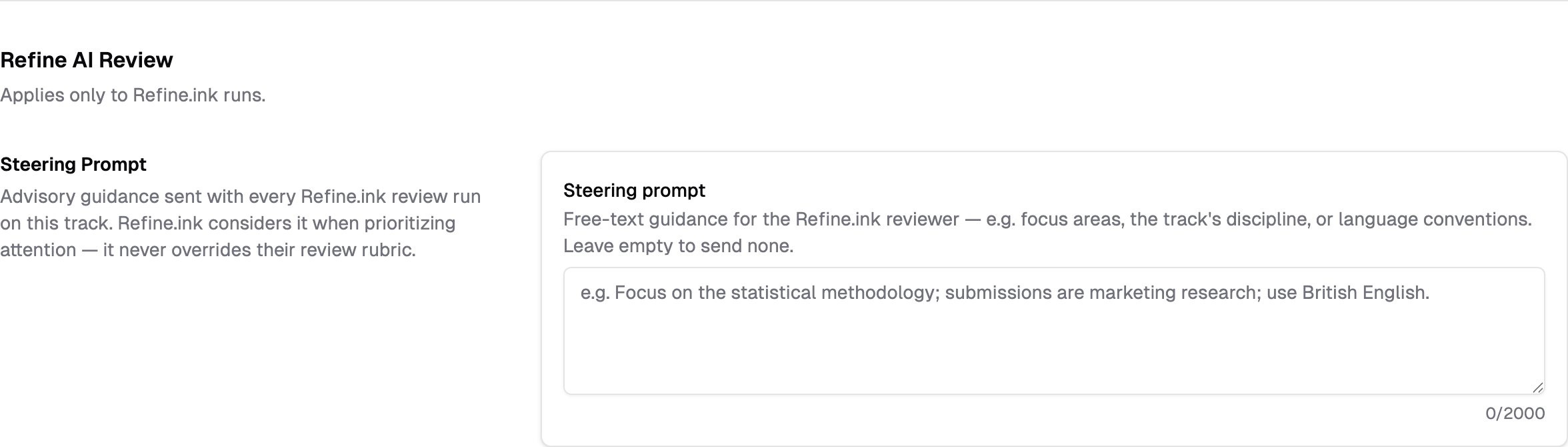
Like the Reviewer2 prompts, the steering prompt is per-track and applies to future runs only. Leave it empty to send nothing.
The Share AI Reviews Page
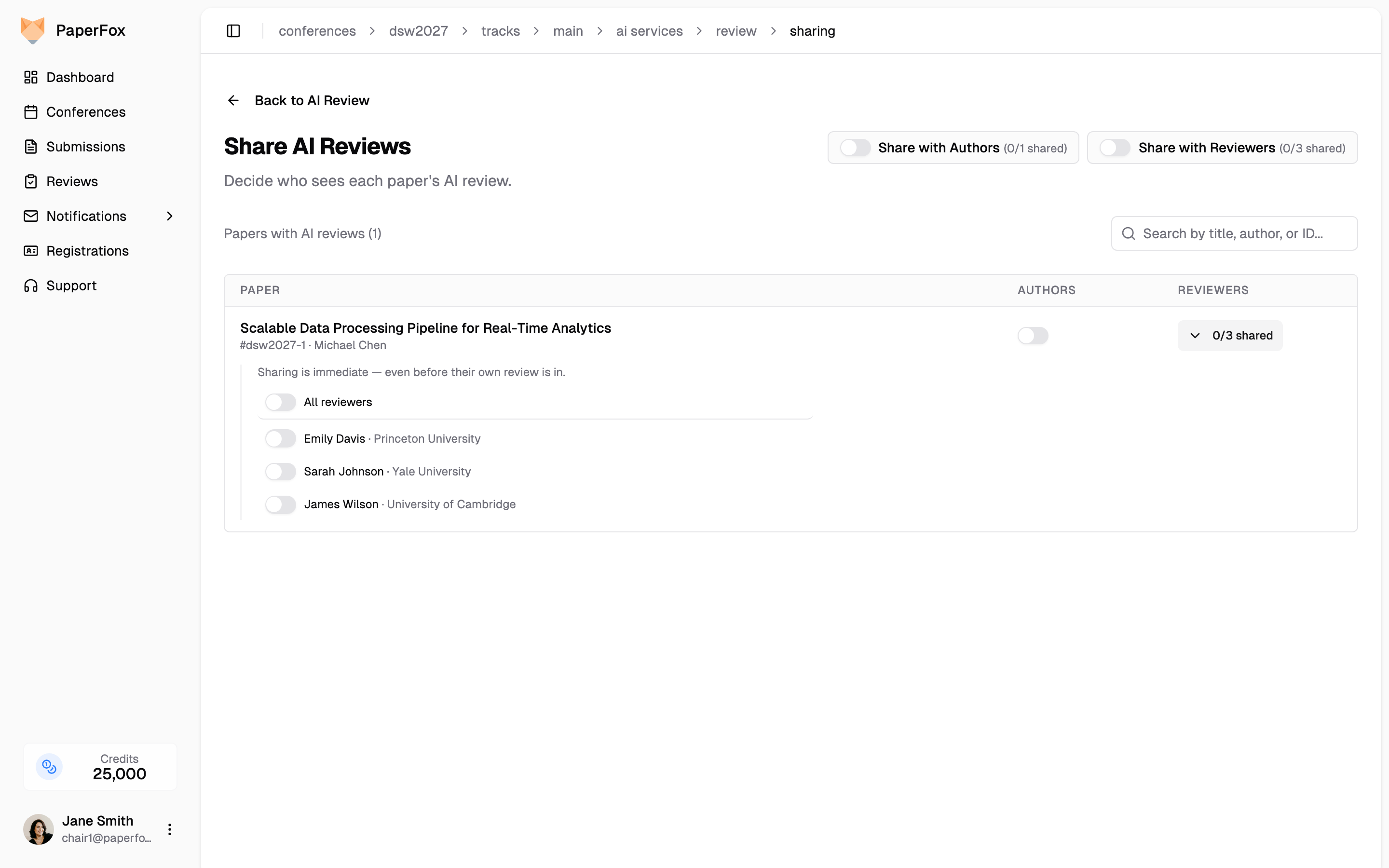
Generating AI reviews and deciding who sees them are separate jobs, so they live on separate pages. The AI Review page only runs and reads them; all sharing happens on the Share AI Reviews page — click "Share AI Reviews" in the AI Review page's header.
The page lists every submission with an AI review — one row per submission, one column per audience:
- Authors — a switch per submission, plus a track-wide "Share with Authors" switch in the header
- Reviewers — a per-reviewer switch list (below), plus the paired track-wide "Share with Reviewers" switch
Which run a submission shares is decided on the AI Review page's run history — latest by default (a re-run automatically becomes the shared one), or the run you marked Use for Sharing. One choice per submission; it drives what authors and released reviewers see.
Sharing with Authors
Sharing takes effect immediately. Authors see the report on their submission's reviews page as soon as you share it — an AI review is a supplement you grant per submission, not a human review, so it does not wait on releasing the phase's decisions and reviews. Your track's release settings still govern human reviews exactly as before; the two are independent.
- "Share with Authors" shares every submission that has an AI review — the count beside it is out of the submissions with AI reviews, not the whole track: a track of 8 submissions where only 5 have been reviewed reads 3/5 shared, never 3/8. Submissions reviewed later are not shared automatically; share them individually or flip the switch again
- Turning the switch off unshares everything; the switch is on whenever at least one submission is shared
- Each submission's own Authors switch shares or unshares just that submission
Authors see the report on their submission's reviews page, opening with the AI-generated disclaimer and presented like a human review — the same overall assessment and issue list you see, but without the verdict badge, provider, model, or run date, which stay chair-only. From that page's Reviews header, authors can copy or download all of their reviews — the shared AI review included — as one document. Reviewers don't see AI reviews unless you share one with them (below).
If you turn on "Let authors respond to shared reviews" on the AI Review Settings page (off by default), the shared AI review card carries its own Responses thread — open the moment the review is shared, with no deadline. Authors can react to the AI-raised points there, and reviewers you've released the report to read those responses in the same thread on their review page. This switch is separate from the phase-level author responses that govern human reviews. You monitor every AI-review thread from the submission's management reviews page.
On your side, the report sits with the submission's human reviews. A submission's management reviews page shows its current AI review as an AI Review card — with the verdict, provider, model and run date — whether or not you've shared it, tagged Shared with authors or Visible to chairs only so the disclosure state is never in doubt. Sharing decides who else sees the report, never whether you can. Its Responses thread is attached to the same card, once the report is shared with authors.
Sharing with Reviewers
You can also share a submission's AI review with its reviewers — all of them, or a specific one — for example as a supplementary opinion during discussion. The Reviewers column shows how many of each submission's reviewers the AI review is shared with:
- Click the "n/m shared" count on the submission's row to expand its reviewer list
- Toggle a reviewer on to share the AI review with just them, or All reviewers to cover the submission's whole panel; toggle off to take it back
- "Share with Reviewers" in the header shares with every reviewer of every submission with an AI review at once; turning it off unshares everything
Two things to know before sharing with reviewers:
- It's immediate, like sharing with authors — a reviewer sees the AI review the moment you toggle them on, even if they haven't submitted their own review yet. If you're worried about anchoring, share only with reviewers whose reviews are already in.
- Reviewers see the same AI review authors would — the AI disclaimer and the issue list, without the chair-only verdict badge, provider, or model — as an AI Review card on their review page. It never counts toward the submission's reviews.
The shared AI review is the submission's current one: the run marked Use for Sharing if you chose one, otherwise the latest. Re-running the submission updates what reviewers see, exactly as it does for authors.
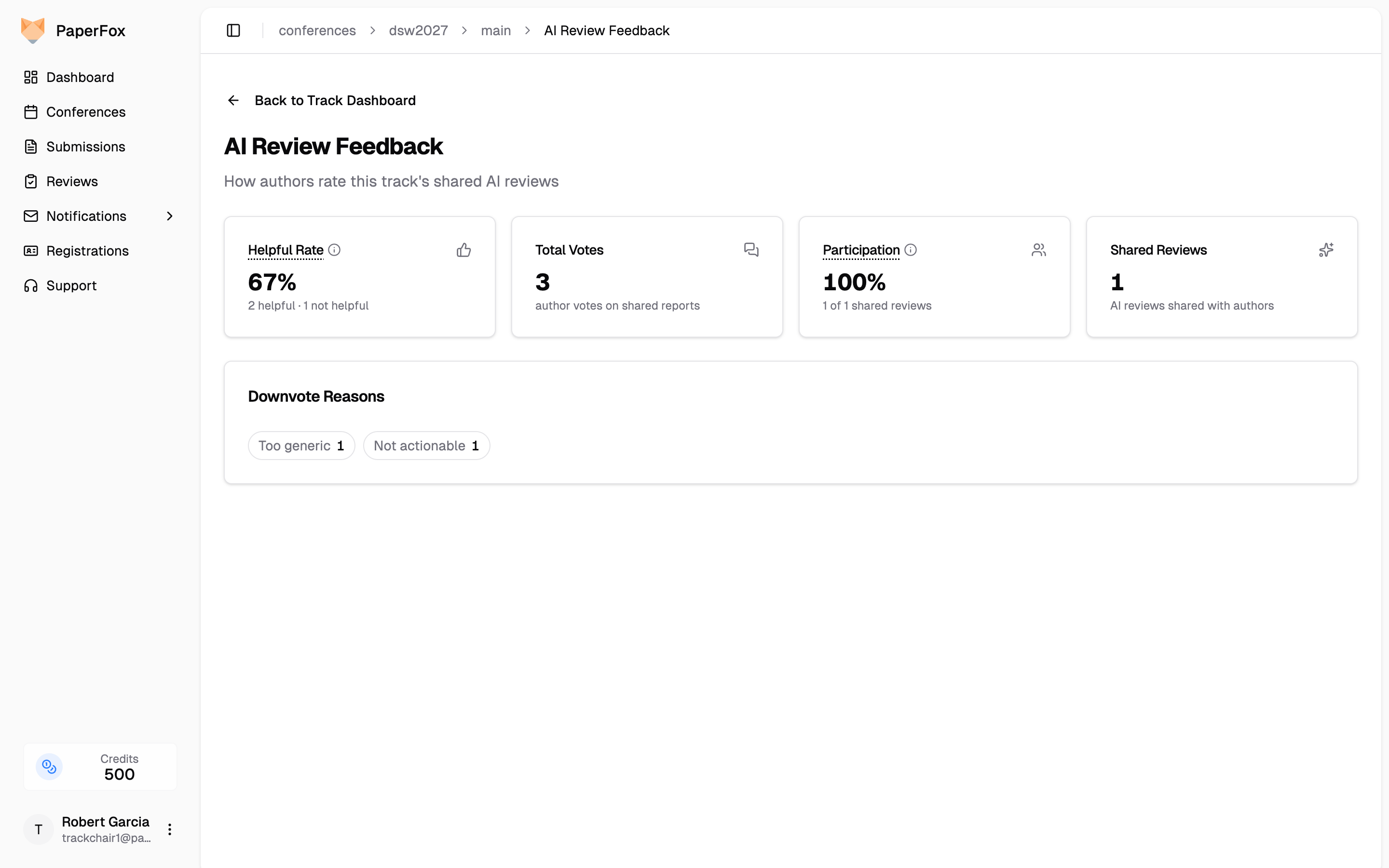
When a review is shared, authors can rate the whole report as helpful or not helpful, with optional reason tags on a downvote (Inaccurate, Too generic, Not actionable, Other). Ratings are visible to chairs only, never to other authors, so authors can be candid.
The "Let authors rate shared reviews" switch on the AI Review Settings page controls this per track (on by default) — one helpful/not-helpful rating per shared report.
Click "View Feedback Analytics" next to that switch (or open Analytics → AI Review Feedback from the track dashboard) to see how the reviews land:
- Helpful rate and total votes — every percentage shows its raw counts; treat rates from only a few votes as anecdotes, not scores
- Participation — how many shared reviews received at least one vote; a low rate means the helpful rate reflects a small, self-selected sample
- Downvote reasons — the "why" behind negative votes, and the signal for what to change in the prompts
The conference-level view at Analytics → AI Review Feedback adds a per-track comparison, so multi-track conferences can see where AI reviews land well.