
Enable Author Responses
Let authors respond to reviews (rebuttal) and run a discussion between authors, reviewers, and chairs
Author responses add a rebuttal step to your review workflow: once you release results, authors can reply to each review in a response thread attached to that review's card, and reviewers, associate/senior editors, and chairs can respond in the thread. Reviewers can then update their reviews before you finalize decisions.
How the Response Window Works
The window is controlled by two things — there is no separate "open" switch:
| Control | Where | Effect |
|---|---|---|
| Author Responses toggle | Phase settings | Turns the feature on or off for that phase |
| Response Deadline (optional) | Phase settings | When authors' ability to post closes automatically |
| Response Word Limit | Phase settings | How long any one author response may be |
Authors can post from the moment the phase's reviews are visible to them (see Release Results) until the deadline passes. If you don't set a deadline, the discussion stays open until you turn the toggle off. Reviewers and chairs are never bound by the window — they can comment anytime.
Extending or reopening
To extend the response period, just move the deadline later — this works even after it has passed. To close early, set the deadline to now or turn the toggle off. Nothing is deleted when the window closes; the thread becomes read-only for authors.
Enable It on a Phase
- Navigate to your track and click Settings → Phases
- Click "Phase Settings" on the phase card to expand it
- Turn on "Author Responses"
- Optionally set a Response Deadline and timezone (defaults to Anywhere on Earth)
- Adjust the Response Word Limit if 500 words isn't right for your round
Each field saves as soon as you change it — there is no Save button.
The word limit caps a single author response, not the whole thread — an author can post again if they have more to say. It accepts 1 to 5,000 words; reviewers, editors and chairs are never capped. Responses to a shared AI review have their own cap under AI Review settings.

The collapsed Phase Settings summary reports the setting at a glance once it is on: "Author responses until Mar 20, 2027" when a deadline is set, or "Author responses on" for an open-ended discussion. While responses are off — the default — the summary stays quiet about them and reports only the phase's deadlines.
Response Threads
Every review carries its own Responses thread, attached to the review's card wherever it renders — authors respond under each of their released reviews, the reviewer sees responses to their own review on their review page, and you see every thread on the management view with real names:
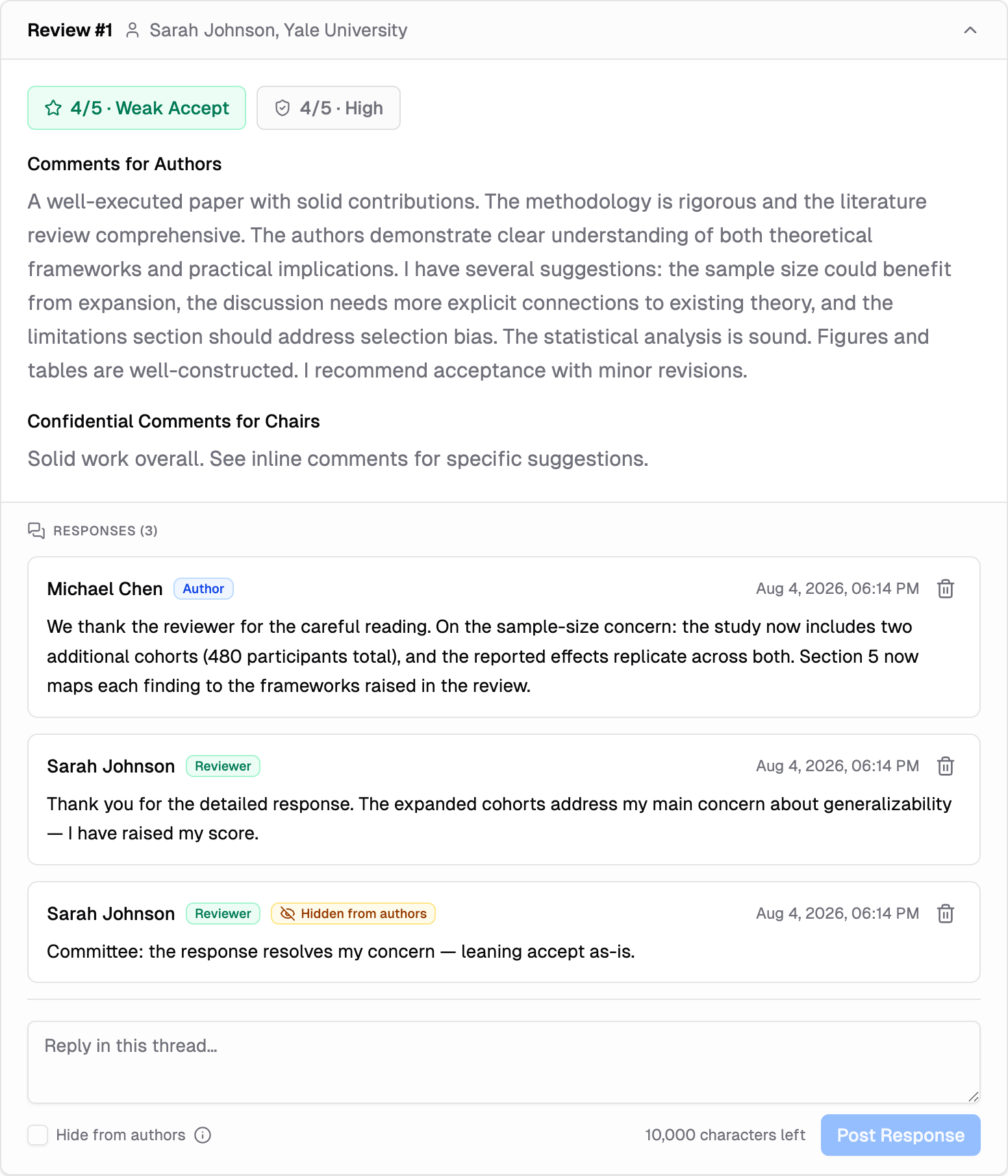
A response is visible to whoever can see the review it answers — so on tracks where reviewers can't see each other's reviews, they also don't see each other's response threads. A shared AI review can carry its own thread too, but it is governed by a separate track-level switch on the AI Review Settings page — not by this phase setting or its deadline. A general Discussion section remains on every page for conversation that isn't about one review.
Committee-only notes: reviewers, editors, and chairs can use "Hide from authors" when posting — the comment stays in the same thread but is hidden from authors, marked with an amber "Hidden from authors" badge. In the general Discussion section it is checked by default for committee members, so an internal note doesn't reach authors unless someone deliberately clears it; in a response thread under a review it starts unchecked, since that thread exists for talking to the authors. The ⓘ next to the checkbox spells out exactly who sees the note and how the poster's identity appears to authors under your track's blinding rules.
Exports include the threads: the copy/download buttons on the reviews pages append each review's responses to the exported document — the committee export marks hidden notes, the author-facing export never contains them.
Edits, Deletion, and the Audit Trail
The discussion can feed your decisions, so it keeps a full audit trail — nothing disappears silently:
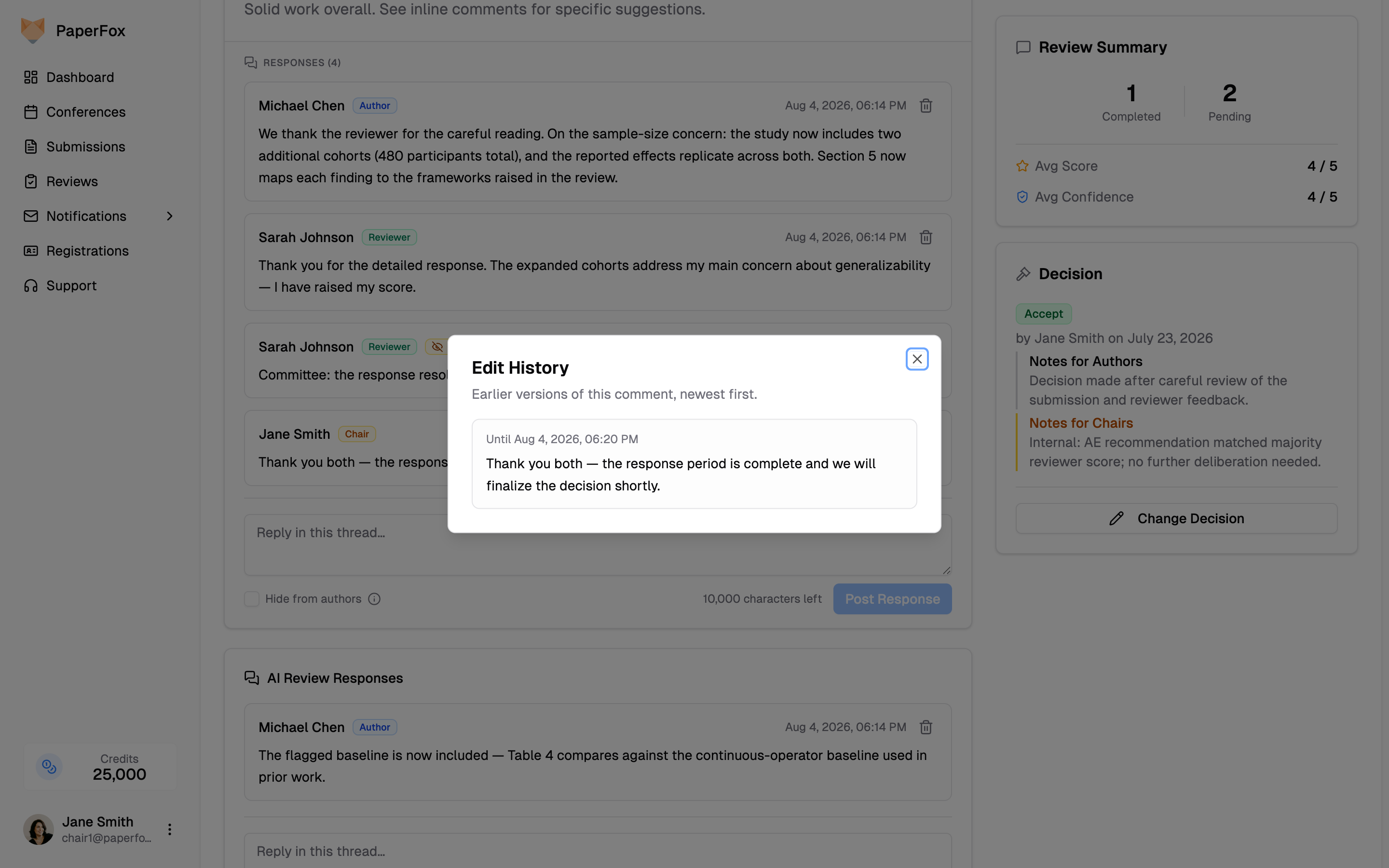
- Edits: everyone can edit their own comments (authors only while their response window is open — an edit after the deadline would be a backdoor revision). Edited comments show an "Edited" marker; click it to read the earlier versions. Edit history is visible to the committee and to the comment's own poster, never to authors.
- Deletion: a comment's poster can delete it, and you can delete any comment on your track (moderation). The comment's text is removed for everyone, but the thread keeps a note showing who removed it — "removed by its author" or "removed by a chair" — so the exchange stays coherent.
- Chairs delete, never rewrite: you cannot edit someone else's comment. If a comment is inappropriate or leaks a reviewer's identity, delete it and ask the poster to repost.
All posts, edits, and deletions are also recorded in the conference activity log.
Who Sees What
Anonymity follows your track's review type, the same rules as the reviews themselves:
| Comment by | Authors see | Committee sees |
|---|---|---|
| Author | Their real name | Real name — or "Authors" for reviewers on double-blind tracks |
| Reviewer | "Reviewer #N" (matches the review numbering) | Real name |
| AE / SE | The track's display name (e.g. "Associate Editor") | Real name |
| Chair | Real name | Real name |
On multi-phase tracks, each round gets its own discussion window, and earlier rounds' threads stay visible as read-only history.
Typical Rebuttal Workflow
- Reviews come in → you release results for the phase (Release Results)
- Authors respond to the reviews before the response deadline
- Reviewers read the responses, reply, and update their reviews (score changes are tracked as review revisions)
- You finalize decisions with the discussion in view
See also: Configure Track Phases · Make Decisions
Collect Author Feedback on Reviews
Let authors rate released reviews as helpful or not helpful — visible to chairs only, never to reviewers
Submission + Camera-Ready Workflow
Complete guide for track chairs to set up and manage a two-phase submission workflow with initial review and camera-ready collection