
Plugins
Turn on integrations for your conference, such as the AIS eLibrary proceedings export, and manage their API keys (formerly Vendor Keys).
Plugins are integrations you can add to a conference. Each conference chooses its own.
Turn a plugin on
- Go to Conferences in the sidebar, then click on your conference
- Under Conference Management, click "Conference Settings"
- Click Plugins in the settings menu
- Flip the switch beside the plugin you want. It takes effect immediately.
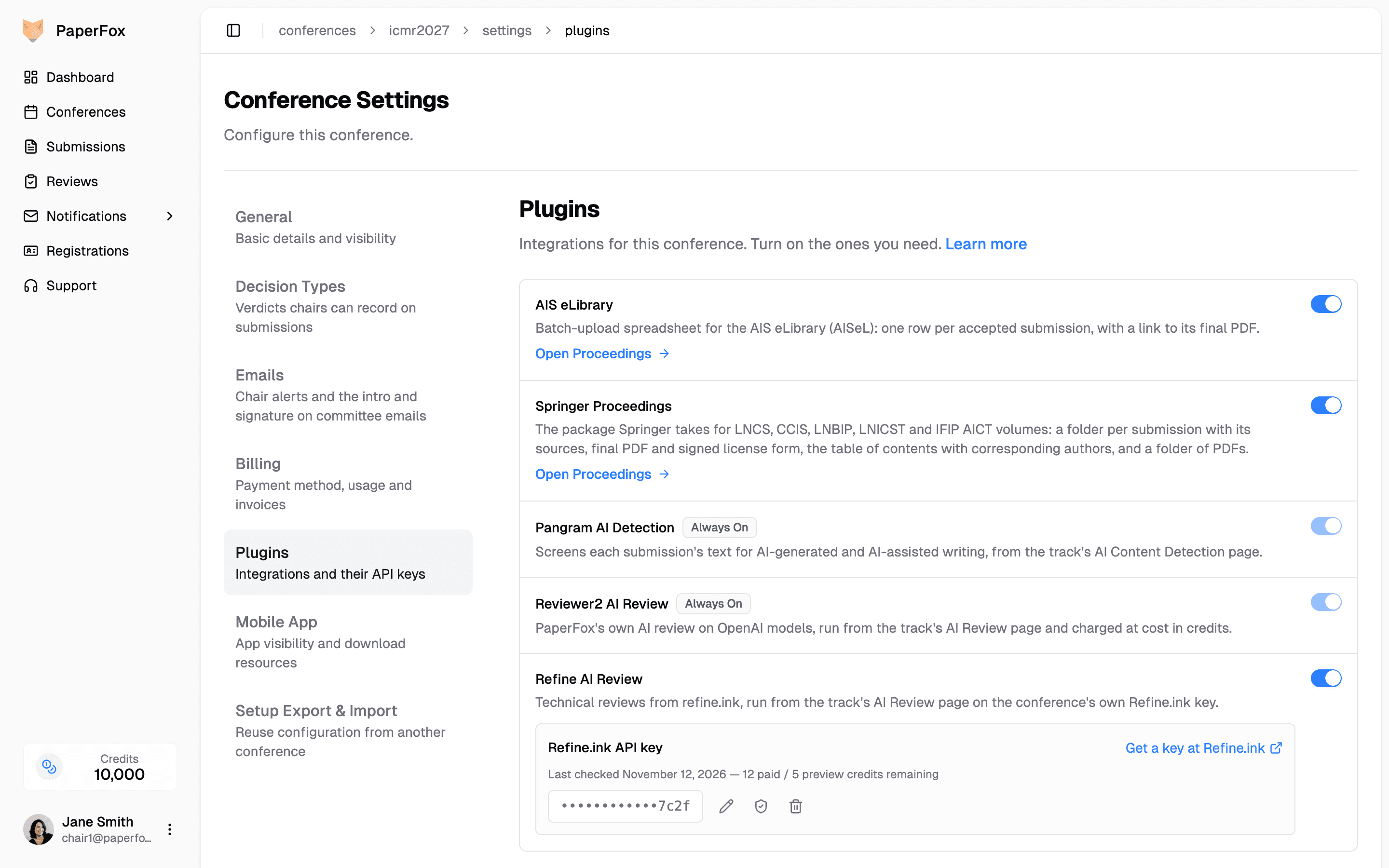
A plugin that adds a page shows a link to it once it is on. For example, AIS eLibrary shows "Open Proceedings".
Plugins with an API key
Some plugins run on your conference's own account with an outside vendor, such as Refine AI Review on Refine.ink. When you turn one on, PaperFox asks for its API key:
- Flip the plugin's switch on
- Paste the key (click "Get a key at …" to create one at the vendor), then click "Save Key and Turn On"
PaperFox checks the key with the vendor before saving it. A key the vendor refuses is not saved, and the plugin stays off. Keys are stored encrypted and are visible to no one, including PaperFox staff. Only conference chairs can manage them.
Once saved, the key appears on the plugin's row, masked except for its last characters:
- Replace (pencil icon) enters a new key
- Check (shield icon) asks the vendor whether the key still works
- Remove (trash icon) deletes it; the plugin's AI services stop running until a new key is added
If the vendor later rejects the key, the row shows Key rejected and runs pause until you replace it.
Turn a plugin off
Flip the switch off and click "Turn Off" to confirm. Nothing is deleted: turning it back on restores the plugin as it was. A plugin's API key is kept too, and you can still remove it from the plugin's row.
Plugins you cannot switch
| Badge | Meaning |
|---|---|
| Always On | Built into PaperFox. It is on for every conference. |
| Managed by PaperFox | Set up for your conference by PaperFox. Contact support to change it. |
Available plugins
| Plugin | What it does |
|---|---|
| AIS eLibrary | Exports the batch-upload spreadsheet for publishing your proceedings in the AIS eLibrary. See Proceedings. |
| Springer Proceedings | Exports the folders Springer takes for an LNCS, CCIS, LNBIP, LNICST or IFIP AICT volume. See Springer Proceedings. |
| Pangram AI Detection | Always On. Screens submissions for AI-generated text. See AI Content Detection. |
| Refine AI Review | AI reviews from refine.ink, run on your own Refine.ink API key. See AI Review. |
| Reviewer2 AI Review | Always On. PaperFox's own AI review, charged in credits. See AI Review. |